- March 24, 2007
- 12,070
- 7,459
- Home Country
-
 Germany
- Moderator
- #1
I was trying to draw a glassy overlay for images using Microsoft Expression Blend.
The XAML is valid for MPF use, but the rendering of outputs is wrong:
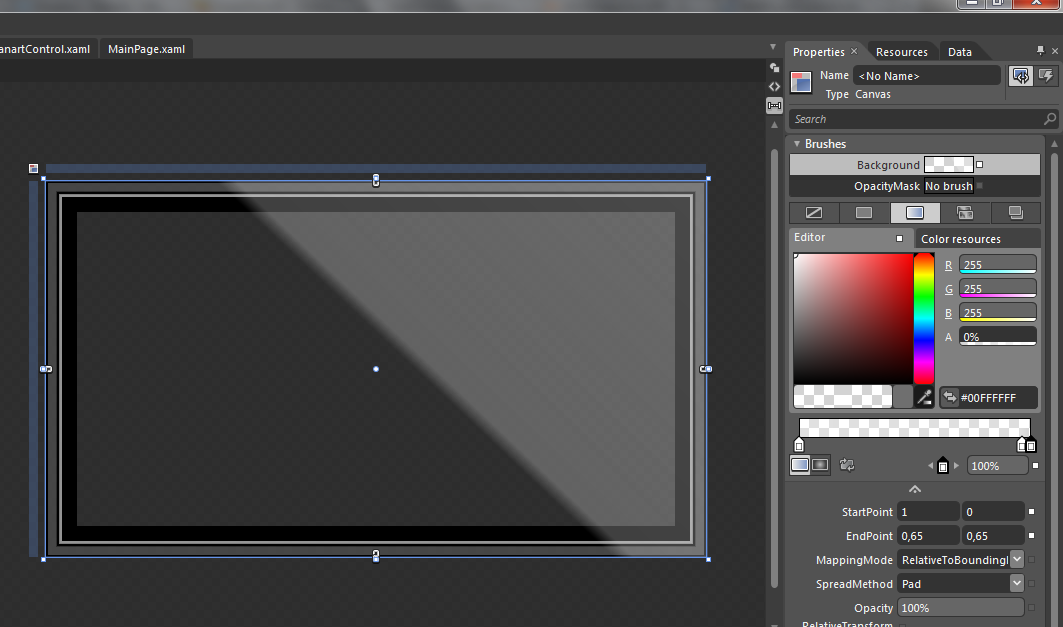
There is a issue in the screenshots:
When there is a BorderThickness > 0, the edges are "cut off" wrongly.
XAML code of the borders (1) and the Canvas using the LinearGradientBrush (2)
The XAML is valid for MPF use, but the rendering of outputs is wrong:
There is a issue in the screenshots:
When there is a BorderThickness > 0, the edges are "cut off" wrongly.
XAML code of the borders (1) and the Canvas using the LinearGradientBrush (2)
Code:
            <Border Grid.Column="0" Grid.Row="0" VerticalAlignment="Stretch" HorizontalAlignment="Stretch" x:Name="Layer_14" Margin="0" BorderBrush="Black"
                    CornerRadius="0" BorderThickness="2"/>
            <Border Grid.Column="0" Grid.Row="0" VerticalAlignment="Stretch" HorizontalAlignment="Stretch" x:Name="Layer_5" Margin="2" BorderBrush="#4A808080"
                    CornerRadius="0" BorderThickness="8"/>
            <Border Grid.Column="0" Grid.Row="0" VerticalAlignment="Stretch" HorizontalAlignment="Stretch" x:Name="Layer_1" Margin="11" Opacity="1" BorderBrush="Black"
                    CornerRadius="0" BorderThickness="3"/>
            <Border Grid.Column="0" Grid.Row="0" VerticalAlignment="Stretch" HorizontalAlignment="Stretch" x:Name="Layer_12" Margin="13" Opacity="0.49" BorderBrush="White"
                    CornerRadius="0" BorderThickness="3"/>
            <Border Grid.Column="0" Grid.Row="0" VerticalAlignment="Stretch" HorizontalAlignment="Stretch" x:Name="Layer_14-1" Margin="16" Opacity="1" BorderBrush="Black"
                    CornerRadius="0" BorderThickness="15"/>

            <Control Grid.Column="0" Grid.Row="0" x:Name="ControlPresenter" Margin="31" VerticalAlignment="Stretch" HorizontalAlignment="Stretch"
                Template="{DynamicResource ResourceKey=MakeGlass}" />

            <Canvas Grid.Column="0" Grid.Row="0" VerticalAlignment="Stretch" HorizontalAlignment="Stretch">
              <Canvas.Background>
                <LinearGradientBrush StartPoint="1,0" EndPoint="0.65,0.65">
                  <GradientStop Offset="0" Color="#4AFFFFFF"/>
                  <GradientStop Offset="0.961" Color="#40FFFFFF"/>
                  <GradientStop Offset="1" Color="#00FFFFFF"/>
                </LinearGradientBrush >
              </Canvas.Background>
            </Canvas>