
IR Server Suite - Version 1.4.2 Test Build 3158/3281 (37 Viewers)

Status
Not open for further replies.

Automate

Portal Pro
December 14, 2008
55
1
Home Country
United States of America United States of America
Any chance we can get the macro name/path problem fixed in the TV3 Blaster plugin? It is discussed in this post https://forum.team-mediaportal.com/ir-server-suite-irss-165/problems-macro-68360/

If you try to save a macro lets say called "MyCommand" it gets saved as
C:\Documents and Settings\All Users\Application Data\IR Server Suite\TV3 Blaster Plugin\MacroMyCommand.Macro
instead of
C:\Documents and Settings\All Users\Application Data\IR Server Suite\TV3 Blaster Plugin\Macro\MyCommand.Macro
(notice this missing backslash in the 1st one)

So currently when you create a new macro you have to manually move it to the Macro directory and remove the "Macro" at the beginning of the file name.
 

chemelli

Retired Team Member
  • Premium Supporter
  • September 28, 2006
    6,159
    2,264
    51
    Milano, Italy
    Home Country
    Italy Italy
    Hi,

    I did a complete uninstall and reinstall of MP and IRSS.

    I am using MP 1.0.2 Stable release with the IRSS 1.4.2 build 3127.

    When I try to setup TV3 Blaster plugin from within TV Server Configuration, I only get the green/blue circle for a while and then nothing happens. I have reported it twice on this thread and somehow it never caught anybody's attention for long. I am trying it once again. Hopefully, someone will respond (or may be I should open a new thread).

    Please see the attached log files and screenshot.

    PLEASE HELP.

    Thanks,
    Srikanth

    Simone,

    Any news on what's wrong with my setup?

    -Srikanth

    currently investigating...

    EDIT: Seems to be a version issue with 1.0.2. IF you can please update to 1.1.0Beta1 + today SVN and report back...

    Simone
     

    chemelli

    Retired Team Member
  • Premium Supporter
  • September 28, 2006
    6,159
    2,264
    51
    Milano, Italy
    Home Country
    Italy Italy
    Any chance we can get the macro name/path problem fixed in the TV3 Blaster plugin? It is discussed in this post https://forum.team-mediaportal.com/ir-server-suite-irss-165/problems-macro-68360/

    If you try to save a macro lets say called "MyCommand" it gets saved as
    C:\Documents and Settings\All Users\Application Data\IR Server Suite\TV3 Blaster Plugin\MacroMyCommand.Macro
    instead of
    C:\Documents and Settings\All Users\Application Data\IR Server Suite\TV3 Blaster Plugin\Macro\MyCommand.Macro
    (notice this missing backslash in the 1st one)

    So currently when you create a new macro you have to manually move it to the Macro directory and remove the "Macro" at the beginning of the file name.

    Please try attached dll and let me know...

    Simone


    EDIT: New version attached to post #1137
     

    skoka123

    MP Donator
  • Premium Supporter
  • January 8, 2009
    187
    16
    Hyderabad, India
    Home Country
    India India
    Hi,

    I did a complete uninstall and reinstall of MP and IRSS.

    I am using MP 1.0.2 Stable release with the IRSS 1.4.2 build 3127.

    When I try to setup TV3 Blaster plugin from within TV Server Configuration, I only get the green/blue circle for a while and then nothing happens. I have reported it twice on this thread and somehow it never caught anybody's attention for long. I am trying it once again. Hopefully, someone will respond (or may be I should open a new thread).

    Please see the attached log files and screenshot.

    PLEASE HELP.

    Thanks,
    Srikanth

    Simone,

    Any news on what's wrong with my setup?

    -Srikanth

    currently investigating...

    EDIT: Seems to be a version issue with 1.0.2. IF you can please update to 1.1.0Beta1 + today SVN and report back...

    Simone

    Hi Simone,

    I updated to 1.1.0Beta1 tried with 1.4.2.3129 version of IRSS - no luck.
    I updated to 1.1.0Beta1 + MP SVN 1.0.4.23908 with 1.4.2.3129 version of IRSS - still no luck.

    I am attaching the new log files.

    Once again, please please please HELP.

    Thanks,
    Srikanth
     

    chemelli

    Retired Team Member
  • Premium Supporter
  • September 28, 2006
    6,159
    2,264
    51
    Milano, Italy
    Home Country
    Italy Italy
    Simone,

    Any news on what's wrong with my setup?

    -Srikanth

    currently investigating...

    EDIT: Seems to be a version issue with 1.0.2. IF you can please update to 1.1.0Beta1 + today SVN and report back...

    Simone

    Hi Simone,

    I updated to 1.1.0Beta1 tried with 1.4.2.3129 version of IRSS - no luck.
    I updated to 1.1.0Beta1 + MP SVN 1.0.4.23908 with 1.4.2.3129 version of IRSS - still no luck.

    I am attaching the new log files.

    Once again, please please please HELP.

    Thanks,
    Srikanth

    This is your issue:

    Code:
    2009-10-21 20:08:20.257011 [TVService]: System.IO.FileNotFoundException: Could not find file 'C:\ProgramData\IR Server Suite\TV3 Blaster Plugin\ExternalChannelConfig1.xml'.
    File name: 'C:\ProgramData\IR Server Suite\TV3 Blaster Plugin\ExternalChannelConfig1.xml'

    Simone
     

    skoka123

    MP Donator
  • Premium Supporter
  • January 8, 2009
    187
    16
    Hyderabad, India
    Home Country
    India India
    currently investigating...

    EDIT: Seems to be a version issue with 1.0.2. IF you can please update to 1.1.0Beta1 + today SVN and report back...

    Simone

    Hi Simone,

    I updated to 1.1.0Beta1 tried with 1.4.2.3129 version of IRSS - no luck.
    I updated to 1.1.0Beta1 + MP SVN 1.0.4.23908 with 1.4.2.3129 version of IRSS - still no luck.

    I am attaching the new log files.

    Once again, please please please HELP.

    Thanks,
    Srikanth

    This is your issue:

    Code:
    2009-10-21 20:08:20.257011 [TVService]: System.IO.FileNotFoundException: Could not find file 'C:\ProgramData\IR Server Suite\TV3 Blaster Plugin\ExternalChannelConfig1.xml'.
    File name: 'C:\ProgramData\IR Server Suite\TV3 Blaster Plugin\ExternalChannelConfig1.xml'

    Simone

    Simone,

    Could this be because, I am using an existing SQL database instead of a new one? Any idea how I could get ExternalChannelConfig1.xml created now?

    -Srikanth

    currently investigating...

    EDIT: Seems to be a version issue with 1.0.2. IF you can please update to 1.1.0Beta1 + today SVN and report back...

    Simone

    Hi Simone,

    I updated to 1.1.0Beta1 tried with 1.4.2.3129 version of IRSS - no luck.
    I updated to 1.1.0Beta1 + MP SVN 1.0.4.23908 with 1.4.2.3129 version of IRSS - still no luck.

    I am attaching the new log files.

    Once again, please please please HELP.

    Thanks,
    Srikanth

    This is your issue:

    Code:
    2009-10-21 20:08:20.257011 [TVService]: System.IO.FileNotFoundException: Could not find file 'C:\ProgramData\IR Server Suite\TV3 Blaster Plugin\ExternalChannelConfig1.xml'.
    File name: 'C:\ProgramData\IR Server Suite\TV3 Blaster Plugin\ExternalChannelConfig1.xml'

    Simone

    Hi Simone,

    I copied ExternalChannelConfig1.xml, ExternalChannelConfig2.xml and ExternalChannelConfig3.xml from another MP installation to this one. Now I am getting the following error in the error.log file of TV Server.

    Code:
    [COLOR="Blue"]2009-10-21 21:57:18.373965 [SetupTv]: Exception   :System.Net.Sockets.SocketException: No such host is known
       at System.Net.Dns.GetAddrInfo(String name)
       at System.Net.Dns.InternalGetHostByName(String hostName, Boolean includeIPv6)
       at System.Net.Dns.GetHostAddresses(String hostNameOrAddress)
       at IrssComms.Client.GetIPFromName(String name) in c:\svnroot\mp-plugins\trunk\plugins\IR Server Suite\IR Server Suite\Common\IrssComms\Client.cs:line 383
       at TvEngine.Forms.PluginSetup.OnSectionActivated() in C:\svnroot\mp-plugins\trunk\plugins\IR Server Suite\MediaPortal Plugins\TVServer plugins\TV3 Blaster Plugin\Forms\PluginSetup.cs:line 64
       at SetupTv.SetupTvSettingsForm.ActivateSection(SectionSettings section)[/COLOR]

    What is the best way to resolve this? Should I completely unistall and reinstall or would reinstalling with an option to use a new database work?

    Thanks,
    Srikanth
     

    Automate

    Portal Pro
    December 14, 2008
    55
    1
    Home Country
    United States of America United States of America
    New version, please retest ( I forgot to update a couple of places... )

    Simone

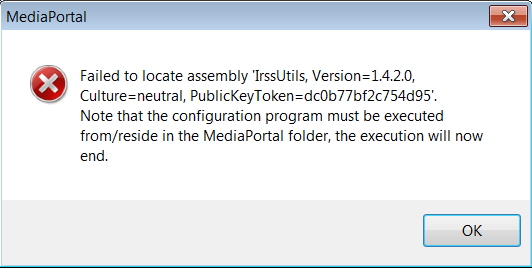
    Getting the attached error when I start TV Server Configuration
     

    Attachments

    • TV3BlasterError.png
      TV3BlasterError.png
      14.4 KB
    Status
    Not open for further replies.

    Users who are viewing this thread

    Top Bottom