
IR Server Suite - Version 1.4.2 Test Build 3158/3281 (3 Viewers)

Status
Not open for further replies.

nachttier

Portal Pro
March 31, 2006
86
1
Viernheim
Home Country
Germany Germany
Hi jv2htpc,

I have attached the script. I run it with the powerscheduler plugin from TVE3, which allows to specify a file to be run after standby.
If you don't use TVE3, you could try Hibernate Trigger.

Good Luck!
Sven
 

cybrmage

Portal Pro
May 30, 2007
498
86
Home Country
Canada Canada
Hi and-81:

I just installed the 1.0.4.2 preview 5 version, intending to try the girder support with the iMon plugin for Girder.

Unfortunately, I didn't have any success....

These are the problems I encountered:

1) running the configuration program, selecting the Girder plugin and clicking on configure causes a crash. The windows "Submit crash information to MicroSoft" dialog appears. No exception information is shown.
2) running the configuration program and selecting AutoDetect causes the program to hang. No dialog is presented. No logging information is added to the logs.

here are the logs that were produced:


Input Service.log

2008-03-14 22:36:05.635125 - Log Opened
2008-03-14 22:36:05.650750 - Input Service, Version=1.0.4.2, Culture=neutral, PublicKeyToken=null
2008-03-14 22:36:05.666375 - Info: Install folder: C:\Program Files\IR Server Suite
2008-03-14 22:36:05.666375 - Info: Starting Input Service ...
2008-03-14 22:36:07.838250 - Warn: No transmit plugin loaded
2008-03-14 22:36:08.213250 - Info: Started in Server Mode
2008-03-14 22:36:08.228875 - Error: Failed to start receive plugin: "Girder Plugin"
2008-03-14 22:36:08.228875 - Error: System.InvalidOperationException: No girder plugin file selected
at InputService.Plugin.GirderPlugin.Start() in F:\MediaPortal Development\Plugins\IR Server Suite\IR Server Plugins\Girder Plugin\Girder Plugin.cs:line 82
at InputService.InputService.OnStart(String[] args) in F:\MediaPortal Development\Plugins\IR Server Suite\Input Service\Input Service\InputService.cs:line 293
2008-03-14 22:36:08.275750 - Info: Input Service started
2008-03-14 22:36:41.791375 - Info: PowerEvent: PowerStatusChange


Input Service Configuration.log

2008-03-14 22:38:16.838250 - Log Opened
2008-03-14 22:38:16.853875 - Input Service Configuration, Version=1.0.4.2, Culture=neutral, PublicKeyToken=null
2008-03-14 22:38:16.853875 - Info: Loading settings ...
 

blobo

Portal Member
March 3, 2008
35
0
Hi jv2htpc,

I have attached the script. I run it with the powerscheduler plugin from TVE3, which allows to specify a file to be run after standby.
If you don't use TVE3, you could try Hibernate Trigger.

Good Luck!
Sven
I ended up using your batch file.. I said before that my remote has left me twice after resuming from standby.. well, yesterday when i did some more testing it happened twice more and i decided to try this method. It seems that after standby the translator works fine, but tvservice.exe needs to be re-run for the remote to work in MP. So i simply made trnaslator to run your batch file when computer resumes. So far, it seems to work.
 

jv2htpc

New Member
March 9, 2008
4
0
nachttier, thank you for the script... I did not yet get to try it... and dont seem to have need for it now either.
I have installed a new dinovo edge keyboard, and since then all seems ok... dont know if the setpoint software could have something keeping the remote connection or something else alive/refreshed after S3.
anyway, since restarting the IRserver input service just once today, I have since then put the computer into and out of S3 several times and all seems ok.
so, for now, I keep your solution as a backup, when it eventually all will go wrong anyway :)
so... thanks in advance...

and while we are on the subject of thanks...
a big thanks to and-81...!!!

:D
 

sensman

Portal Member
February 11, 2007
41
37
Hi and-81,

First: I love your "IR-SERVER SUITE" :D

I have a problem with my plasma TV (Panasonic).
I would like to switch on and turn off the TV with IRBLAST.
I originally train remote control this with this one on/off command.
However, this is too short and does not tackle the plasma if I send the command.
Can I change the duration of the sending command?

Thx Sensman

Sorry for my bad english
 

Olli0815

MP Donator
  • Premium Supporter
  • August 22, 2006
    182
    17
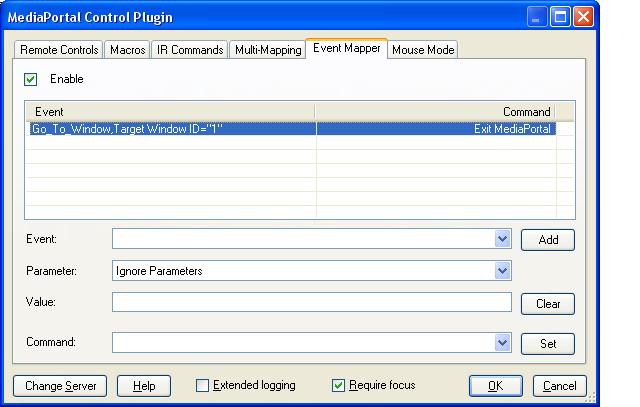
    attachment.php


    Hi,

    Just for testing purpose - I would expect that MP closes after entering the TV screen with this config...it doesn't.
    Is this a bug or did I make a mistake?

    Best regards,

    Olli
     

    Attachments

    • go_to_window.JPG
      go_to_window.JPG
      44.8 KB

    and-81

    Retired Team Member
  • Premium Supporter
  • March 7, 2005
    2,257
    183
    Melbourne
    Home Country
    Australia Australia
    Olli0815:

    I've got some ideas for the Event Mapper, I'll try to get it sorted out before the next release.

    What you described in your last post should work, but it might not work because MediaPortal isn't sending that message internally... I'll try to sort this out, but I might need to have the plugin monitor these things a little differently...

    TheBatfink:

    Any of the receivers listed in the Input Service Configuration app should do the trick.

    jv2htpc:

    It almost sounds like the registry keys to remove the automatic handling are being removed and then the change only takes effect after you resume from standby... then maybe on the next reboot the registry keys are being put back in place because the driver is re-installed ... but that's a pretty whacky thing to happen ...

    It could just be a bug in the suspend/resume code ... I'm working on this at the moment to try to remove the last of the niggling suspend/resume bugs ... man, working with drivers coming in and out of standby is a pain in the arse.

    blobo:

    I'll rework the "force window focus" item to try to remedy this. I'll start a focus watching thread that will force the window to keep focus even if it loses it.

    nachttier:

    The WinLirc / Standby bug should be fixed in the next version.

    sensman:

    Try teaching the commands again but hold down the remote button while teaching. If that doesn't work you could create a macro that sends the same command twice in a row. If that doesn't work you could send me the IR files and I could modify them to repeat. I might improve the IR File Tool to allow users to do this themselves.

    Everyone:

    There should be a new test version (Preview 6 :() in the next few days.

    Cheers,
     

    sensman

    Portal Member
    February 11, 2007
    41
    37
    Hi and-81,

    Thanks for the fast answer.
    I have already tried this with a Macro but the interval between the commands is too large.
    I append my IR file and hope you can help me.
    I would be happy if I could do this in the "IR File Tool" later myself.

    Greetings Sensman
     

    and-81

    Retired Team Member
  • Premium Supporter
  • March 7, 2005
    2,257
    183
    Melbourne
    Home Country
    Australia Australia
    sensman:

    Try this... it's only a small change, but it might do what you want...

    Cheers,
     

    sensman

    Portal Member
    February 11, 2007
    41
    37
    Hi and 81,

    This modifies many thanks for it but unfortunately does not work either.
    The problem appears plasma for Panasonic at everyone. Not has influence let the equipment switch itself on only if the energy button is held tight, once push. However, the order will train fed in only once.
    As Macro, unfortunately, it does not work either because the interval is too long between the commands.

    There is a possibility of inserting the command in a *.IR file repeatedly, however without break?

    Greetings Sensman
     
    Status
    Not open for further replies.

    Users who are viewing this thread

    Top Bottom