IR Server Suite - Version 1.4.2 Test Build 3158/3281 (3 Viewers)

Status
Not open for further replies.

Runny

Portal Member
December 2, 2007
11
0
Home Country
Israel Israel
Is there a way to send an IR command to my MP server from one of the clients and still leave the blaster configuration on localhost?

I'm using a local blaster (on the client) to turn ON/OFF and volume control on my TV - that's why I need the general configuration to be as localhost.

It could be via the plugin or Translator, both work on both computers

Thank you
 

binary64

Portal Pro
July 30, 2006
105
1
Runny: the mce remote has built in support for macro'ing commands to a blaster (while PC is off). have you tried that? you gotta press certain buttons to 'teach' it.
 

Terriff

Portal Pro
March 28, 2008
75
3
The button for MyVideos (Videos) isn't working for me. All of the other buttons (ie. Pictures, Live TV, Recorded TV, etc.) are working properly.

I've checked the button mapping in the MP Config plugin and it is set to the proper action (Window->Video) and the abstract remote mapping is set to the proper raw remote code (2074) for the Videos button press.

I'm not sure what else I could look at to troubleshoot. Any ideas?

Thanks.
Is anyone else having this problem of the Videos button not taking you to MediaPortal Videos?
 

jolcese

Portal Member
December 20, 2007
28
0
Home Country
Argentina Argentina
Guys,

I've a Soundgraph OEM VFD with CybrDisplayPlugin and the IR Server Suite.

So far I can only use the remote keys that exists in IMON Pad.xml.

For instance, I've added the following lines:

<RemoteTable RawCode="1050" AbstractButton="Up" />
<RemoteTable RawCode="1048" AbstractButton="Down" />
<RemoteTable RawCode="1046" AbstractButton="Left" />
<RemoteTable RawCode="1044" AbstractButton="Right" />

but nothing happens, actually the log for pressing a Clear(exists in original IMON Pad.xml) and then Right buttons show:

2008-05-10 11:26:21.963487 - Debug: iMon generated a remote event: 1252
2008-05-10 11:26:21.963487 - Debug: Clear, remote: Imon PAD - Copy, device: iMon
2008-05-10 11:26:21.963487 - Info: Abstract Remote Button mapped: Clear
2008-05-10 11:26:21.963487 - Debug: SendToAll(RemoteEvent, Notify)
2008-05-10 11:28:15.146487 - Debug: iMon generated a remote event: 1244
2008-05-10 11:28:15.146487 - Error: System.NullReferenceException: Object reference not set to an instance of an object.
at InputService.InputService.LookupAbstractButton(Str ing deviceName, String keyCode) in F:\MediaPortal Development\Plugins\IR Server Suite\Input Service\Input Service\InputService.cs:line 1726
2008-05-10 11:28:15.147487 - Info: Abstract Remote Button not found: iMon (1244)
2008-05-10 11:28:15.147487 - Debug: SendToAll(RemoteEvent, Notify)

help is welcome!
Jose
 

chemelli

Retired Team Member
  • Premium Supporter
  • September 28, 2006
    6,159
    2,264
    52
    Milano, Italy
    Home Country
    Italy Italy
    Just installed 1.4.2 RC1 to a friend's pc with X10 Wireless Technology and it's not recognized as installed.
    The driver is based on "x10ufx2.sys".

    How can I help you understand why is not detected ?

    EDIT: Vista 32bit, driver auto-downloaded/installed from Microsoft WindowsUpdate.

    Simone

    Fixed, the driver is not enought, you need also the software "x10_remote.exe" for Vista/XP.

    Simone
     

    joho500

    Portal Member
    June 3, 2007
    20
    1
    Haarlem NL
    Home Country
    Netherlands Netherlands
    MediaPortal not found

    Hi Aaron,

    I have the problem that the installer doesn't find the installation of MediaPortal. I didn't use the default path for it. Is there a way to select the correct path in the installer? That would be great.

    Cheers.

    Joost.
     

    mironicus

    Portal Pro
    March 9, 2008
    688
    44
    I tried the new RC1 version with my Vista x64. After hibernation the remote driver (using original MCE remote) is not active anymore (sometimes it works somehow). I have to restart the service manually.
     

    1stdead

    Portal Pro
    February 1, 2008
    1,089
    139
    Copenhagen
    Home Country
    Denmark Denmark
    Hi...
    Thanks for making this software.. I have been trying to get this working but not succeded. This is what i have done:
    1) Installed MP RC1
    2) installed IR Server Suite - Test Build 1.4.2.1711
    3) Stoppede the process input services
    4) Copied the updated IR Server Plugin(Imon usb recievers) to C:\Program Files\IR Server Suite\IR Server Plugins
    Copied the updated Abstract Remote Model (imod pad) to C:\ProgramData\IR Server Suite\Input Service\Abstract Remote Maps\iMon
    Copied the updated MP Control Plugin to process in MP plugins..
    5) Started input service config. Choose server mode in advanced and IMON..
    6) Opened MP config and deleted MCE remote in "MP Control Plugin" and added "Abstract Remote Model"
    7) Restarted.. Started Mp, tried using the remote - nothing works
    8) What now? The remote doesn't work and i'm getting this message in the log
    2008-05-12 17:00:12.874875 - Input Service, Version=1.4.2.0, Culture=neutral, PublicKeyToken=dc0b77bf2c754d95
    2008-05-12 17:00:12.952875 - Info: Starting Input Service ...
    2008-05-12 17:00:13.108875 - Warn: No transmit plugin loaded
    2008-05-12 17:00:13.327275 - Info: Started in Server Mode
    2008-05-12 17:00:13.327275 - Error: Failed to start receive plugin: "iMon"
    2008-05-12 17:00:13.327275 - Error: System.ApplicationException: No iMon devices found!
    at InputService.Plugin.iMonUSBReceivers.Start() in F:\MediaPortal Development\Plugins\IR Server Suite\IR Server Plugins\Imon USB Receivers\Imon USB Receivers.cs:line 1152
    at InputService.InputService.OnStart(String[] args) in F:\MediaPortal Development\Plugins\IR Server Suite\Input Service\Input Service\InputService.cs:line 284
    2008-05-12 17:00:13.374075 - Info: Input Service is running in Abstract Remote mode
    2008-05-12 17:00:13.374075 - Info: Input Service started

    What am I doing wrong?

    My system is:
    Vista SP1 all updated 32bit
    Case: Thermaltake DH101 with LCD Oem hid v. 0x3801
    - imon manager version 6.20.0830
    - MP RC1 - No updates
    - trying to use the included remote:
    tt-medialab-blk-2.jpg

    The case have some buttons too, they don't work either..
    - One thing is that CybrDisplayPlugin_05_08_2008 works :)

    As far as I found out the problem lies in IR suite managing the driver... :confused: I tried to post some logs, if you need more just say so.
     

    cybrmage

    Portal Pro
    May 30, 2007
    498
    86
    Home Country
    Canada Canada
    What am I doing wrong?

    You forgot one critical step... (between your step 5 and step 6)...

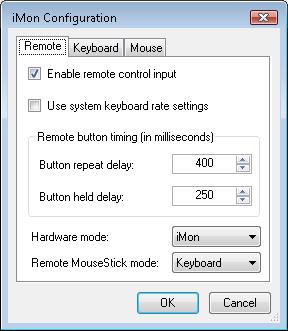
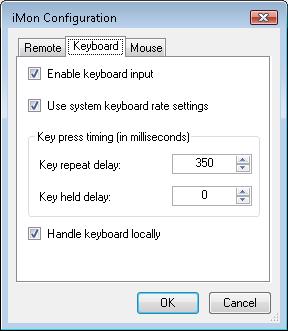
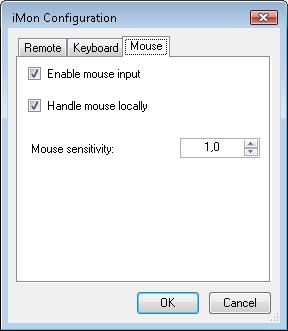
    In the IR Server Suite configuration, you selected the iMon driver, but you did not configure the driver... You MUST configure the driver (enable the remote, keyboard and mouse... and select the mode for the remote (MCE or iMON PAD)).

    If the iMon driver is not configured, it won't find an iMon device, because it is not told to look for a device...
     
    Status
    Not open for further replies.

    Users who are viewing this thread

    Top Bottom