IR Server Suite - Version 1.4.2 Test Build 3158/3281 (4 Viewers)

Status
Not open for further replies.

Yannik

New Member
December 7, 2008
4
0
When you blast is the flash on your bug a short, dim flash or a long, bright flash? I have had a similar problem from time to time. I'm not sure whether IRSS isn't correctly learning the command and saying it is or isn't correctly blasting. Look for the long, bright flash and keep re-learning until you see that. When I'm learning commands, I have the best luck when the remote I'm learning from is placed directly in front of my receiver (almost touching).

Andy


Effectively i have seen these two behaviours (short, dim flash or a long, bright flash), but resulting the same.... do not work. Very srtange and i really have no idea of a way to investigate.....
 

svcguy

Portal Member
October 16, 2008
42
0
Effectively i have seen these two behaviours (short, dim flash or a long, bright flash), but resulting the same.... do not work. Very srtange and i really have no idea of a way to investigate.....

From what I've noticed devices weren't responding to the short dim flash. I just kept relarning the command until it worked and then stopped messing with it. I still to this day have some problems with my audio receiver seeing IR blasts. In my macros, I just blast the command several times with short pauses in between to make sure it actually picks one of the blasts up.

Andy
 

dir

MP Donator
  • Premium Supporter
  • August 30, 2006
    408
    36
    Home Country
    Afghanistan Afghanistan
    Aaron,
    Which MCE remote do you use? I'm in Melbourne too and want to get one. Scorptec have a couple of different ones, and Hardly Normal and Dick Smith's don't have any.

    I figure I should get one that you're using so I'm assured of ongoing compatibility!

    Cheers,

    Dir
     

    alc_aardvark

    Portal Member
    January 9, 2008
    19
    0
    IR Server - Blasting problem

    Hi all,

    I have read the docs, and even order a new (Marmitek) IR Extender cable, as I thought the one that came with the MCE eHome blaster must have been faulty, BUT I still cannot get ANY IR code to blast. I have uninstalled the old version of IR Server and installed the latest 1.4.2.2391 build, but still no good. It captures my IR codes great, but when I perform a Blast, I get ... nothing.

    Is there anything I should be looking at / checking. All help and pointers would be very much appreciated.

    Details
    =====
    Input Service (windows Service is running)
    Media Portal is NOT started
    Clean install of latest version of IR Server suite
    Original MCE eHome IR extender connected to socket 1
    New Marmitek IR extender connected to socket 2

    Useing both Translator and IR File Tool I can learn IR commands, but using both Test (to blast) and just using the IR commands, I see nothing from either IR extender ( and the equipment does not respond in any way).

    I have tried several different IR commands etc, but nothing.
     

    rsbrux

    Documentation Group
  • Team MediaPortal
  • April 15, 2007
    1,225
    187
    Home Country
    Switzerland Switzerland
    If I understand the documentation correctly, th IR Server Suite allows multiple inputs, but only one output mechanism.
    Unfortunately, I need to control my amplifier via the MCE blaster output, but my TV (display) via RS-232.
    How can I do this?
     

    alc_aardvark

    Portal Member
    January 9, 2008
    19
    0
    The Translator appears to allow you to map an Input IR code to be any of the Output types and can be mixed and Matched. I have set up combinations of IR blasting and RS232 outputs. I cannot verify it works though, as the specifictaion for my DSP's RS232 codes was not correct for my software version, and as can be see from my previous post, I cannot get the IR blast8ing to work.

    Update : IR Server Blasting problem

    I have found that if I change the blasting from BOTH to port 1 (or port 2 but not BOTH), then it works.

    i.e.
    Port: BOTH - No blasting
    Port: 1 - Yes blasting
    Port 2 - Yes blasting

    :)
     

    rsbrux

    Documentation Group
  • Team MediaPortal
  • April 15, 2007
    1,225
    187
    Home Country
    Switzerland Switzerland
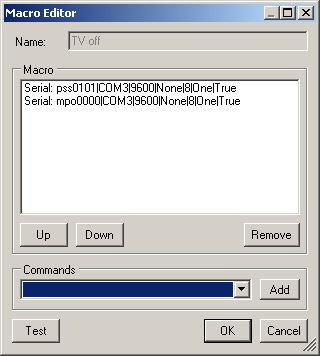
    no serial commands

    Not sure what you mean by PORTs above, didn't find this setting anywhere.
    Anyway, I don't get any RS-232 output with the official (1.4.1) release, no matter what I do.
    I have tried sending via Translator, MP Control plug-in, MP Blast Zone plug-in and TV3 Blaster plug-in, both with Blaster output and with IR Serial output enabled in the Input Service Configuration to no avail. The RS-232 commands I am sending work when sent using Windows HyperTerminal or by simply using the command line:
    print /d:com3:
    It isn't clear to me from the doc/help which of Translator, MP Control plug-in, MP Blast Zone plug-in and TV3 Blaster plug-in should be used under which circumstances. They seem to have overlapping functions.
    In my tests, all except Translator produced "No object instance" errors.

    P.S. Now tried with IR Server Suite - Test Build 1.4.2.2391, using Translator.
    Translator complains that it doesn't have access to COM3 as long as the Input Service is running.
    However, even if I stop Input Service, I still get no response from my TV.
    One posible explanation could be if IRSS is automatically adding any EOL characters.
    Since the Serial Command syntax provides explicit ways of including these, I assume that this is not the case.
    IAC, the package needs to be recoded to prevent Input Service and Translator from interfering with each other.
     

    Attachments

    • Serial macros.jpg
      Serial macros.jpg
      18.8 KB

    alc_aardvark

    Portal Member
    January 9, 2008
    19
    0
    By "Port", I mean the IR blasting "ports" 1 and 2 on the MCE eHome IR blaster. i.e. connect the IR extender cable via 3.5mm jack to the rear. Thery are labeled 1 and 2.

    As for the RS232 sending, I can only say that I also got these errors, when I was running an earlier release. It was possibly due to not having the Input Service or not being connected though. I cannot confirm that it works as I have nothing to check the result with. I use the Translator program and configure the "Programs" Tab for an IR (Receive) signal, that I then map to an IR (Blast / Transmit) that I previously set up in the "IR Commands" Tab. I can easily edit the "Program" entry and change my IR "Blas IR" entry to be a "Serial" entry, by entering the values and pressing "Set" to change the configuration for this entry.

    I agree that it is important to know how the Serial COM port data is being sent, as you quite rightly point out that of you can set the WriteLine characters to be what you end

    c# example snippet
    ================

    mSerialPort.NewLine = "\n";
    mSerialPort.WriteLine(message);

    Or it may just do a
    mSerialPort.Write ....

    Does it send a new line character or a Carriage return, NewLine ????

    If you can tell me a test I can perform without the need for specialist equipment, then I will see what I get back.

    Q1. Is there a way to do IR pass through? i.e. whatever IT command you send to the device, it passes the IR command out of the IR extenders (Blasts) (Port 1 / Port 2 / Both.

    I dont really wish to have to program every button on the remote and configure it to Blast this same IR command.


    Q2. My MCE eHome IR sender is above a plasma TV and it red light is conastantly flickering due to the plasma putting out interference that it is picking up. It doesnt seem to affect it too much, but is there anything that can be done to limit the interference?
     

    Jupek

    Portal Member
    March 6, 2006
    24
    5
    Home Country
    Finland Finland
    Resume from standby failing

    Hi!

    I have following problem with version 1.4.2.2391 on Vista Home Premium running on Scaleo EVi (sorry for Finnish operating system messages) with "Microsoft MCE" driver:

    2008-12-15 08:30:12.397000 - Error: System.ComponentModel.Win32Exception: Palvelu palautti palvelukohtaisen virhekoodin
    kohteessa InputService.Plugin.NotifyWindow.RegisterDeviceRemoval(IntPtr deviceHandle) tiedostossa C:\svnroot\mp-plugins\trunk\plugins\IR Server Suite\IR Server Plugins\Microsoft MCE Transceiver\NotifyWindow.cs:rivillä 230
    kohteessa InputService.Plugin.DriverVista.OpenDevice() tiedostossa C:\svnroot\mp-plugins\trunk\plugins\IR Server Suite\IR Server Plugins\Microsoft MCE Transceiver\DriverVista.cs:rivillä 989
    kohteessa InputService.Plugin.DriverVista.Resume() tiedostossa C:\svnroot\mp-plugins\trunk\plugins\IR Server Suite\IR Server Plugins\Microsoft MCE Transceiver\DriverVista.cs:rivillä 743
    kohteessa InputService.Plugin.MicrosoftMceTransceiver.Resume() tiedostossa C:\svnroot\mp-plugins\trunk\plugins\IR Server Suite\IR Server Plugins\Microsoft MCE Transceiver\MicrosoftMceTransceiver.cs:rivillä 422
    kohteessa InputService.InputService.OnPowerEvent(PowerBroadcastStatus powerStatus) tiedostossa C:\svnroot\mp-plugins\trunk\plugins\IR Server Suite\Input Service\Input Service\InputService.cs:rivillä 542

    I worked a little bit better with 1.0.4.1 altought not 100%. Now it seems to fail 100% on every resume. :( Restarting input service works, but I guess that is not planned to work like that. :)

    Input service log included.
     

    Attachments

    • Input Service.txt
      30.6 KB

    alc_aardvark

    Portal Member
    January 9, 2008
    19
    0
    IR Commands : Duplicates

    I have a Virgin Media V+ Box and I have been setting the IR codes to blast the codes 1 for 1 (i.e. press button 1, will blast button 1 code). BUT I have found that some buttons appear to get the same code in the Pragrams TAB. i.e. the V+ red button gets code 641 and also button Number 1 gets the same code (641). When I look at the .IR files though, the codes are completely different

    V+ red button: 0000 0071 000B 0000 0042 0021 0021 0021 0021 0040 0042 0040 0044 001F 0021 0021 0021 001F 0023 001F 0021 0021 0021 0040 0023 0ABF

    Number 1: 0000 0071 000B 0000 0021 0021 0042 001F 0021 0042 0042 0040 0042 0021 0021 001F 0023 001F 0021 0021 0021 001F 0023 0040 0021 0ABF


    This is prohibiting me from blasting the V+ red button, as I can only map it as either Number 1 or the V+ red button.

    Anyone know why it does give me a unique code in the Programs TAB?
     
    Status
    Not open for further replies.

    Users who are viewing this thread

    Top Bottom