
You are using an out of date browser. It may not display this or other websites correctly.
You should upgrade or use an alternative browser.
You should upgrade or use an alternative browser.
Issue with MPTVServer no TV Server present (1 Viewer)
- Thread starter teros
- Start date
- September 1, 2008
- 21,544
- 8,236
- Home Country
-
 New Zealand
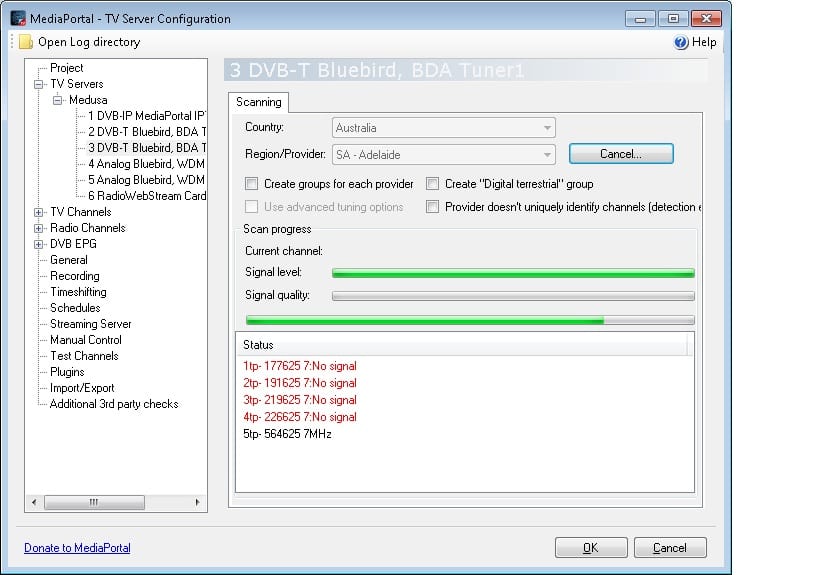
The patch that I gave you loosens the signal detection criteria, however it seems like the tuner really isn't receiving signal. About the only think I can think of that we haven't already checked is that the signal is offset one way or the other...Have set the timeout to 10 and attempted to tune on both tuners without any luck am now getting a singl bar though have included screen shot.
Fair enough. It is 5 AM here too so I should probably do the same. I'll be back to check on this thread and post instructions for checking offsets tomorrow.Off for some sleeo catch ya
- September 1, 2008
- 21,544
- 8,236
- Home Country
-
New Zealand
Hi again teros
I hope you're well rested.
Checking for offset is as simple as doing a few single transponder scans using the advanced options. You need to know the frequency of one of your local DVB-T muxes, and then scan the following frequencies:
1. f - 166000
2. f - 125000
3. f
4. f + 125000
5. f + 166000
(where f is the frequency of the mux in kHz)
Note: use a bandwidth of 7 MHz.
Does that make sense?
[Edit: make sure you use the 10 second tune timeout that we tried last night and the original fix DLL that doesn't have my signal detection loostening code in it. It might also pay to put the tuner in the more compatible "stop graph" mode:
1. Open TV Server configuration.
2. Edit the tuner settings (same as for the network provider that we tried last evening).
3. Change from "pause card" to "stop card".
(4. TV Server will need to restart.)
]
I hope you're well rested.
Checking for offset is as simple as doing a few single transponder scans using the advanced options. You need to know the frequency of one of your local DVB-T muxes, and then scan the following frequencies:
1. f - 166000
2. f - 125000
3. f
4. f + 125000
5. f + 166000
(where f is the frequency of the mux in kHz)
Note: use a bandwidth of 7 MHz.
Does that make sense?
[Edit: make sure you use the 10 second tune timeout that we tried last night and the original fix DLL that doesn't have my signal detection loostening code in it. It might also pay to put the tuner in the more compatible "stop graph" mode:
1. Open TV Server configuration.
2. Edit the tuner settings (same as for the network provider that we tried last evening).
3. Change from "pause card" to "stop card".
(4. TV Server will need to restart.)
]
- September 1, 2008
- 21,544
- 8,236
- Home Country
-
New Zealand
Your latest logs seem to show that you're only scanning "125". That isn't right. Let me try and be more specific...
From your earlier logs it looks like one of the frequencies in your area is 177500kHz. That is what people call a mux/multiplex frequency. For that frequency I would be asking you to scan:
1. -166 => 177334
2. -125 => 177375
3. ~ => 177500
4. +125 => 177625
5. +166 => 177666
Is that what you've been doing?
From your earlier logs it looks like one of the frequencies in your area is 177500kHz. That is what people call a mux/multiplex frequency. For that frequency I would be asking you to scan:
1. -166 => 177334
2. -125 => 177375
3. ~ => 177500
4. +125 => 177625
5. +166 => 177666
Is that what you've been doing?
- September 1, 2008
- 21,544
- 8,236
- Home Country
-
New Zealand
Hi again teros
I have to confess that I am stumped at this point. Short of increasing the tune time preference, fiddling with the network provider settings, or doing more scanning with various offsets, I just don't understand why the tuner can't lock. Have you tried ScanChannelsBDA to see if that works?
I have to confess that I am stumped at this point. Short of increasing the tune time preference, fiddling with the network provider settings, or doing more scanning with various offsets, I just don't understand why the tuner can't lock. Have you tried ScanChannelsBDA to see if that works?
Users who are viewing this thread
Online now: 2 (members: 0, guests: 2)