
You are using an out of date browser. It may not display this or other websites correctly.
You should upgrade or use an alternative browser.
You should upgrade or use an alternative browser.
[WiP] madVR support in MP1 (38 Viewers)
- Thread starter Sebastiii
- Start date
yep, its still happen.
tried on a strong client, with titan wd1 it feels even more random and takes many more on off tv action as before with defaulthd until it goes fullscreen again
the last tv on in each log was with a straight fullscreen
tried on a strong client, with titan wd1 it feels even more random and takes many more on off tv action as before with defaulthd until it goes fullscreen again
the last tv on in each log was with a straight fullscreen

So the long stop is connected to DXVA Copy Back.
Can we all agree to use DXVA Native for now so that we are all on the same page and try to resolve other remaining issues?
FYI i have been using DXVA Native almost all the time and it is pretty stable.
@joecrow did u check if maybe DXVA Native also resolves ur return to default Hz?
Sent from my GT-I9100 using Tapatalk
Can we all agree to use DXVA Native for now so that we are all on the same page and try to resolve other remaining issues?
FYI i have been using DXVA Native almost all the time and it is pretty stable.
@joecrow did u check if maybe DXVA Native also resolves ur return to default Hz?
Sent from my GT-I9100 using Tapatalk
EDIT: In order for us to understand the difference between Native and Copy Back. Native is a direct connection to the GPU and should be the fastest way to decode video, Copy Back on the other hand is transfering the data back to ur system RAM after the decoding is done by ur GPU and then resends it again to the GPU from the system RAM, this is done so that u can post process video since with Native u cannot use any post processing. Some people on Doom9 suggest that Copy Back is working better for them with MadVR, i personally found native to be faster and less system taxing on my side, i also use it cause it is just working fine and cause i was only using it before MadVR was ported to MP.
Sent from my GT-I9100 using Tapatalk
Sent from my GT-I9100 using Tapatalk

- August 9, 2012
- 2,715
- 2,078
- Home Country
-
 Germany
Looks like I've gone native.
v222 OK with all settings back to my normal with Madvr selected but with DXVA2 (Native) set as the "Hardware Decoder to use" in LAV, the stop times after ca 15mins+ playing in both TVS and OLV are at most an acceptable 5sec.
3D plays fine (still with 23hz stucck on stop) and it is using hardware accel. for HEVC HD TV. Have not tried UHD (Elysium) though yet.
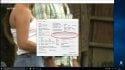
Reference the attached screenshot, does anyone know what this may mean and given all the recommendations to use Copy Back with AMD GPUs, if using Native will have any negative issues?
@Sebastiii Do you want me to try out v225 with Copy Back and Dshowhelpers, or stay with the Native fix, please let me know where you want me to go from here?
UPDATE:
The uhd test vid Elysium does not play (black screen with audio and not hung) with native, ok with copy back.
@Kotik Native did not fix the stuck 23hz after 3D playback.
v222 OK with all settings back to my normal with Madvr selected but with DXVA2 (Native) set as the "Hardware Decoder to use" in LAV, the stop times after ca 15mins+ playing in both TVS and OLV are at most an acceptable 5sec.
3D plays fine (still with 23hz stucck on stop) and it is using hardware accel. for HEVC HD TV. Have not tried UHD (Elysium) though yet.
Reference the attached screenshot, does anyone know what this may mean and given all the recommendations to use Copy Back with AMD GPUs, if using Native will have any negative issues?
@Sebastiii Do you want me to try out v225 with Copy Back and Dshowhelpers, or stay with the Native fix, please let me know where you want me to go from here?
UPDATE:
The uhd test vid Elysium does not play (black screen with audio and not hung) with native, ok with copy back.
@Kotik Native did not fix the stuck 23hz after 3D playback.
Last edited:
This means that when u are using DXVA Native you cannot select another GPU for its usage, let me try to explain it a bit better, DXVA Native can only work on your default GPU only, meaning it will run only on the GPU that is set as primary in windows and also connected to ur display. Let me give you an example, lets suppose u got ur AMD GPU plus ur Intel iGPU, with DXVA Copy Back you are able to select which GPU LAV Filters will use to decode the video, this is possible cause DXVA Copy Back can be used on a secondary GPU since the video frames will return back to the system and from there u can direct them to ur Primary GPU for rendering, this way you can use ur Intel iGPU for video decoding and then forward your decoded frames to ur primary GPU for rendering. This is not possible with Native cause once the frames are sent to the GPU they stay there and are rendered from that GPU.does anyone know what this may mean
This message indicates exactly that
In other words it is telling you that since u got Native selected u cannot select another GPU (if you have one) for your decoding.The uhd test vid Elysium does not play (black screen with audio and not hung) with native, ok with copy back.
Can you try with MPC-HC and Native to see if it works there? If it doesn't work there either then I suspect again the Crimson drivers

- Thread starter
- Moderator
- #2,728
@Sebastiii Do you want me to try out v225 with Copy Back and Dshowhelpers, or stay with the Native fix, please let me know where you want me to go from here?
View attachment 183210
UPDATE:
The uhd test vid Elysium does not play (black screen with audio and not hung) with native, ok with copy back.
@Kotik Native did not fix the stuck 23hz after 3D playback.
I'm not sure to following you
V225 has all WIP bin fix content, so yes if you can try it with both DXVA option to see if i'm in the right direction.
But what i didn't understand is : does dshowhelper bin help with DXVA copy back ?
Testrelease 1: 10 Minute Test
Start @ 10:38:23
Stop @ 10:48:30
Stop Done @ 10:48:53
--- Post updated ---
Testrelease 2: 10 Minute Test
Start @ 10:53:33
Stop @ 11:04:03
Stop Done @ 11:04:27
And to say that, it's tested with Copy Back. I go to native for some normal use tests.
Start @ 10:38:23
Stop @ 10:48:30
Stop Done @ 10:48:53
--- Post updated ---
Testrelease 2: 10 Minute Test
Start @ 10:53:33
Stop @ 11:04:03
Stop Done @ 11:04:27
And to say that, it's tested with Copy Back. I go to native for some normal use tests.
Last edited:
Users who are viewing this thread
Online now: 34 (members: 0, guests: 34)