Maya: Beta release 04-04-10 (Original Thread) (5 Viewers)

Status
Not open for further replies.

su27

New Member
March 26, 2010
4
0
Home Country
Poland Poland
Re: Maya: Beta release 06-02-10

Are there any settings to be set in order to get the weather icons to work? Everything works great, apart from the weather icons, which are not present.

Same here. No weather icons. Also, how to get an hour show somewhere?
 

cmdrsamu

Portal Member
May 3, 2009
20
0
Re: Maya: Beta release 04-04-10 (v 0.3.254)

Hey guys,

I have a problem with Maya Skin and moving pictures. I think the skin is the source for this issue but Im not sure.
After entering the small thumb film overview the title of the first movie isnt displayed. When I press a cursor key the title of the next selected movie is properly shown.
This is especially annoying when I use the "SMS" function to search for a movie, every first movie has no title...

This should be fixed in next SVN.

:D

Hey, thank you, thats really great! Maya is an outstanding skin :)

Are there any settings to be set in order to get the weather icons to work? Everything works great, apart from the weather icons, which are not present.

Same here. No weather icons. Also, how to get an hour show somewhere?

Also same problem here, no idea, why icons are not shown. Everything seems to be correct (i.e. all files are in its directories).
 

pilehave

Community Skin Designer
  • Premium Supporter
  • April 2, 2008
    2,566
    521
    Hornslet
    Home Country
    Denmark Denmark
    Re: Maya: Beta release 06-02-10

    Are there any settings to be set in order to get the weather icons to work? Everything works great, apart from the weather icons, which are not present.

    Same here. No weather icons. Also, how to get an hour show somewhere?

    InfoService must be enabled and configured. If the icons are still missing, you should try and delete the curWeather.xml file in the cache folder.

    To get the clock showing you must configure the Maya BasicHome process-plugin.
     

    spoco2

    Portal Member
    March 6, 2006
    46
    1
    Re: Maya: Beta release 04-04-10 (v 0.3.254)

    I now have the time showing up thanks to using the basic home portion, and I'm now using the basic home screen, which I wasn't, as it looks nicer too.

    So, all round awesome work here guys!
     

    1stdead

    Portal Pro
    February 1, 2008
    1,089
    139
    Copenhagen
    Home Country
    Denmark Denmark
    Re: Maya: Beta release 04-04-10 (v 0.3.254)

    Pilehave: Submenus are not working in new plugin update. When entering something every submenu has the same ID as the first submenu. This also happens in configuration.
     

    pilehave

    Community Skin Designer
  • Premium Supporter
  • April 2, 2008
    2,566
    521
    Hornslet
    Home Country
    Denmark Denmark

    su27

    New Member
    March 26, 2010
    4
    0
    Home Country
    Poland Poland
    Re: Maya: Beta release 06-02-10

    To get the clock showing you must configure the Maya BasicHome process-plugin.

    Yes, I have checkboxes marked in Maya home configuration but clock doesn't show up anywhere...
     

    rak

    Portal Pro
    March 5, 2008
    93
    1
    Home Country
    Czech Republic Czech Republic
    Re: Maya: Beta release 06-02-10

    pilehave, are those new buttons (not glossy but flat) going to stay for good or are they going to be a choice?
    I for one do not like them, I think the old ones, the glossy ones, were beautyfull and really going with the skin, and the new ones just don't look as good and are not on the same high design level for this skin...
    what do you think?

    We are not sure yet providing a choice for the buttons.
    Personally i think the glossy buttons are too bulky. But the last word isnt said about the buttons. So new ones are always a possibility untill I feel that they are perfect.

    +1 for the glossy selection buttons

    The flat ones look very "unprofessional" and do not match the glossy design. Anyway, if you still decide to keep the flat ones, I would appreciate an option for the glossy buttons during installation.

    Beside this, it is still the best skin for the MP!
     

    polarie

    Retired Team Member
  • Premium Supporter
  • November 20, 2006
    1,250
    153
    53
    Hasloh (near Hamburg)
    Home Country
    Germany Germany
    AW: Maya: Beta release 04-04-10 (v 0.3.254)

    :D this thread has been goin really long ...
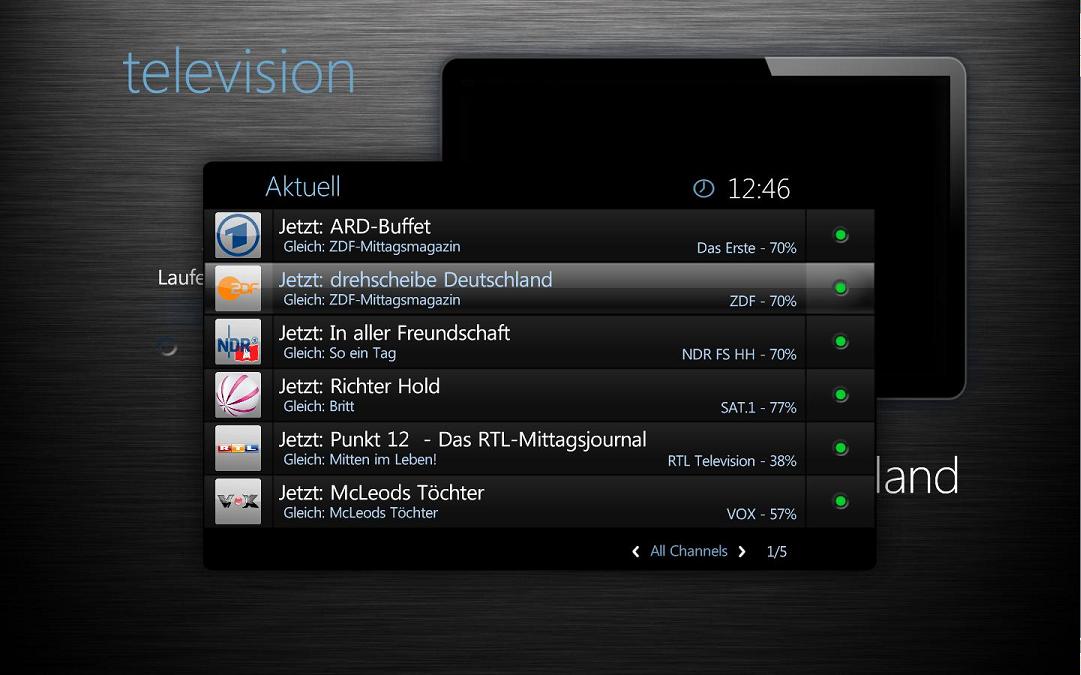
    so i am not sure if anyone here got the same "problem" with the tv-mini-guide
    and posted this befor ....

    .. as the name says - MINI-guide ... but it was to small for me in my projector-screen...
    i sized it up a bit - also made the TV-Logos a bit bigger - better recognize ..

    if anybody want that also - i could post that modded-tvminiguide.xml
     

    Attachments

    • TVminiguide.JPG
      TVminiguide.JPG
      82.9 KB

    disaster123

    MP Donator
  • Premium Supporter
  • May 14, 2008
    3,558
    434
    Home Country
    Germany Germany
    AW: Maya: Beta release 04-04-10 (v 0.3.254)

    polarie
    where did you get this background from? For me Maya is blue?
     
    Status
    Not open for further replies.

    Users who are viewing this thread

    Top Bottom