Maya Bug Reports & issues (5 Viewers)

Status
Not open for further replies.

1stdead

Portal Pro
February 1, 2008
1,089
139
Copenhagen
Home Country
Denmark Denmark
Re: AW: Re: Maya Bug Reports & issues

hmm...cannot confirm. Do you use the larger fonts? Can you post some logs, please? :D

I use larger fonts as well, but changing to normal didn't make any difference. Attached are logs, using bigger, of me starting mp, entering weather, leaving weather and exiting mp.

//Johannes
Do you use Infoservice version 1.6?
The property name for the images is changed between version 1.5 and 1.6 (#infoservice.weather.dayX* to #infoservice.weather.forecastX*) so are not displayed anymore.

Attached you will find the myweather.xml that is compatible with version 1.6

Yeah working better on 1.6, i'll look through and fix it:) :D

I guess ncoh still have 1.5
 

kjd01

MP Donator
  • Premium Supporter
  • April 24, 2009
    159
    19
    I know I mentioned this before with a few other screens, but I have noticed it again with the new OSD. There seems to be no allowance for 12hour time as can be seen in the attached screenshot.
     

    Attachments

    • OSD.jpg
      OSD.jpg
      146.3 KB

    MrCrabs

    Portal Pro
    January 21, 2010
    884
    129
    Braunschweig
    Home Country
    Germany Germany
    That's because Maya is an infamous project to force the whole world to use 24 hour time.

    The problem with weather screen is gone with latest svn, thanks!
     

    Wbunaarf

    Portal Pro
    December 9, 2005
    534
    103
    Sweden
    Home Country
    Sweden Sweden
    The problem with weather screen is gone with latest svn, thanks!

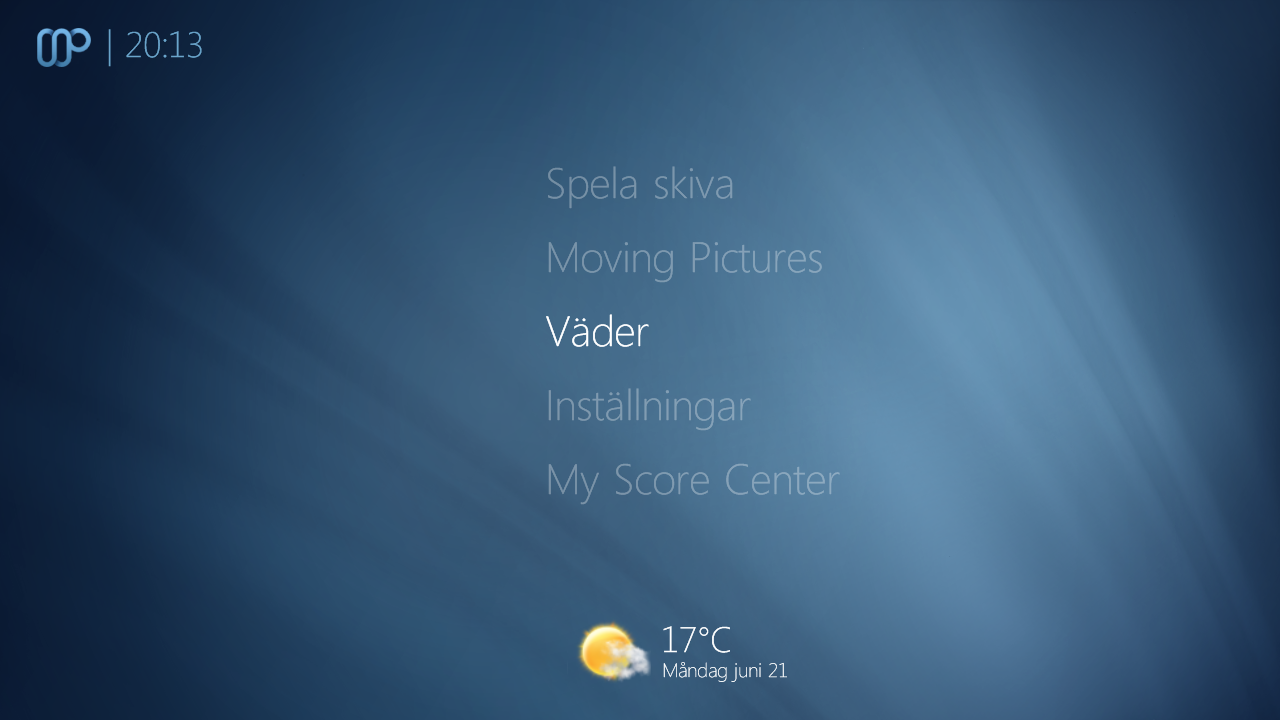
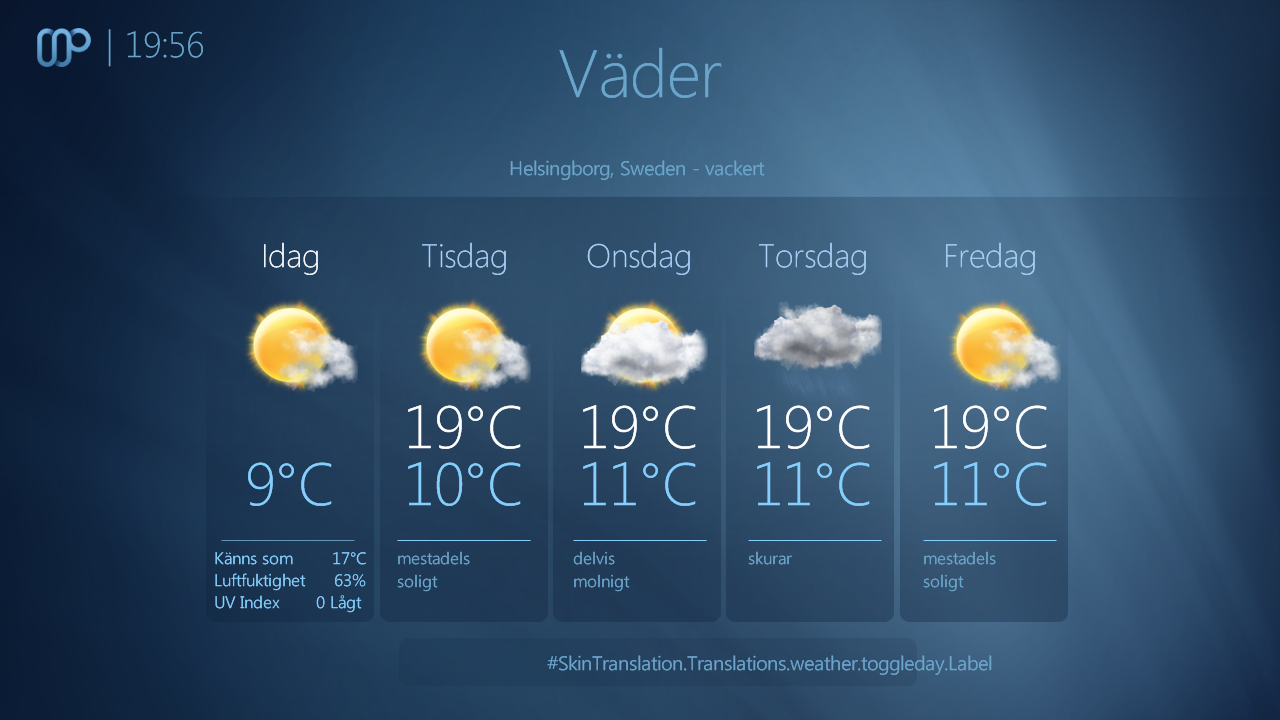
    With the latest svn (and the SkinTranslations plugin) that problem is indeed gone. Excellent! However, there is a small 'quirk'. The temperature on the homescreen seems to be the 'feels like' rather than the actual temperature.

    //Johannes
     

    Attachments

    • 20-13-03.png
      20-13-03.png
      418.1 KB
    • 19-56-55.png
      19-56-55.png
      458.5 KB

    1stdead

    Portal Pro
    February 1, 2008
    1,089
    139
    Copenhagen
    Home Country
    Denmark Denmark
    The problem with weather screen is gone with latest svn, thanks!

    With the latest svn (and the SkinTranslations plugin) that problem is indeed gone. Excellent! However, there is a small 'quirk'. The temperature on the homescreen seems to be the 'feels like' rather than the actual temperature.

    //Johannes

    I see, but code says:
    #infoservice.weather.today.temp on basic home
    and:
    #infoservice.weather.today.feelsliketemp + controlIDin weather.

    Sorry cannot find a reason this is wrong.. But i have that as well. It's probably a bug in infoservice..
    Confirmed not a bug in infoservice:
    PropertyUtils.SetProperty(PropertyUtils.Properties.TodayWeather.Temp, WeatherService.Weather.WeatherData.TodayTemperature); PropertyUtils.SetProperty(PropertyUtils.Properties.TodayWeather.Feelsliketemp, WeatherService.Weather.WeatherData.TodayFeelsLikeTemperature);


    So perhaps the maya dll..? Disabling it removes temperature so maya dll definitely does something.
     

    1stdead

    Portal Pro
    February 1, 2008
    1,089
    139
    Copenhagen
    Home Country
    Denmark Denmark
    just updated SVN again and noticed that Issue 175 - mamp2 - Exception when adding recordings - Project Hosting on Google Code was fixed in SVN333 but then backed out again in SVN335.

    I am getting the exceptions again and was wondering why this has been done.

    Sorry, but i ask you here which was correct: https://forum.team-mediaportal.com/maya-520/maya-bug-reports-issues-82291/index7.html#post629143

    and in that issue you say:
    Should be <type>label</type>
    not <type>fadelabel</type

    and the change in r333 is fadelabel: r333 - mamp2 - Project Hosting on Google Code which you say is working? Sorry but you're not clear here.. :confused: That's the reason i changed it back in r335.

    So please be clear. Should it be fadelabel or label...?
     

    jameson_uk

    Retired Team Member
  • Premium Supporter
  • January 27, 2005
    7,257
    2,533
    Birmingham
    Home Country
    United Kingdom United Kingdom
    and in that issue you say:
    Should be <type>label</type>
    not <type>fadelabel</type

    and in r333 is changed in to fadelabel: r333 - mamp2 - Project Hosting on Google Code which you say is working? Sorry but you're not clear here.. :confused: That's the reason i changed it back in r335.

    So please they fadelabel or label...?
    I am not sure how I have managed to break it but it looks like I have a very odd version of Maya on my HTPC :confused: I am sure I checked out everything in SVN on dev machine and copied across but someone I seem to have picked up an older version...

    The should be label not fadelabel as above. This is now right in SVN just looks odd as SVN333 to actually fix the issue broke it again. (indeed just checked revision history and this was actually fixed in SVN306 then fix was put in as SVN333 which broke it and SVN335 has now fixed it again)

    Please ignore me I am having one of those days :oops: SVN is now correct I just need to delete my skin on main HTPC and make sure all files are latest versions :sorry:
     

    1stdead

    Portal Pro
    February 1, 2008
    1,089
    139
    Copenhagen
    Home Country
    Denmark Denmark
    Great:) That happens, i'm sometimes confused as well.
     

    ncoH

    Retired Team Member
  • Premium Supporter
  • January 27, 2007
    925
    1,569
    Hannover
    Home Country
    Germany Germany
    AW: Re: Maya Bug Reports & issues

    The problem with weather screen is gone with latest svn, thanks!

    With the latest svn (and the SkinTranslations plugin) that problem is indeed gone. Excellent! However, there is a small 'quirk'. The temperature on the homescreen seems to be the 'feels like' rather than the actual temperature.

    //Johannes

    I see, but code says:
    #infoservice.weather.today.temp on basic home
    and:
    #infoservice.weather.today.feelsliketemp + controlIDin weather.

    Sorry cannot find a reason this is wrong.. But i have that as well. It's probably a bug in infoservice..
    Confirmed not a bug in infoservice:
    PropertyUtils.SetProperty(PropertyUtils.Properties.TodayWeather.Temp, WeatherService.Weather.WeatherData.TodayTemperature); PropertyUtils.SetProperty(PropertyUtils.Properties.TodayWeather.Feelsliketemp, WeatherService.Weather.WeatherData.TodayFeelsLikeTemperature);

    The labels #infoservice.weather.today.feelsliketemp and #infoservice.weather.today.temp that comes from the infoservice plugin have the same value.

    So perhaps the maya dll..? Disabling it removes temperature so maya dll definitely does something.

    The temperature is removed because the plugin set it enable or disable in the configuration...
     
    Status
    Not open for further replies.

    Users who are viewing this thread

    Top Bottom