
Media Portal 1.6.0 Working fine then no sound (1 Viewer)

AncientYoof

Portal Member
November 25, 2013
23
1
Home Country
Great Britain (UK) Great Britain (UK)
I have been using MP for a while now I ran the beta with no problems for a few months and then did an upgrade over the beta to the latest release

its been working generally fine, but once or twice I has a no sound issue and saw that the HDMI sound output had put itself on mute , I unticked the box and all was fine.

now after no problems for a few weeks it has stopped playing sound again Music, Video and TV. The HDMI output is set to on and I can play movies via VLC on the computer outside of MP fine no problems.

any ideas?
 

RonD

Test Group
  • Team MediaPortal
  • December 20, 2011
    911
    278
    SillyValley CA
    Home Country
    United States of America United States of America
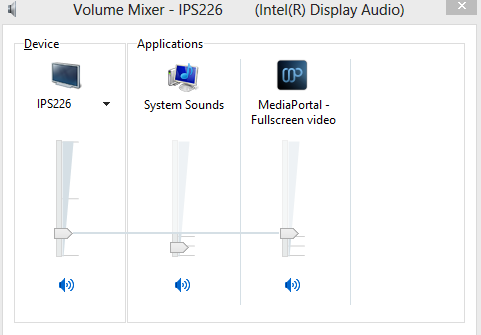
    as a sanity check look at the windows sound mixer. with a mouse right click on the speaker icon in the lower right side of windows taskbar/status area. make sure MePo volume is not set to 0 or muted.
     

    AncientYoof

    Portal Member
    November 25, 2013
    23
    1
    Home Country
    Great Britain (UK) Great Britain (UK)
    I've checked everything in the sound speaker icon nothing is muted but I can see no MEPO volume option, I have reinstalled and still no sound

    very peculiar. It was working fine and I changed nothing ..as I said playing music and video outside of MP works fine
     

    RonD

    Test Group
  • Team MediaPortal
  • December 20, 2011
    911
    278
    SillyValley CA
    Home Country
    United States of America United States of America
    since you don't see MePo in the mixer seems strange, on win7/win8 I typically see the following. looks like you should upload your log files. don't know what is getting confused. I assume you've already double checked the MePo audio codec setups

    http://wiki.team-mediaportal.com/Forum/How_to_post_logs
     

    Attachments

    • Mixer.PNG
      Mixer.PNG
      18.6 KB

    AncientYoof

    Portal Member
    November 25, 2013
    23
    1
    Home Country
    Great Britain (UK) Great Britain (UK)
    I have media portal on 2 pcs , the secondary one its working fine and the main one connected to my TV is the one that has stopped working

    I am running win7 on both machines and on neither do I see an option for MP in the volume mixer control. All I see is device and applications (system sounds) options.
     

    AncientYoof

    Portal Member
    November 25, 2013
    23
    1
    Home Country
    Great Britain (UK) Great Britain (UK)
    double checked all settings reinstalled cleanly twice ....NO sound:(

    installed XMBC perfect...........bye bye MP which is a shame as it was really good
     

    pur_berger

    Super User
  • Team MediaPortal
  • Super User
  • May 14, 2007
    1,678
    312
    53
    Vienna
    Home Country
    Austria Austria
    double checked all settings reinstalled cleanly twice ....NO sound:(

    installed XMBC perfect...........bye bye MP which is a shame as it was really good

    Did you check in the Codec Section of MP Configuration whch audiorenderer MP uses? I had teh issue that it switched to Optical instead of MPAudio (which also needs to set in itself to use HDMI for default or the default Audio Device)
     

    Peter2

    MP Donator
  • Premium Supporter
  • September 18, 2006
    847
    53
    Home Country
    Belgium Belgium
    Also, you have to make sure MePo is running so the specific slider in the mixer is available.
     

    Users who are viewing this thread

    Top Bottom