
media portal & imon remote (2 Viewers)

whatisk

Portal Pro
May 21, 2007
242
12
Brisbane
Home Country
Australia Australia
Hi there good people.

I have the Silverstone cabinet my self. With the Imon remote.

The remote works fine as a "mouse", but i want it to act more like a remote in Media Portal. That means if i press down, it jumps down 1 space in the menu. Now it scrolls down like a mouse.

Iv tried running as "General HID", but still it moves like a mouse.

Anyone gotten that to work?

In the options for iMon (can't quite remember where offhand), there is a setting for if it is in mouse or keyboard mode when it first starts. You can either set that to keybaord (it is mouse by default), or pressing the button on the remote at the top of the large round mouse movement button should toggle between mouse and keyboard mode (I think it has a picture of a keyboard and mouse on it).
 

MrT

Portal Member
May 18, 2007
11
0
remote.jpg


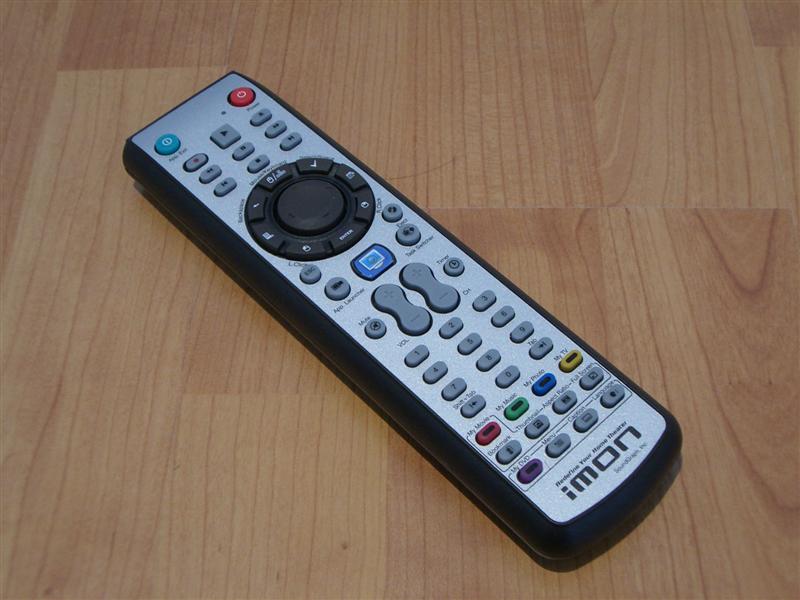
This is the remote i got.. I'll try whatisk's trick over here.. It sounds like it could be the solution.
 

yatesd

Portal Pro
April 30, 2007
90
2
55
I have the same configuration and also did what whatisk said.

Configured it for keyboard, used GeneralHID options under Remote in MP.

Also imported an IMON configuration I found on here and then modified to work with the Generic Keyboard plugin, so that the "MyDVD" and "MyTV" buttons on the remote could be configured to open plugins like MyTvSeries and MyFilms.
 

fanoI

Portal Pro
December 26, 2006
121
1
I used to have these problems but I now use Girder instead. It uses much less ram than Imon and gives you much better control - you don't need to put up with any of the silly onscreen clocks or anything. I also found the Imon pad annoying, particularly the middle control button so I switched to the Sony RM-VL600 learning remote - now it works like a treat and one remote controls my comp and amp. Now my system works perfectly.

I hate the imon remote, too!
In particular this 2 thing:
1) Always focus on application to work
2) If I use girder to avoid 1 after resuming from hibernation it sets in mouse mode and I have to press the mouse/keyboard button all time... very annoying

But I like a lot the function to power up the PC with remote and with the remte I'm using (happauge remote) is lost :(

Have you programmed the Sony remote to act as Imon pad?
Can you start your PC using power button on remote?

It seems some button is lost on Sony remote: subtitles cycle , audio cicle, dvd menu... or Am I wrong?

fanoI
 

armyofme

Portal Pro
January 21, 2006
121
3
York
Home Country
United Kingdom United Kingdom
Hi Fanoi,

In answer to both your questions: yes and yes. The sony remote is great - my only crit is that some of the buttons are missing but there are ways round it Still a great remote :)
 

MrT

Portal Member
May 18, 2007
11
0
Does anyone have a complete MEDIA Portal setup file for the Imon remote?
I can't get fex: stop, fwd, rewind and all sorts of other buttons to work :(
 

Pejn

Portal Member
May 9, 2007
6
1
I have the Sony RM-VL600 remote and it works great except in MP its abit fast, so ex when going left/right it jumps 2 steps sometimes, ive changed the repeat delay setting in imon config but still not good enough :( anyone have the same problem and manage to fix it?
 

armyofme

Portal Pro
January 21, 2006
121
3
York
Home Country
United Kingdom United Kingdom
Hi Pejn, I use the same remote instead of the imon one. I managed to solve this problem using Girder. I found using Girder a lot better than the imon software - the imon software is a resource hog.
 

Users who are viewing this thread

Top Bottom