MediaPortal Audio renderer - better video playback quality (5 Viewers)

tourettes

Retired Team Member
  • Premium Supporter
  • January 7, 2005
    17,301
    4,800
    New release available. As usual you can grab it from the 3rd post: https://forum.team-mediaportal.com/637138-post3.html


    NOTE: you need to reset the 5.1 and 7.1 channel mask overrides - setting name has been changed in registry

    channelMaskOverride_5_1 to ChannelMaskOverride_5_1
    channelMaskOverride_7_1 to ChannelMaskOverride_7_1

    • Fixed a deadlock with audio stream changes
    • Fixed A/V sync with stream changes
    • Fixed a possible crash with the AC3 encoding

    If nothing critical appears (crashes or dead locks) the next test build will be containing the resampling functionality.
     

    tourettes

    Retired Team Member
  • Premium Supporter
  • January 7, 2005
    17,301
    4,800
    Re: AW: MediaPortal Audio renderer - better video playback quality

    here are the logs. I watched RTL then changed to pro7. After a while I had the stuttering (fps ist going up an down ). I went back (5 sec) and everything was ok.

    Logs don't show any clues what could be wrong. Please provide a TS buffer that can be used to reproduce the issue.


    1) stop tv service and delete all TS buffer files
    2) start tv on RTL - watch for 30 seconds
    3) change to pro7 - watch 1 minute
    4) change to RTL - watch 1 minute
    5) use task manager to kill the tv service
    6) make sure that the issue is reproducible in My Videos by playing that TS buffer file the tv service created
     

    Freuli

    Portal Pro
    October 31, 2007
    391
    77
    AW: MediaPortal Audio renderer - better video playback quality

    Hi tourettes,

    I think you can't reproduce it with the ts file. I don't have the problems with recorded tv. I have this problem only by watching live TV
     

    tourettes

    Retired Team Member
  • Premium Supporter
  • January 7, 2005
    17,301
    4,800
    Re: AW: MediaPortal Audio renderer - better video playback quality

    I think you can't reproduce it with the ts file. I don't have the problems with recorded tv. I have this problem only by watching live TV

    If you play a TS buffer file (for instructions how to create that see my previous post) it should be reproducible since the it s basicly the same as playing live tv. Only exception to that would be TsReader running out of the material in live tv - this kind of issue cannot be reproduced with playing a timeshifting buffer file in my videos.
     

    Johnnie

    MP Donator
  • Premium Supporter
  • December 12, 2008
    120
    4
    Home Country
    Netherlands Netherlands
    Hi all,

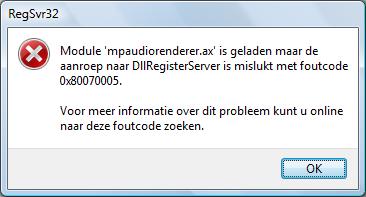
    I'm in the process of trying this thread also, because my video and audio under MP1.1.0 is stuttering. But I'm not able to register the mpaudiorenderer.ax.

    It says that its loaded but the call to DllRegisterServer failed with code 0x80070055. Please see attached file.

    Can somebody please give me some pointers?

    Thanks in advance,
    John
     

    Attachments

    • error.jpg
      error.jpg
      16.4 KB

    tourettes

    Retired Team Member
  • Premium Supporter
  • January 7, 2005
    17,301
    4,800
    red5goahead, here's a version that will log what latency the audio HW reports. Just to check if the Xonar would report something else than the actual buffer size as the latency (it would be doing something odd most likely, but would be good to check).

    Others shouldn't update to this version - there is nothing new in.

    Logging will contain:

    WASAPIRenderer::InitAudioClient device reported latency 50 ms - buffer based latency 50 ms
     

    Attachments

    • mpaudiorenderer_latency_logging.zip
      138.7 KB

    chemelli

    Retired Team Member
  • Premium Supporter
  • September 28, 2006
    6,159
    2,264
    52
    Milano, Italy
    Home Country
    Italy Italy
    Back from holidays and already done some tests ;)

    Simone
     

    Attachments

    • WASAPI_test_Realtek Digital Output (Realtek High Definition Audio)_HTPC.txt
      3.6 KB
    • WASAPI_test_Speakers (Realtek High Definition Audio)_Laptop.txt
      7.4 KB

    tourettes

    Retired Team Member
  • Premium Supporter
  • January 7, 2005
    17,301
    4,800
    From "RME Fireface 400"

    12-09-2010 12:19:49.268 [ 9ac] WASAPIRenderer::InitAudioClient device reported latency 400 ms - buffer based latency 200 ms

    I hope Xonar shows up the same (althou I don't like the idea that some HW as good that is providing worser latency that the few bucks integrated audio chips :D). If some Xonar user can confirm that the bugger and device based latency values are different it will allow my to fix the defaul "50 ms" lipsync issue that red5goahead reported.
     

    red5goahead

    MP Donator
  • Premium Supporter
  • November 24, 2007
    695
    144
    Italy, North West
    Home Country
    Italy Italy
    From "RME Fireface 400"

    12-09-2010 12:19:49.268 [ 9ac] WASAPIRenderer::InitAudioClient device reported latency 400 ms - buffer based latency 200 ms

    I hope Xonar shows up the same (althou I don't like the idea that some HW as good that is providing worser latency that the few bucks integrated audio chips :D). If some Xonar user can confirm that the bugger and device based latency values are different it will allow my to fix the defaul "50 ms" lipsync issue that red5goahead reported.

    12-09-2010 21:12:58.891 [ 1030] WASAPIRenderer::InitAudioClient device reported latency 10 ms - buffer based latency 0

    with WASAPIUseEventMode=0 because with WASAPIUseEventMode=1 with this release I've no sound at all (pause / play sometimes it come back , usual awful sound like play-exclusive test as you know)

    NOTE: If I set WASAPIUseEventMode=1 then log report

    12-09-2010 21:32:58.455 [ 58c] WASAPIRenderer::InitAudioClient device reported latency 5 ms - buffer based latency 0
     

    Users who are viewing this thread

    Top Bottom