- April 28, 2012
- 1
- 0
- 42
- Home Country
-
 Australia
Hi Team,
Lastnight we were watching some series and mediaportal crashed. Now it is now longer working. If I try to open mediaportal, mediaport configuration or MP-TV Configurator, I get a windows error, 'Media Portal has stopped working.' Tried restoring to a day before with no luck.
Error Details:
Description:
Stopped working
Problem signature:
Problem Event Name:CLR20r3
Problem Signature 01:mediaportal.exe
Problem Signature 02:1.2.3.0
Problem Signature 03:4f844ede
Problem Signature 04 ystem.Xml
Problem Signature 05:2.0.0.0
Problem Signature 06:4ca2ba8e
Problem Signature 07:6c1
Problem Signature 08:27
Problem Signature 09ystem.Xml.XmlException
OS Version:6.1.7601.2.1.0.256.48
Locale ID:3081
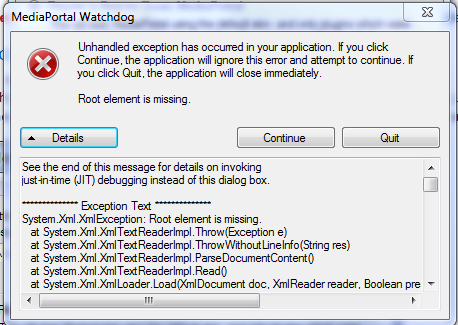
When I try to run in debug mode to gather logs i had the attached screen and then it crashed.
All effort to get Logs did not work!
PC is Windows 7 Pro 64bit
Please help... I do not want to reinstall everything.
Lastnight we were watching some series and mediaportal crashed. Now it is now longer working. If I try to open mediaportal, mediaport configuration or MP-TV Configurator, I get a windows error, 'Media Portal has stopped working.' Tried restoring to a day before with no luck.
Error Details:
Description:
Stopped working
Problem signature:
Problem Event Name:CLR20r3
Problem Signature 01:mediaportal.exe
Problem Signature 02:1.2.3.0
Problem Signature 03:4f844ede
Problem Signature 04
ystem.XmlProblem Signature 05:2.0.0.0
Problem Signature 06:4ca2ba8e
Problem Signature 07:6c1
Problem Signature 08:27
Problem Signature 09
ystem.Xml.XmlExceptionOS Version:6.1.7601.2.1.0.256.48
Locale ID:3081
When I try to run in debug mode to gather logs i had the attached screen and then it crashed.
All effort to get Logs did not work!
PC is Windows 7 Pro 64bit
Please help... I do not want to reinstall everything.