MediaStream by pilehave - upd. 22/08/09 (2 Viewers)

pilehave

Community Skin Designer
  • Premium Supporter
  • April 2, 2008
    2,566
    521
    Hornslet
    Home Country
    Denmark Denmark
    Hi pilehave,

    For internationalization reasons, it'd be better to use string language ID instead of labels. For example put 100001 instead of TV, 100002 as Picture...
    So each foreign user get the local text instead of english one.
    Of course, we can change it into the xml file but not so easy to identify all entries...

    The idea is that every user has to generate his/hers own XML-file. This way it will be in the language he/she wants, and it will read whatever you enter in the generator.
     

    pilehave

    Community Skin Designer
  • Premium Supporter
  • April 2, 2008
    2,566
    521
    Hornslet
    Home Country
    Denmark Denmark
    A simple feature that I miss since I switched to this skin,

    When pressing (i for information) on my remote, in the old Blue3 skin you could always see the current time, even if you watch video etc, thats gone in MediaStream, any tips how to get it back?

    Would this work? :

    clock-test.jpg
     

    stormbringer

    Portal Pro
    November 22, 2004
    401
    4
    A point to myprograms:
    When change the view to symbols it is very hard to find ut what item is selected.what image is responsible for that.I couldn´t find it out.
    Another question:Has someone a file (xml) for my programms with working fanart -> would like it very much.Or can some tell me what to change to get fanart working?

    I postet this a little bit earlier but I guess it dissapeared

    Could someone help?
     

    ddlooping

    MP Donator
  • Premium Supporter
  • November 23, 2008
    80
    5
    Home Country
    United Kingdom United Kingdom
    Hello all. :)

    First I'd like to thank pilehave and all the contributors who are participating in the porting of this great skin. :D

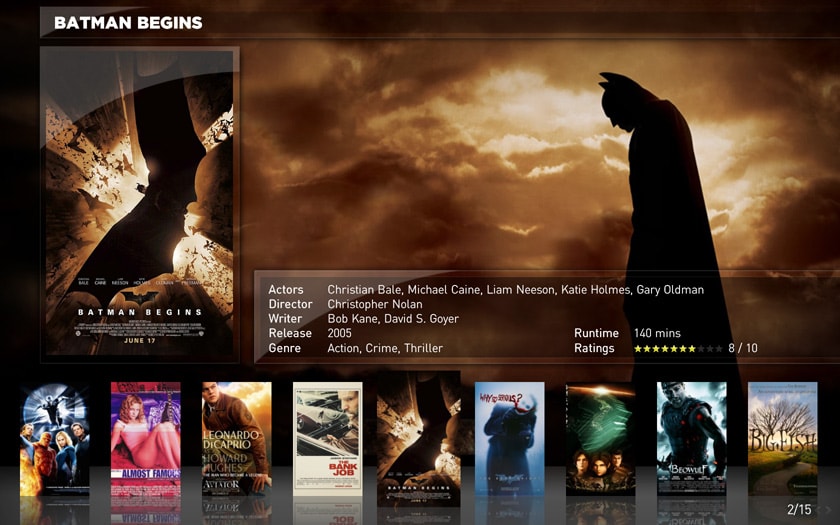
    Second: what xml file do I need to modify to move the page numbering that appears in filmstrip view?

    TIA ;)

    Looks like it's Moving Pictures? In that case it's movingpictures.facade.xml

    I'll fix the bug in next update :)
    I've managed to modify it. :)
     

    Attachments

    • My_MovingPictures.jpg
      My_MovingPictures.jpg
      148.9 KB

    pilehave

    Community Skin Designer
  • Premium Supporter
  • April 2, 2008
    2,566
    521
    Hornslet
    Home Country
    Denmark Denmark
    Hello all. :)

    First I'd like to thank pilehave and all the contributors who are participating in the porting of this great skin. :D

    Second: what xml file do I need to modify to move the page numbering that appears in filmstrip view?

    TIA ;)

    Looks like it's Moving Pictures? In that case it's movingpictures.facade.xml

    I'll fix the bug in next update :)
    I've managed to modify it. :)

    Ooh...nice look you got there!

    :)
     

    ddlooping

    MP Donator
  • Premium Supporter
  • November 23, 2008
    80
    5
    Home Country
    United Kingdom United Kingdom
    Ooh...nice look you got there!

    :)
    Thank you for the compliment, pilehave, and for making it possible. :D

    One technical query you might be able to help me with:
    When I press "Enter" the screen switches to the detailed view.
    Is it at all possible to hide/show controls on the same screen instead?
    My goal: pressing "Enter" would show/hide the scrolling movie summary. :)

    I guess one simple solution would be to edit the details view so it looks like the filmstrip with the addition of the movie summary. :D
    P.S: it's not that simple, lol.
     

    Raytestrak

    MP Donator
  • Premium Supporter
  • April 12, 2008
    497
    21
    50
    Honselersdijk
    Home Country
    Netherlands Netherlands
    Ooh...nice look you got there!

    :)
    Thank you for the compliment, pilehave, and for making it possible. :D

    One technical query you might be able to help me with:
    When I press "Enter" the screen switches to the detailed view.
    Is it at all possible to hide/show controls on the same screen instead?
    My goal: pressing "Enter" would show/hide the scrolling movie summary. :)

    I guess one simple solution would be to edit the details view so it looks like the filmstrip with the addition of the movie summary. :D
    P.S: it's not that simple, lol.

    Would you mind sharing your xml files ddlooping?
     

    pilehave

    Community Skin Designer
  • Premium Supporter
  • April 2, 2008
    2,566
    521
    Hornslet
    Home Country
    Denmark Denmark
    Can't seem to find a way to save a playlist in my music. Is this missing?

    Great skin by the way. :)

    No, but the hidden menu with all the buttons should come up if you either use the right-key to step right a couple of times (NOTE 1), or use the mouse and hover it close to the right edge of the screen.

    (NOTE 1): Because of a weird bug in MediaPortal (or design-feature) you have to use the UP-key when focus is on the up/down-control. up/down-control is only visible if your playlist has more than 8 items.

    (Not user-friendly, I know, but MP was apparantly not designed to work with a menu on the right side of the screen, only the left) :confused:
     

    Users who are viewing this thread

    Top Bottom