
You are using an out of date browser. It may not display this or other websites correctly.
You should upgrade or use an alternative browser.
You should upgrade or use an alternative browser.
MediaStream by pilehave - upd. 22/08/09 (3 Viewers)
- Thread starter pilehave
- Start date
 Finland

- Thread starter
- Moderator
- #622
Hi, Have you a link to the version of mptv series plugin which is compatible. I have searched for MP-TV Series v2.0.3260 as per the first post of this thread but cannot find it. I did try to use the last svn but this does not work.
many thanks
I think I'm using the newest one, the DLL says 2.0.3296 in versionnumber.
Get it from http://mptvseries.googlecode.com/files/MP-TVSeries-2.0.3296 (SVN).zip
It works here
reinstalled the mptvseries dll and then reimported and all is well. Also, just like to say I have just migrated from streamedmp and this is faster and more stable. I only have one other issue - in 4TR I get no picture in the tv preview box in tv guide any ideas. thanks for all your effort into this skin.
With the tv-preview box, do you mean the one on the top left with the title, runtime etc.? I mena, the one where music is also displayed?
Perhaps 4TR uses another way of showing windowed tv...
- Thread starter
- Moderator
- #623
Fonts are there (atleast the 4 that came with the skin), I did however notice if I don't have any spaces in the names they will show up as they should. Prefix is allowed to have spaces though. is it supossed to be like this?
Are you by any chance using Vista? The fonts could be screwed up...
Fonts are there (atleast the 4 that came with the skin), I did however notice if I don't have any spaces in the names they will show up as they should. Prefix is allowed to have spaces though. is it supossed to be like this?
Are you by any chance using Vista? The fonts could be screwed up...
nop, xp sp3
- Thread starter
- Moderator
- #625
Fonts are there (atleast the 4 that came with the skin), I did however notice if I don't have any spaces in the names they will show up as they should. Prefix is allowed to have spaces though. is it supossed to be like this?
Are you by any chance using Vista? The fonts could be screwed up...
nop, xp sp3
Try and delete the cached skin (delete the MediaStream folder fromC:\ProgramData\Team MediaPortal\MediaPortal\Cache)
Are you by any chance using Vista? The fonts could be screwed up...
nop, xp sp3
Try and delete the cached skin (delete the MediaStream folder fromC:\ProgramData\Team MediaPortal\MediaPortal\Cache)
thanks that fixed it, I wonder why it did not work to start with

always delete cache when you make some changes to the fonts or images kossu
- April 1, 2008
- 100
- 5
I think I'm using the newest one, the DLL says 2.0.3296 in versionnumber.
Get it from http://mptvseries.googlecode.com/files/MP-TVSeries-2.0.3296 (SVN).zip
It works here
reinstalled the mptvseries dll and then reimported and all is well. Also, just like to say I have just migrated from streamedmp and this is faster and more stable. I only have one other issue - in 4TR I get no picture in the tv preview box in tv guide any ideas. thanks for all your effort into this skin.
With the tv-preview box, do you mean the one on the top left with the title, runtime etc.? I mena, the one where music is also displayed?
Perhaps 4TR uses another way of showing windowed tv...
yes thats the box, I'll go and investigate on the 4tr forums, anyone here running 4tr with the same issue?
always delete cache when you make some changes to the fonts or images kossu
Yeh I know, though I did a complete reinstall of mediaportal, as I upgraded from RC2 to Final. So cache shouldnt have exsisted.TV client
Hi everyone,
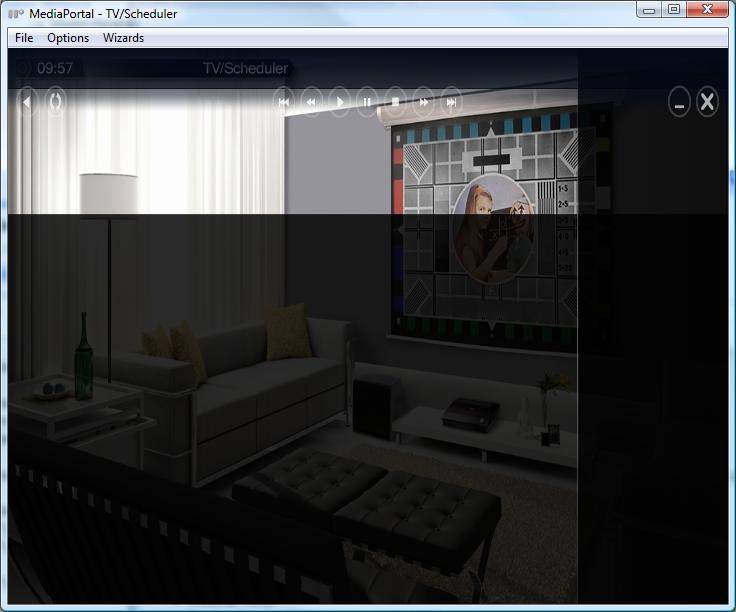
great skin, however, I found a small problem in the tv (server) client. If you are in the tv client and click on Scheduled, to manually program a recording, I am faced with a screen like the one I have attached.
By default, there is no way to program a recording. With the keyboard one can then click the right cursor button to access the menu but this should be shown by default I think ( at least in the default blue skin this is the case).
Would be nice if this could be fixed. Thanks in advance !
Alex
Hi everyone,
great skin, however, I found a small problem in the tv (server) client. If you are in the tv client and click on Scheduled, to manually program a recording, I am faced with a screen like the one I have attached.
By default, there is no way to program a recording. With the keyboard one can then click the right cursor button to access the menu but this should be shown by default I think ( at least in the default blue skin this is the case).
Would be nice if this could be fixed. Thanks in advance !
Alex
Attachments
Users who are viewing this thread
Online now: 3 (members: 0, guests: 3)