.mkv subtitles default not working (1 Viewer)

ChriZ

Portal Pro
March 22, 2008
125
3
Home Country
Denmark Denmark
Hello.

No problem here.

I have all videos in MKV (subtitles are inside mkv files). Most of videos have ENG and CZE subtitles. In mediaportal i set up CZE subtitles as default, and it works very well, no problem at all.

Using MP RC2 - so i think, it is no bug.

PS: Sorry for my english

Are you encoding movies yourself and set the default tag for subs? Otherwise this could simply be a matter of tags not being sent correctly to/from MP to the decoder, since it appears that Czech subs work, but Danish and English doesn't??

Remuxing is not really the right way to do this, seriously....

/Christian
 

hoborg

Portal Pro
June 13, 2008
4,413
1,644
Nový Jičín
Home Country
Czech Republic Czech Republic
Are you encoding movies yourself and set the default tag for subs? Otherwise this could simply be a matter of tags not being sent correctly to/from MP to the decoder, since it appears that Czech subs work, but Danish and English doesn't??

Remuxing is not really the right way to do this, seriously....

/Christian
Hello.

No, i didnt encode movies (well - sometime yes...). I simply mux avi+sub into MKV and set language tag for video/audio (i do not set "default track flag", only language).
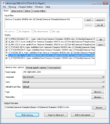
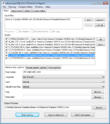
mkv_dan.png

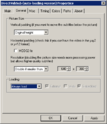
You need to set subtitles & language in MP configuration too:
MP-sub.png

I just do some testing, and ENG and DAN default subtitles work perfectly for me.

PS:I not sure if you know - muxing avi to mkv is not encoding - this procedure only change format, not recode audio/video.
 

hoborg

Portal Pro
June 13, 2008
4,413
1,644
Nový Jičín
Home Country
Czech Republic Czech Republic
Well, and what about put subtitles in to MKV and tag them with language tag. It is fast and work perfect in MP. I didnt see any reason to use external subtitles with MKV files...

I tried this (package the srt into the MKV), but still no subtitles in MP with MKV files?! When I hit the yellow button on my MCE remote I can see the subtitle switching, but there is nothing on the screen. I also enabled DirectVobSub as post processing filter in the Movie section of MP Configuration, but also no results :confused:

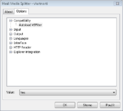
Have you install and register "VSFilter.dll" ? (latest version is 2.39)
Have you configure MKV slitter & VobSub correctly?
haali.pngdirectvob.png

When your video is played, do you have both of this icons on desktop?
icons.png
 

ChriZ

Portal Pro
March 22, 2008
125
3
Home Country
Denmark Denmark
Are you encoding movies yourself and set the default tag for subs? Otherwise this could simply be a matter of tags not being sent correctly to/from MP to the decoder, since it appears that Czech subs work, but Danish and English doesn't??

Remuxing is not really the right way to do this, seriously....

/Christian
Hello.

No, i didnt encode movies (well - sometime yes...). I simply mux avi+sub into MKV and set language tag for video/audio (i do not set "default track flag", only language).
View attachment 25170

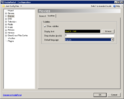
You need to set subtitles & language in MP configuration too:
View attachment 25171

I just do some testing, and ENG and DAN default subtitles work perfectly for me.

PS:I not sure if you know - muxing avi to mkv is not encoding - this procedure only change format, not recode audio/video.

Okay, so you normally only have 1 subtitle language in the mkv? As I don't encode myself, I don't know if the default tag is set or not. My experience is still that MP just picks up the first language available in the file and ignores the default language tag in MP Setup...

You're using RC2 without any SVN's, right?

/Christian
 

hoborg

Portal Pro
June 13, 2008
4,413
1,644
Nový Jičín
Home Country
Czech Republic Czech Republic
Okay, so you normally only have 1 subtitle language in the mkv? As I don't encode myself, I don't know if the default tag is set or not. My experience is still that MP just picks up the first language available in the file and ignores the default language tag in MP Setup...

You're using RC2 without any SVN's, right?

/Christian

Im using RC2 without any SVN's.
Look on this:
mkv_dan.png

There are 5 subtitles included in this MKV - 3xENG,CZE and DAN.
All works OK for me. Just set up default subtitle language in MP configuration.

I am not using MP directvob in postprocesing - mayby this is your problem. VobSub are call by Halli media spliter only when needed. So HD videos without subtitles are decoded by DXVA - works great.
 

ChriZ

Portal Pro
March 22, 2008
125
3
Home Country
Denmark Denmark
Okay, so you normally only have 1 subtitle language in the mkv? As I don't encode myself, I don't know if the default tag is set or not. My experience is still that MP just picks up the first language available in the file and ignores the default language tag in MP Setup...

You're using RC2 without any SVN's, right?

/Christian

Im using RC2 without any SVN's.
Look on this:
View attachment 25180

There are 5 subtitles included in this MKV - 3xENG,CZE and DAN.
All works OK for me. Just set up default subtitle language in MP configuration.

I am not using MP directvob in postprocesing - mayby this is your problem. VobSub are call by Halli media spliter only when needed. So HD videos without subtitles are decoded by DXVA - works great.


No postprocessing filters activated here, still doesn't work.. :mad: ...

/Christian
 

ronzelver

MP Donator
  • Premium Supporter
  • March 13, 2008
    97
    5
    Sittard
    Home Country
    Netherlands Netherlands
    Okay, so you normally only have 1 subtitle language in the mkv? As I don't encode myself, I don't know if the default tag is set or not. My experience is still that MP just picks up the first language available in the file and ignores the default language tag in MP Setup...

    You're using RC2 without any SVN's, right?

    /Christian

    Im using RC2 without any SVN's.
    Look on this:
    View attachment 25180

    There are 5 subtitles included in this MKV - 3xENG,CZE and DAN.
    All works OK for me. Just set up default subtitle language in MP configuration.

    I am not using MP directvob in postprocesing - mayby this is your problem. VobSub are call by Halli media spliter only when needed. So HD videos without subtitles are decoded by DXVA - works great.


    No postprocessing filters activated here, still doesn't work.. :mad: ...

    /Christian

    Same here, I configured everything as suggestedt by Hoborg, but still the same result: NO subtitles for MKV :confused:
     

    ChriZ

    Portal Pro
    March 22, 2008
    125
    3
    Home Country
    Denmark Denmark
    Same here, I configured everything as suggestedt by Hoborg, but still the same result: NO subtitles for MKV :confused:

    To make everything, I think we have 2 different issues - subtitles work fine for me, but the default language doesn't... that's basically what this thread is about...


    Before RC2, I had success with this guide:
    http://users.vic.chariot.net.au/~mitreski/mediaportal codec guide v.2.pdf
    With RC2, everything seems to work straight away without postprocessing filters...

    /Christian
     

    hoborg

    Portal Pro
    June 13, 2008
    4,413
    1,644
    Nový Jičín
    Home Country
    Czech Republic Czech Republic
    ronzelver & ChriZ:

    Run MP in window and start some MKV video with inside subtitles.

    Do you have both of these icons right-down on your desktop? icons.png

    It is DirectVob sub + Halli media spliter icons.

    If not, you configured it wrongly.
     

    ChriZ

    Portal Pro
    March 22, 2008
    125
    3
    Home Country
    Denmark Denmark
    ronzelver & ChriZ:

    Run MP in window and start some MKV video with inside subtitles.

    Do you have both of these icons right-down on your desktop? View attachment 25244

    It is DirectVob sub + Halli media spliter icons.

    If not, you configured it wrongly.

    Yep, everythings fine, but this thread is still not about missing subs, but about default language setting in MP Setup not having any effect...


    /Christian
     

    Users who are viewing this thread

    Top Bottom