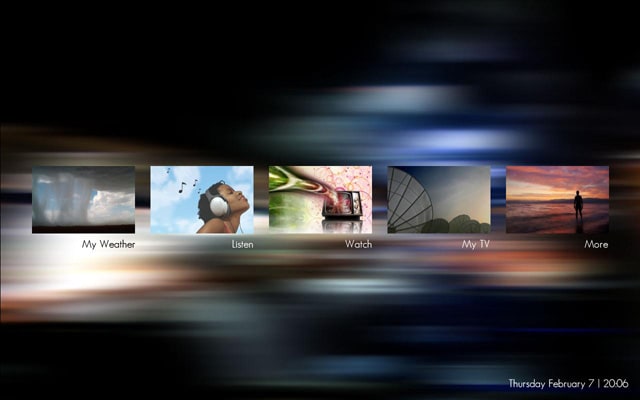
Monochrome (for those who like dark skins), updated... (2 Viewers)

THDBASED

Portal Pro
January 30, 2006
469
2
Home Country
Belgium Belgium
Screen1 - Not sure what's happening there because mine doesn't look like that (see screenshot).

I am seeing this too...

Ok, I found the problem (I think), if you are not using "Fan Art" or the "Series Info Panel" view. Do not copy the TVSeries.xml from the No Series Info Panel folder into your Monochrome folder. The TVSeries.xml included in the Monochrome folder is the default one, the one in the No Series Info Panel folder is causing the problem :sorry:

@ zombiee77, could you explain the steps I need to take to reproduce this?

@ jiggier, I'll see if I can figure something out, but it may not be possible...

Thx...
 

GetaGrip

Portal Member
February 2, 2008
9
1
Switserland
Home Country
Netherlands Netherlands
Maybe a kick in the right direction?

Hello Psycho Reptile, first off all.... great Skin! :D - so that sad... off I go to question that's biteing me for a day of two.

It began with the need to change the background, because the wife thought it was to dark:mad:
But oké a little bit of color can't hurt... so off i went and took as a compromise a background of Foofaraw.
Well to take a long story short... I'm skinning the damn beast:mad:

Here's some stuff I changed.

Picasa Web Albums - Arno - Media Portal ...

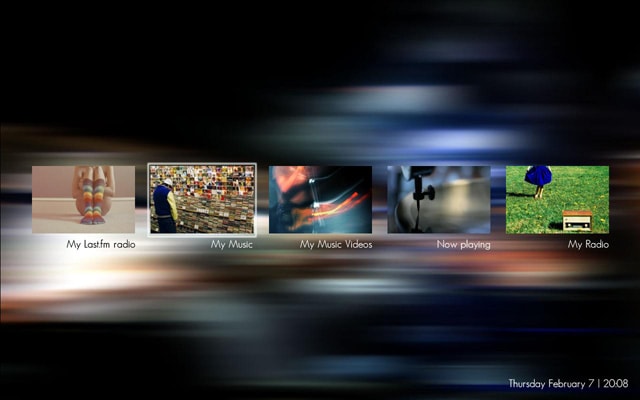
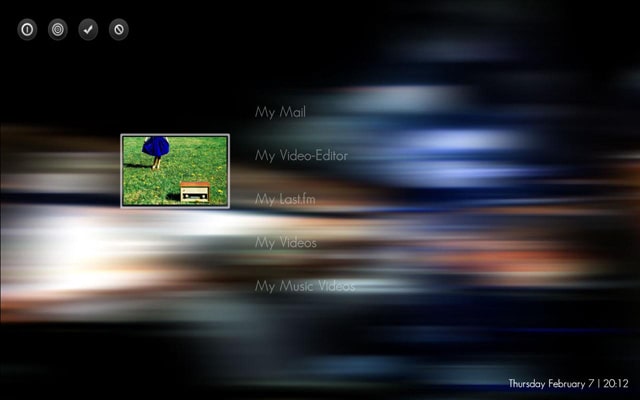
So there a three pix, BasicHome, MusicMenu and myHome.xml

As you can see the picture of lastFM and my Radio in the MusicMenu are different, but in myHome layout it's displaying only the pic of the My Radio on both My last FM and My Radio.
So off I went into the deep codes of your work, to figure out what was going on in there.
But with no results so far, so if you can help me(or give me a kick in the right direction) - It will be appreciate.:)

Regards in advance,

GetaGrip

Edit: just discovered that you updated your skin, gonna try that first....

Edit II: Just did a update, compared the modified code... problem still exist ... hope you can help.
 

NewUser

Portal Pro
January 8, 2008
91
2
Home Country
New Zealand New Zealand
If it isnt too much to ask can you upload a higher quality of the background? On the big screen its banding all over the place (if its intentional is there a smooth version?) thanks.
 

Psycho Reptile

Retired Team Member
  • Premium Supporter
  • April 19, 2006
    1,316
    787
    Cambridge, England
    Home Country
    United Kingdom United Kingdom
    As you can see the picture of lastFM and my Radio in the MusicMenu are different, but in myHome layout it's displaying only the pic of the My Radio on both My last FM and My Radio.
    So off I went into the deep codes of your work, to figure out what was going on in there.
    But with no results so far, so if you can help me(or give me a kick in the right direction) - It will be appreciate.:)
    I noticed that a long time ago, back when I was doing ReVision. The problem lies in MP's code - GUIRadioLastFM.cs has this

    Code:
        public bool GetHome(out string strButtonText, out string strButtonImage, out string strButtonImageFocus, out string strPictureImage)
        {
          strButtonText = GUILocalizeStrings.Get(34000);
          strButtonImage = string.Empty;
          strButtonImageFocus = string.Empty;
          [B]strPictureImage = "hover_my radio.png"[/B];
          return true;
        }

    Changing:

    strPictureImage = "hover_my radio.png" to strPictureImage = "hover_lastFM.png" would fix this....

    If it isnt too much to ask can you upload a higher quality of the background? On the big screen its banding all over the place (if its intentional is there a smooth version?) thanks.
    Sure. Width, height, resolution, colour mode and depth?

    @ All, I'll make the "white" changes and just make sure the text is still legible on my lcd before releasing an update.
     

    NewUser

    Portal Pro
    January 8, 2008
    91
    2
    Home Country
    New Zealand New Zealand
    I am using this on a Sony 40" LCD TV with a resolution of 1360x768. I actually like the double gradient background. Now sure what color mode or depth, but i would really like it to have a smooth gradient transition. On small screens (say on my 12" laptop) it looks great. But on a 40" you can really see the different shades of grey distinctively.

    As for the white, thank you a lot!

    Thanks.
     

    GetaGrip

    Portal Member
    February 2, 2008
    9
    1
    Switserland
    Home Country
    Netherlands Netherlands
    Thx for the quick answer... maybe I sleep to night better:D

    public bool GetHome(out string strButtonText, out string strButtonImage, out string strButtonImageFocus, out string strPictureImage) { strButtonText = GUILocalizeStrings.Get(34000); strButtonImage = string.Empty; strButtonImageFocus = string.Empty; strPictureImage = "hover_my radio.png"; return true; }

    I'll guess that's the code compiled in MP? - but can I change it then? must I read something from the site of MP to get this thing under control? (I must stop with all these question marks).

    Other thing.... the reason I'm changing your skin is that I'm using a 12.1" touchscreen in a HTPC case from Origen [S21T] and that some controls are getting focused and unfocused when it should be the other way around.
    And some button layouts are to small for a 1200x800 resolution to be controlled with your finger.

    Also mine wife has to control the MP MC too and with that sad, the keyword would we USER FRIENDLY!!!!:rolleyes:

    So I'll hope it's oké?.... to change it. - btw.. what do you think so far?(just a ego thing)

    Thanx in advance[again!!!] - GetaGrip
     

    Attachments

    • BasicHome.jpg
      BasicHome.jpg
      68.4 KB
    • MusicMenu.jpg
      MusicMenu.jpg
      74.5 KB
    • myHome.jpg
      myHome.jpg
      65 KB

    Psycho Reptile

    Retired Team Member
  • Premium Supporter
  • April 19, 2006
    1,316
    787
    Cambridge, England
    Home Country
    United Kingdom United Kingdom
    I am using this on a Sony 40" LCD TV with a resolution of 1360x768. I actually like the double gradient background. Now sure what color mode or depth, but i would really like it to have a smooth gradient transition.

    I'm not sure how I could do that, I'm really a photoshop newbie so I'll need some help. I'm running the same res on a 37" LCD and don't notice anything - on a side note - do you have your desktop set to 32-Bit colour?

    Thx for the quick answer... maybe I sleep to night better:D

    public bool GetHome(out string strButtonText, out string strButtonImage, out string strButtonImageFocus, out string strPictureImage) { strButtonText = GUILocalizeStrings.Get(34000); strButtonImage = string.Empty; strButtonImageFocus = string.Empty; strPictureImage = "hover_my radio.png"; return true; }

    I'll guess that's the code compiled in MP? - but can I change it then? must I read something from the site of MP to get this thing under control? (I must stop with all these question marks).

    So I'll hope it's oké?.... to change it. - btw.. what do you think so far?(just a ego thing)

    Thanx in advance[again!!!] - GetaGrip
    You can try Compiling MediaPortal, or maybe post a bug report/request and one of the devs will sort it out for the next SVN ;).

    Your're welcome to mod/change any of my skins :). As for what I think - looks good, but I think the bg has too much "going on"....
     

    GetaGrip

    Portal Member
    February 2, 2008
    9
    1
    Switserland
    Home Country
    Netherlands Netherlands
    You can try Compiling MediaPortal, or maybe post a bug report/request and one of the devs will sort it out for the next SVN

    Thx, I'll will look into that and put it on a to do list - you are a great help! :)

    Regards, GetaGrip
     

    Users who are viewing this thread

    Top Bottom