MP stuck at 720p, I want 1080p (1 Viewer)

2.0

MP Donator
  • Premium Supporter
  • January 18, 2012
    106
    19
    New York
    Home Country
    United States of America United States of America
    MediaPortal Version: 1.2.2
    MediaPortal Skin: Black Glass HD
    Windows Version: Windows 7 32-Bit Home Premium SP1
    CPU Type: Intel Core 2 Duo E6750
    HDD: Intel 320 SSD 80GB System, WD 1TB Caviar Black Storage
    Memory: 4GB DDR3
    Motherboard: MSI G41M-P23
    Video Card: EVGA Geforce GT 430
    Video Card Driver: 8.17.12.8562
    1. TV Card: Haupauge Win-TV HVR 2250
    1. TV Card Type:
    1. TV Card Driver:
    2. TV Card: DVICO FusionHDTV7 RT Gold
    2. TV Card Type:
    2. TV Card Driver:
    MPEG2 Video Codec:
    MPEG2 Audio Codec:
    h.264 Video Codec:
    HTPC Case: Foxconn DH-153C
    Cooling: A very cold apartment
    Power Supply: 300W
    Remote: Hauppauge MCE Remote
    TV:
    TV - HTPC Connection: HDMI 1.4

    I'm using a Geforce GT 430 connected to my 1080p television with HDMI. My graphics drivers are configured correctly and display resolution is set at 1920x1080. Windows even recognizes the brand name of my television. I have no problems with my display at all, and Media Player Classic recognizes my fullscreen resolution as 1920x1080. However, I think MP is only giving me 1280x720 resolution in fullscreen. I want full 1080p.

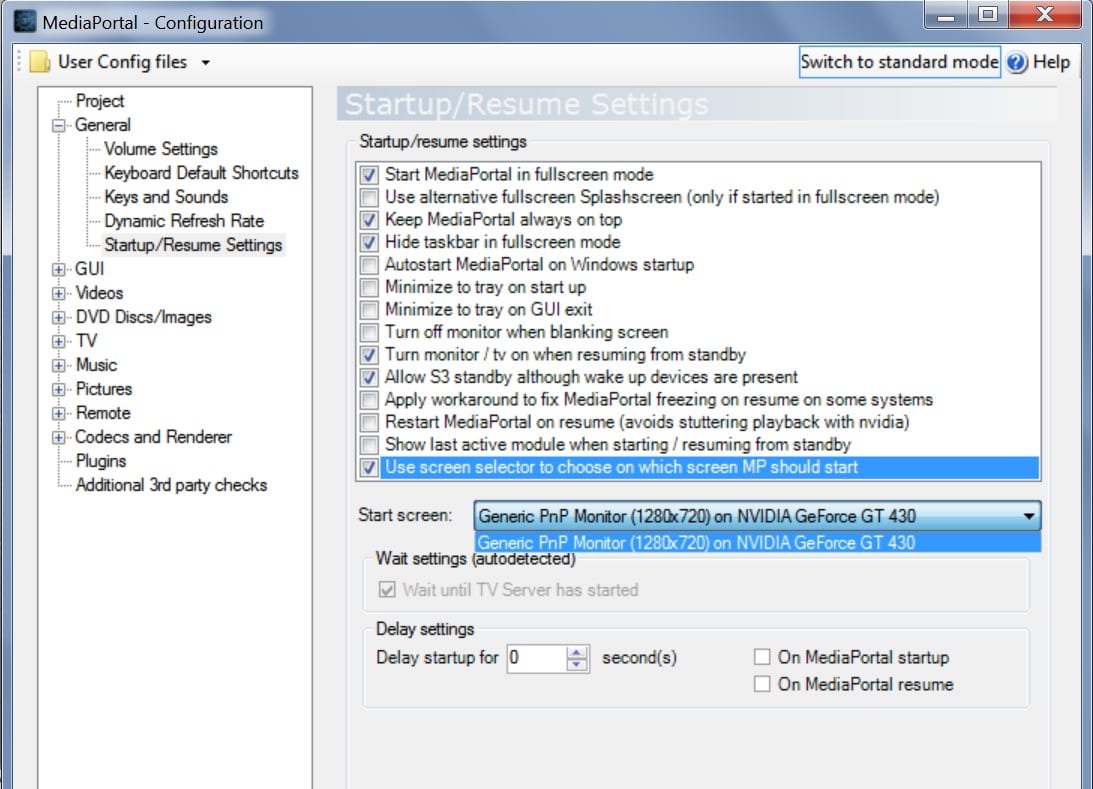
    In MP configuration, under Startup/Resume Settings, the start screen is listed as "Generic PnP Monitor (1280x720) on NVIDIA Geforce GT 430". It gives me no other options besides this.

    I checked the MP log file and found that it always contains these lines:
    -[Info.][MPMain(1)]: D3D: Starting fullscreen
    -[Info.][MPMain(1)]: D3D: Client size: 1280x720 - Screen: 1280x720
    -[Info.][MPMain(1)]: d3dapp: Graphic adapter 'NVIDIA GeForce GT 430' is using driver version '8.17.12.8562'
    -[Info.][MPMain(1)]: d3dapp: Pixel shaders supported: 512 (Version: 3.0), Vertex shaders supported: 32 (Version: 3.0)
    Which leads me to believe that I'm only getting 720p when I want 1080p.

    I searched and found another thread from someone who had the same problem over two years ago, but there was no solution there. Is there anybody today who can tell me why MP won't recognize my proper display resolution?
     

    elliottmc

    Retired Team Member
  • Premium Supporter
  • August 7, 2005
    14,927
    6,061
    Cardiff, UK
    Home Country
    United Kingdom United Kingdom
    Do you have any software installed that would automatically change resolution? I can see no reason why MP would change resolution. Do you have a plugin installed? Full logs might help.

    Do you actually notice the resolution change?

    Mark
     

    2.0

    MP Donator
  • Premium Supporter
  • January 18, 2012
    106
    19
    New York
    Home Country
    United States of America United States of America
    Do you have any software installed that would automatically change resolution? I can see no reason why MP would change resolution. Do you have a plugin installed? Full logs might help.

    Do you actually notice the resolution change?

    Mark

    Thanks for replying so quickly.

    There is no kind of unusual software on my HTPC that would mess with the resolution. I have NVIDIA control panel configured properly to set it at 1920x1080 and AFAIK there is nothing that can change that.

    I ran MP with default skin and no plugins and I got the same message about 1280x720 resolution in the MP logfile. I'm posting that log here so anyone can see. But unfortunately for some reason Watchdog is not working for me so I can't post full logs (It gives me an unhandled exception error when it compiles the logs and crashes). If you would like to see any specific log files then let me know and I can try to find it.

    As for noticing the change in resolution... There's nothing I can tell with just my eyes. I don't notice anything happen to the display when MP starts. I could be looking at a 1080p or 720p picture but I wouldn't notice the difference at this point.

    I believe that the "Generic PnP Monitor" refers to the old VGA connector, the kind used to connect monitors in the past. The strange thing is that I physically disconnected the VGA plug from my video card before installing it, so how could MP think that there is even a monitor connected that way?

    MP Configuration must be getting the wrong information from somewhere. Why is it that Windows recognizes my HDMI connection to my TV but MP does not see it? It only gives me the choice of using the wrong monitor connection, as you can see in the screenshot.
     

    Attachments

    • MPConfig.jpg
      MPConfig.jpg
      230.5 KB

    logifuse

    Portal Pro
    January 19, 2011
    118
    11
    Sydney
    Home Country
    Generic PnP can be digital too.

    I had a problem where I changed video cards & it was stuck at the resized resolution of the old card. There may be a config file in the c:\programdata\team-mediaportal\mediaportal folder that contains the info, but I couldn't work it out. I ended up reinstalling MP.

    You could try setting your Nvidia res to 1280x720, start MP, close MP, change back to 1920x1080 & then see if MP resets upon starting next time.
     

    elliottmc

    Retired Team Member
  • Premium Supporter
  • August 7, 2005
    14,927
    6,061
    Cardiff, UK
    Home Country
    United Kingdom United Kingdom
    Maybe it just thinks the resolution for MP is 1280x720.

    Have you tried switching back to windows (alt-tab) when MP is running to check that the resolution really has been changed.

    Mark
     

    Spooky

    MP Donator
  • Premium Supporter
  • February 14, 2005
    1,187
    47
    void 4tl
    Home Country
    Austria Austria
    Something is not right with this screenshot. The inside of the UI of the MePo Confguration looks scaled up, while the Windows UI looks normal (but unusually big, probably because of bigger font setting though).
     

    2.0

    MP Donator
  • Premium Supporter
  • January 18, 2012
    106
    19
    New York
    Home Country
    United States of America United States of America
    SOLVED! :D

    I read what Spooky wrote and that gave me a hunch. To make things easier to see on my TV from ten feet away, when I first set up this computer, I had set Windows Display settings to enlarge everything by 150%. I now changed this to 125% and problem fixed! MP Configuration shows the monitor as 1920x1080 now. I ran MP and exited it and checked the log file:
    - [Info.][MPMain(1)]: D3D: Client size: 1920x1080 - Screen: 1920x1080

    I guess that means it's working properly now. The problem now is that it's harder to see the smaller icons and windows on my TV, but I guess that won't be a problem once I get MP to run all the time. Also, the font size in Black Glass HD looks a little too big now, but I suppose that can be fixed (I hope).

    Thanks to everyone who offered their help with this.

    EDIT: I took another look at the log file and found this:
    - [Warn.][MPMain(1)]: GraphicContext: NO screen calibration file found for resolution 1920x1080!
    And sure enough, I'm missing that file. I have a "ScreenCalibration1280x720.fs.xml" but no such 1920x1080 file. That might be why the fonts are too big? Where can I get this file?
     

    emphatic

    Design Group
  • Team MediaPortal
  • August 25, 2006
    3,758
    1,250
    Alingsås
    Home Country
    Sweden Sweden
    NO screen calibration file found for resolution 1920x1080!
    And sure enough, I'm missing that file. I have a "ScreenCalibration1280x720.fs.xml" but no such 1920x1080 file. That might be why the fonts are too big? Where can I get this file?

    Run MediaPortal in 1080p, then calibrate your screen using the General->Sceen options. When
    You're done a new file should exist.

    Emph
     

    Users who are viewing this thread

    Top Bottom