United States of America
MediaPortal Version: 1.2.2
MediaPortal Skin: Black Glass HD
Windows Version: Windows 7 32-Bit Home Premium SP1
CPU Type: Intel Core 2 Duo E6750
HDD: Intel 320 SSD 80GB System, WD 1TB Caviar Black Storage
Memory: 4GB DDR3
Motherboard: MSI G41M-P23
Video Card: EVGA Geforce GT 430
Video Card Driver: 8.17.12.8562
1. TV Card: Haupauge Win-TV HVR 2250
1. TV Card Type:
1. TV Card Driver:
2. TV Card: DVICO FusionHDTV7 RT Gold
2. TV Card Type:
2. TV Card Driver:
MPEG2 Video Codec:
MPEG2 Audio Codec:
h.264 Video Codec:
HTPC Case: Foxconn DH-153C
Cooling: A very cold apartment
Power Supply: 300W
Remote: Hauppauge MCE Remote
TV:
TV - HTPC Connection: HDMI 1.4
I'm using a Geforce GT 430 connected to my 1080p television with HDMI. My graphics drivers are configured correctly and display resolution is set at 1920x1080. Windows even recognizes the brand name of my television. I have no problems with my display at all, and Media Player Classic recognizes my fullscreen resolution as 1920x1080. However, I think MP is only giving me 1280x720 resolution in fullscreen. I want full 1080p.
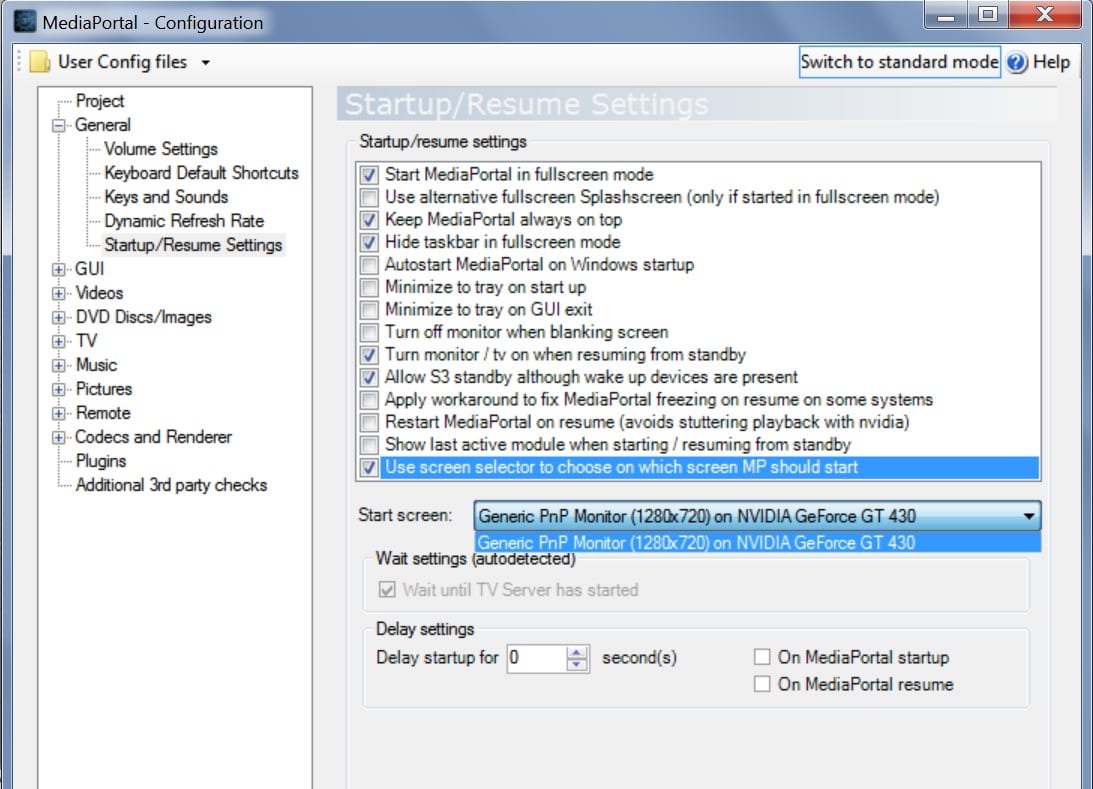
In MP configuration, under Startup/Resume Settings, the start screen is listed as "Generic PnP Monitor (1280x720) on NVIDIA Geforce GT 430". It gives me no other options besides this.
I checked the MP log file and found that it always contains these lines:
-[Info.][MPMain(1)]: D3D: Starting fullscreen
-[Info.][MPMain(1)]: D3D: Client size: 1280x720 - Screen: 1280x720
-[Info.][MPMain(1)]: d3dapp: Graphic adapter 'NVIDIA GeForce GT 430' is using driver version '8.17.12.8562'
-[Info.][MPMain(1)]: d3dapp: Pixel shaders supported: 512 (Version: 3.0), Vertex shaders supported: 32 (Version: 3.0)
Which leads me to believe that I'm only getting 720p when I want 1080p.
I searched and found another thread from someone who had the same problem over two years ago, but there was no solution there. Is there anybody today who can tell me why MP won't recognize my proper display resolution?
MediaPortal Skin: Black Glass HD
Windows Version: Windows 7 32-Bit Home Premium SP1
CPU Type: Intel Core 2 Duo E6750
HDD: Intel 320 SSD 80GB System, WD 1TB Caviar Black Storage
Memory: 4GB DDR3
Motherboard: MSI G41M-P23
Video Card: EVGA Geforce GT 430
Video Card Driver: 8.17.12.8562
1. TV Card: Haupauge Win-TV HVR 2250
1. TV Card Type:
1. TV Card Driver:
2. TV Card: DVICO FusionHDTV7 RT Gold
2. TV Card Type:
2. TV Card Driver:
MPEG2 Video Codec:
MPEG2 Audio Codec:
h.264 Video Codec:
HTPC Case: Foxconn DH-153C
Cooling: A very cold apartment
Power Supply: 300W
Remote: Hauppauge MCE Remote
TV:
TV - HTPC Connection: HDMI 1.4
I'm using a Geforce GT 430 connected to my 1080p television with HDMI. My graphics drivers are configured correctly and display resolution is set at 1920x1080. Windows even recognizes the brand name of my television. I have no problems with my display at all, and Media Player Classic recognizes my fullscreen resolution as 1920x1080. However, I think MP is only giving me 1280x720 resolution in fullscreen. I want full 1080p.
In MP configuration, under Startup/Resume Settings, the start screen is listed as "Generic PnP Monitor (1280x720) on NVIDIA Geforce GT 430". It gives me no other options besides this.
I checked the MP log file and found that it always contains these lines:
-[Info.][MPMain(1)]: D3D: Starting fullscreen
-[Info.][MPMain(1)]: D3D: Client size: 1280x720 - Screen: 1280x720
-[Info.][MPMain(1)]: d3dapp: Graphic adapter 'NVIDIA GeForce GT 430' is using driver version '8.17.12.8562'
-[Info.][MPMain(1)]: d3dapp: Pixel shaders supported: 512 (Version: 3.0), Vertex shaders supported: 32 (Version: 3.0)
Which leads me to believe that I'm only getting 720p when I want 1080p.
I searched and found another thread from someone who had the same problem over two years ago, but there was no solution there. Is there anybody today who can tell me why MP won't recognize my proper display resolution?