MP1 EVR Presenter/dshowhelper community development (3 Viewers)

jet70

Portal Pro
March 7, 2009
95
0
Home Country
England England
I am finding V12 being the most stable. Seems to recover from any out of synch issues after refresh rate and skipping chapters.

I found that some later versions - 15 and 17 had more trouble correcting themselves as quickly and 17 got into a jagged cycle which lasted about 8-10 seconds.

Have not tested V14 for a while (which I believe is just a 5 buffer version of V12) so will try and get back to you.

I can also confirm that IFC causes the dlls to glitch a bit so it is important that people disable this when testing or they will get spurious results.

(P.S. I am only testing media files h264 and divx not Live TV).
 

mironicus

Portal Pro
March 9, 2008
688
44
AW: Re: AW: MP1 EVR Presenter/dshowhelper community development

It's almost nearly perfect now.

But I have still the problem with stutter after a refresh rate change.

Logs ? Screen capture ?

Tony

There you have it. :)

- Started Mediaportal in Debug-Mode. (using your latest dll)
- Default refresh rate is set to 50 Hz
- Started a video with 23.976 fps, refreshrate changes to 23.976 Hz, video is stutter-free
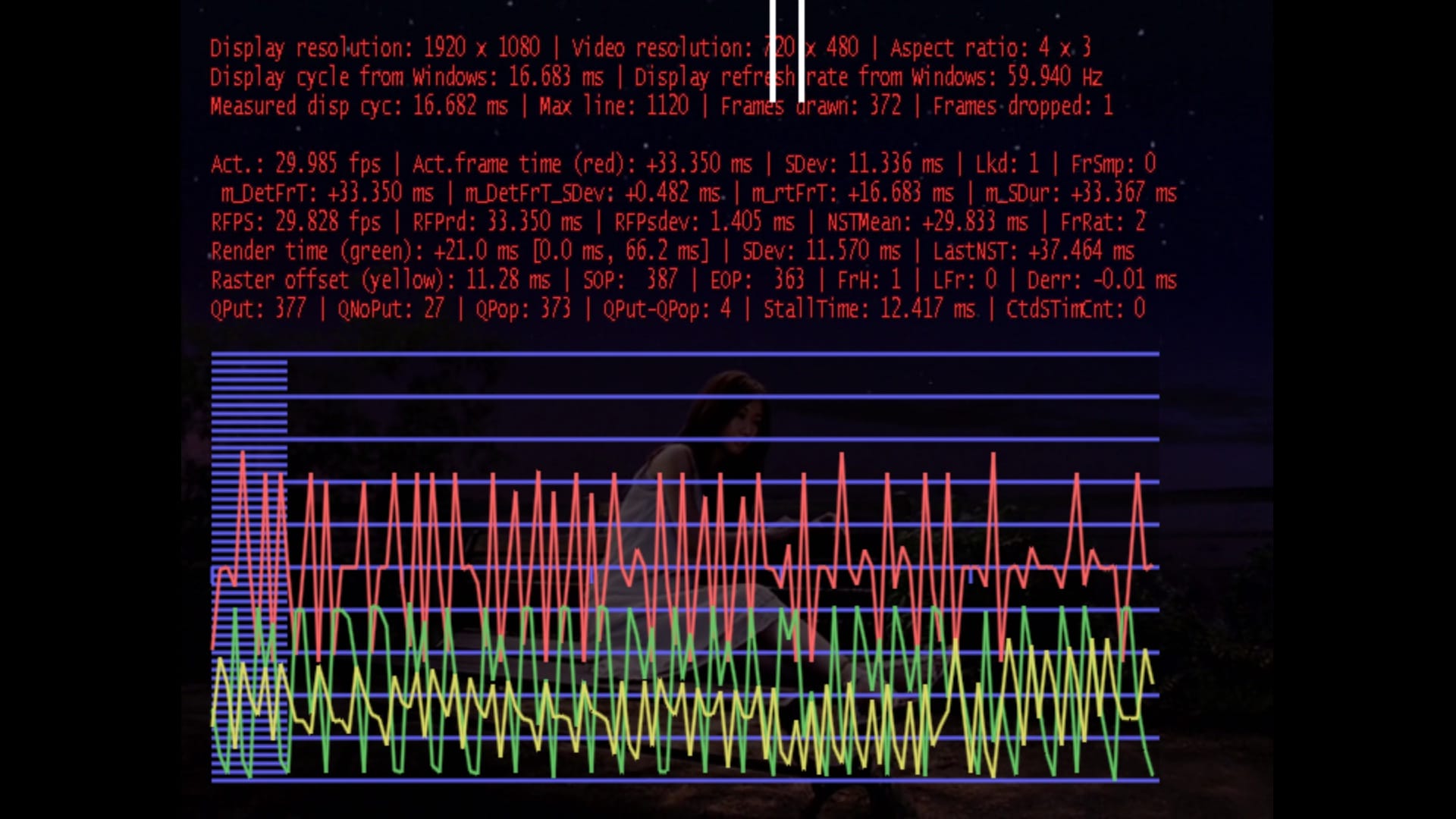
- Started a video with 29.97 fps, refreshrate changes to 59.94 Hz, video stutters (see attached picture)

--------------------------------

- Stopping and restarting the 29,97 fps video it runs smooth again (no refreshrate change done)

I repeated this steps three times in a row - and everytime the behaviour is the same. :eek:
 

Attachments

  • stutter_after_refresh_change.jpg
    stutter_after_refresh_change.jpg
    448.5 KB

Owlsroost

Retired Team Member
  • Premium Supporter
  • October 28, 2008
    5,539
    5,038
    Cambridge
    Home Country
    United Kingdom United Kingdom
    I am finding V12 being the most stable. Seems to recover from any out of synch issues after refresh rate and skipping chapters.

    I found that some later versions - 15 and 17 had more trouble correcting themselves as quickly and 17 got into a jagged cycle which lasted about 8-10 seconds.

    Have not tested V14 for a while (which I believe is just a 5 buffer version of V12) so will try and get back to you.

    I can also confirm that IFC causes the dlls to glitch a bit so it is important that people disable this when testing or they will get spurious results.

    (P.S. I am only testing media files h264 and divx not Live TV).
    Try the v0019 version I've just added to the first post.

    Tony


    It's almost nearly perfect now.

    But I have still the problem with stutter after a refresh rate change.

    Logs ? Screen capture ?

    Tony

    There you have it. :)

    - Started Mediaportal in Debug-Mode. (using your latest dll)
    - Default refresh rate is set to 50 Hz
    - Started a video with 23.976 fps, refreshrate changes to 23.976 Hz, video is stutter-free
    - Started a video with 29.97 fps, refreshrate changes to 59.94 Hz, video stutters (see attached picture)

    --------------------------------

    - Stopping and restarting the 29,97 fps video it runs smooth again (no refreshrate change done)

    I repeated this steps three times in a row - and everytime the behaviour is the same. :eek:

    Does this happen with the standard RC4 dll ?

    Does pausing or skipping forward in the video fix it ?

    The dshowhelper.dll isn't directly involved with the refresh rate changes - that's done inside MP core/player code (and the numbers in the render stats look OK, except that the render time is long (21ms) - greater than a display frame period (16.6ms), which is probably what is causing the stutter).

    Tony
     

    mironicus

    Portal Pro
    March 9, 2008
    688
    44
    AW: Re: MP1 EVR Presenter/dshowhelper community development

    Does this happen with the standard RC4 dll ?

    Yes, also.

    Does pausing or skipping forward in the video fix it ?

    Skipping solves it.

    The dshowhelper.dll isn't directly involved with the refresh rate changes - that's done inside MP core/player code (and the numbers in the render stats look OK, except that the render time is long (21ms) - greater than a display frame period (16.6ms), which is probably what is causing the stutter).

    21 ms would be fine if the refresh rate is 23,97 - right? But for 29,97 fps you'll need 16.6 ms? So the last refreshrate change from 23,97 to 59,94 Hz was not transmitted correctly within Mediaportal so it would always stutter in this case...?

    Then this seems to be a bug in the player/core code? Who does work on this files? :)
     

    Owlsroost

    Retired Team Member
  • Premium Supporter
  • October 28, 2008
    5,539
    5,038
    Cambridge
    Home Country
    United Kingdom United Kingdom
    Re: AW: Re: MP1 EVR Presenter/dshowhelper community development

    Does this happen with the standard RC4 dll ?

    Yes, also.

    Does pausing or skipping forward in the video fix it ?

    Skipping solves it.

    The dshowhelper.dll isn't directly involved with the refresh rate changes - that's done inside MP core/player code (and the numbers in the render stats look OK, except that the render time is long (21ms) - greater than a display frame period (16.6ms), which is probably what is causing the stutter).

    21 ms would be fine if the refresh rate is 23,97 - right? But for 29,97 fps you'll need 16.6 ms? So the last refreshrate change from 23,97 to 59,94 Hz was not transmitted correctly within Mediaportal so it would always stutter in this case...?

    Then this seems to be a bug in the player/core code? Who does work on this files? :)

    Can you try this specific case with dll v0012 or v0013 ? (i.e. the dll's before I put in the recent 24Hz fixes)

    The render time isn't controlled by MP - it's just that it's normally much shorter e.g. 3 - 10 ms, so 21 ms probably means something further down the render pipe is unhappy....

    Tony

    Tony
     

    mironicus

    Portal Pro
    March 9, 2008
    688
    44
    AW: Re: AW: Re: MP1 EVR Presenter/dshowhelper community development

    Can you try this specific case with dll v0012 or v0013 ? (i.e. the dll's before I put in the recent 24Hz fixes)

    Tried v13 - no change.

    The render time isn't controlled by MP - it's just that it's normally much shorter e.g. 3 - 10 ms, so 21 ms probably means something further down the render pipe is unhappy....

    I made further tests: I switched constantly between two videos with 29,97 fps running at 59,94 Hz. Starting and playing for some seconds, stopping - playing the next... and repeated those steps. There are no refresh rate changes.

    In some cases the started videos are constantly stuttering - not everytime, but sometimes. (tested v13, v19)

    My TV supports also 1080p29. If I playback the two videos with this refresh rate (1:1) - there is no stutter at all, even if I start and stop the videos like a beserker (works fine even with the original dll). For this videos 1080p29 is running like a dream. But to stay compatible with all kind of NTSC videos (interlaced, FILM-converted NTSC) you have to use 1080p59.

    It would be nice if Mediaportal could recognize interlaced video and switch between 25/29,97 Hz and 50/59,94 Hz automatically. MP uses Mediainfo to retrieve the information about the framerate of the video and uses this info to switch to the desired refresh rate. Interlaced videos are reported as 25/29,97 fps - for this you need 50/59,94 Hz. If the videos are progressive there should be an additional detection to switch to 25/29,97 Hz.
     

    tourettes

    Retired Team Member
  • Premium Supporter
  • January 7, 2005
    17,301
    4,800
    Re: AW: Re: AW: Re: MP1 EVR Presenter/dshowhelper community development

    In some cases the started videos are constantly stuttering - not everytime, but sometimes. (tested v13, v19)

    Most likely this is caused by teh fact that EVR mixer (not implemented by MP code) is not taking the v-sync position into account and that causes trouble since all the frames will be scheduled starting from that random v-sync position (that is happening with all content, but some refresh rate and fps combinations are much more tolerant to the result).

    In short to fix that either custom reference clock needs to be implemented (audio renderer for example is exposing normally reference clock) or EVR mixer is required to be implemented in addition to the EVR presenter.

    If you check with the "stock" DLL that comes with the MP you'll see that the v-sync position will change on every startup or pause/resume. Owlsroost's implementation of EVR presenter hides that, but it is still happening (meaning that frames are scheduled to a random v-sync position that gets randomized on start / pause & resume). And there could be some areas where forcing v-sync position approach just cannot handle such.
     

    davitzen

    MP Donator
  • Premium Supporter
  • May 30, 2008
    198
    7
    Berlin
    Home Country
    Germany Germany
    AW: Re: AW: MP1 EVR Presenter/dshowhelper community development

    Hi Owlsroost,

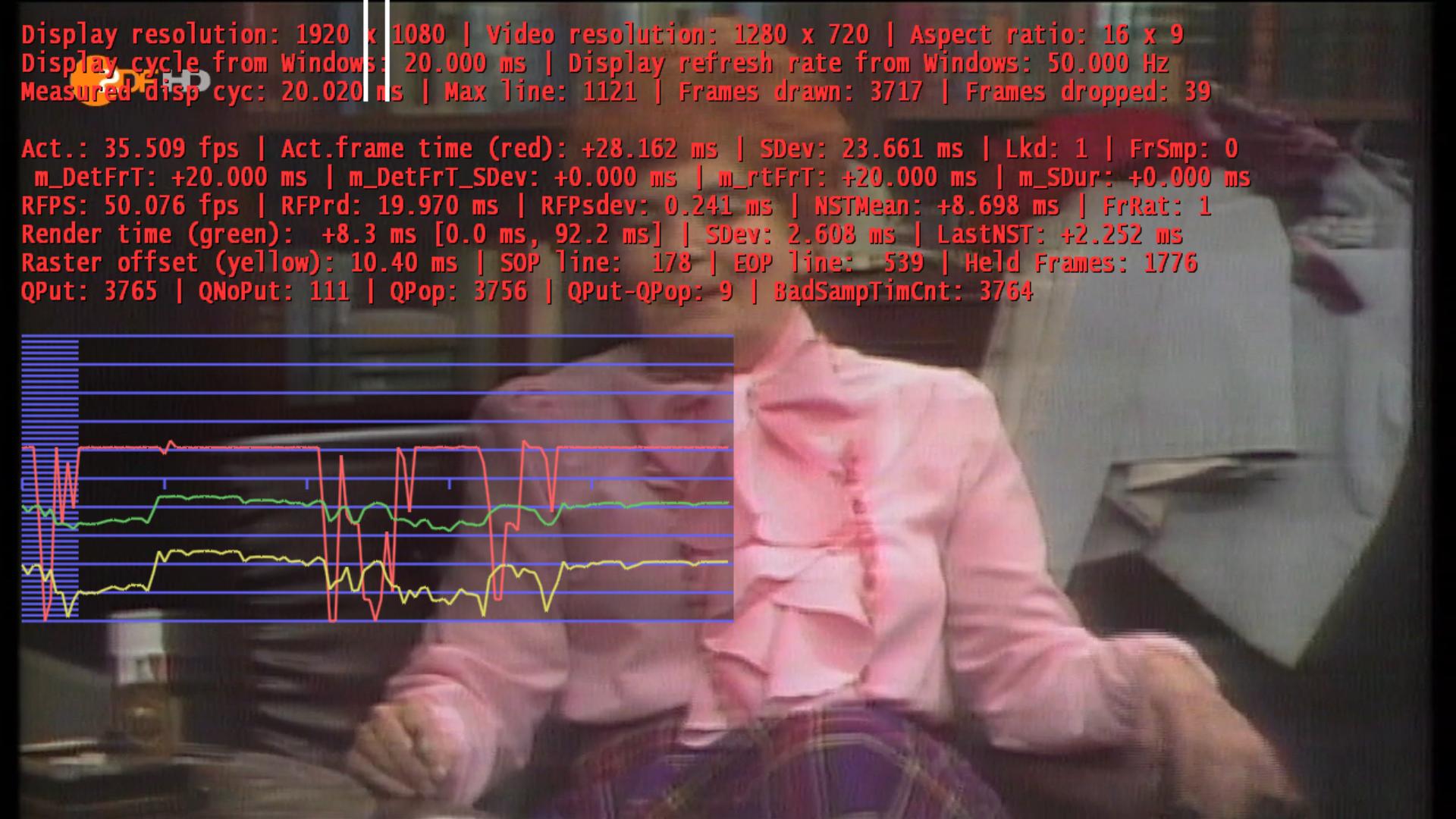
    I tested all your dll's, before I had much stuttering and judder. Now it isn't gone, but its really better. SD runs smooth HD e.g. ZDF HD (720p) stutters.:mad: I use v002 now and SD runs good.

    Screenshot attached

    You might try updating the nVidia drivers to 257.xx - some of the 197.xx drivers have known stutter problems with EVR, which have apparently been fixed in 257.xx versions (not tried them myself yet - I'm still on 195.62 on my 9500GT).

    Tony

    Hello Owlsroost,

    I updated my Driver and tested my client 1. There is the same problem, stutter and dropped frames with HD 720p. On recordings there aren't stutter or dropped frames.

    David

    My GT240 shouldn't too slow!
     

    Attachments

    • screenshot.jpg
      screenshot.jpg
      231.2 KB

    Owlsroost

    Retired Team Member
  • Premium Supporter
  • October 28, 2008
    5,539
    5,038
    Cambridge
    Home Country
    United Kingdom United Kingdom
    Re: AW: Re: AW: MP1 EVR Presenter/dshowhelper community development

    Hello Owlsroost,

    I updated my Driver and tested my client 1. There is the same problem, stutter and dropped frames with HD 720p. On recordings there aren't stutter or dropped frames.

    David

    My GT240 shouldn't too slow!

    If recordings and other video files play OK then it's nothing to do with the dshowhelper - the problem is somewhere earlier in the chain I suspect....

    Tony
     

    cecet23

    MP Donator
  • Premium Supporter
  • March 18, 2009
    137
    16
    Perugia
    Home Country
    Italy Italy
    yes... I used v002 a lot of time since rc3 (with reclock), without problem...

    OK - so the bug has been intoduced after v002.....thanks for the info.

    Tony

    Hi cecet23,

    Can you try the attached dll please ?

    I've modified the way the processing threads are paused (which was changed between v004 and v0010), in case the earlier mods are causing the crashes.

    Tony

    (and thanks to everyone for the feedback :) )


    it seems that it solves the problem....I have to try better..but it seems that it work worse than v12 and v13...can I try v19 too?
     

    Users who are viewing this thread

    Top Bottom