My Anime 2 (5 Viewers)

Lauregos

Portal Member
September 5, 2009
8
0
After a while files that had been hashed and checked against AniDB started to disappear again. I tried bert_r's solution, ie. deleting the associated entries in the DB, and tried to rehash - some new series are found everytime I do this, so hopefully all will be imported soon. :)


I've attached my MyAnime2.log, but it's ridiculously long, and I've run a few imports since the last confirmation of series not added correctly.

The first series that wasn't added correctly was Gundam SEED - it's there somewhere that something went wrong, probably.

EDIT: Hehe, seems like I didn't remove all necessary entries, since some peculiar oddities showed up: episodes of Yakitate Japan were showing up in the Gurren-Lagann movie-entry and things like that. Solved it by emptying a few more tables (as long as I didn't touch the AniDB or TVDB ones, the rehash was just a matter of seconds).

I have however found a file causing mediaportal to crash (or rather, stuck in some kind of loop, since it's hogging up all CPU and all the RAM). I'll, try to find all entries concerning it in the db and post it here, or if someone wants to take a look at the file, just PM me. :)

Aside from that, everything works now! :D
 

Raytestrak

MP Donator
  • Premium Supporter
  • April 12, 2008
    497
    21
    49
    Honselersdijk
    Home Country
    Netherlands Netherlands
    Hi Leo,

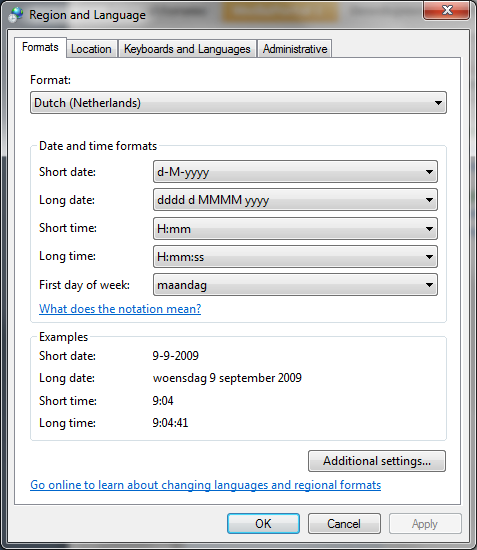
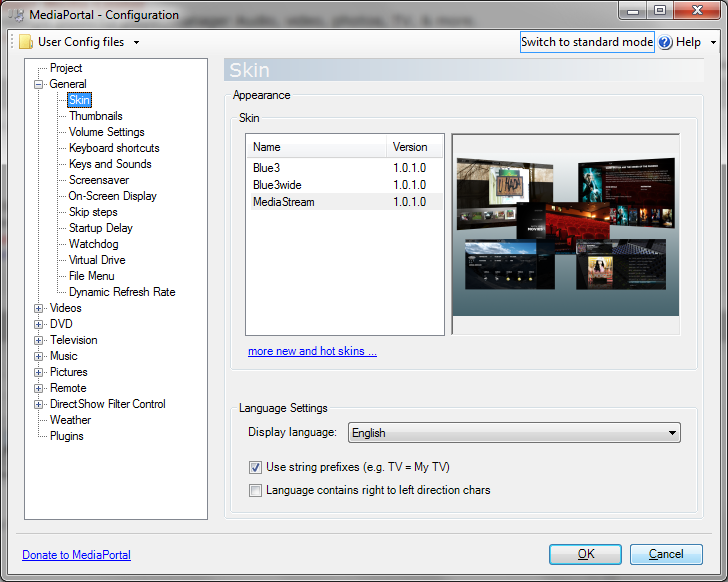
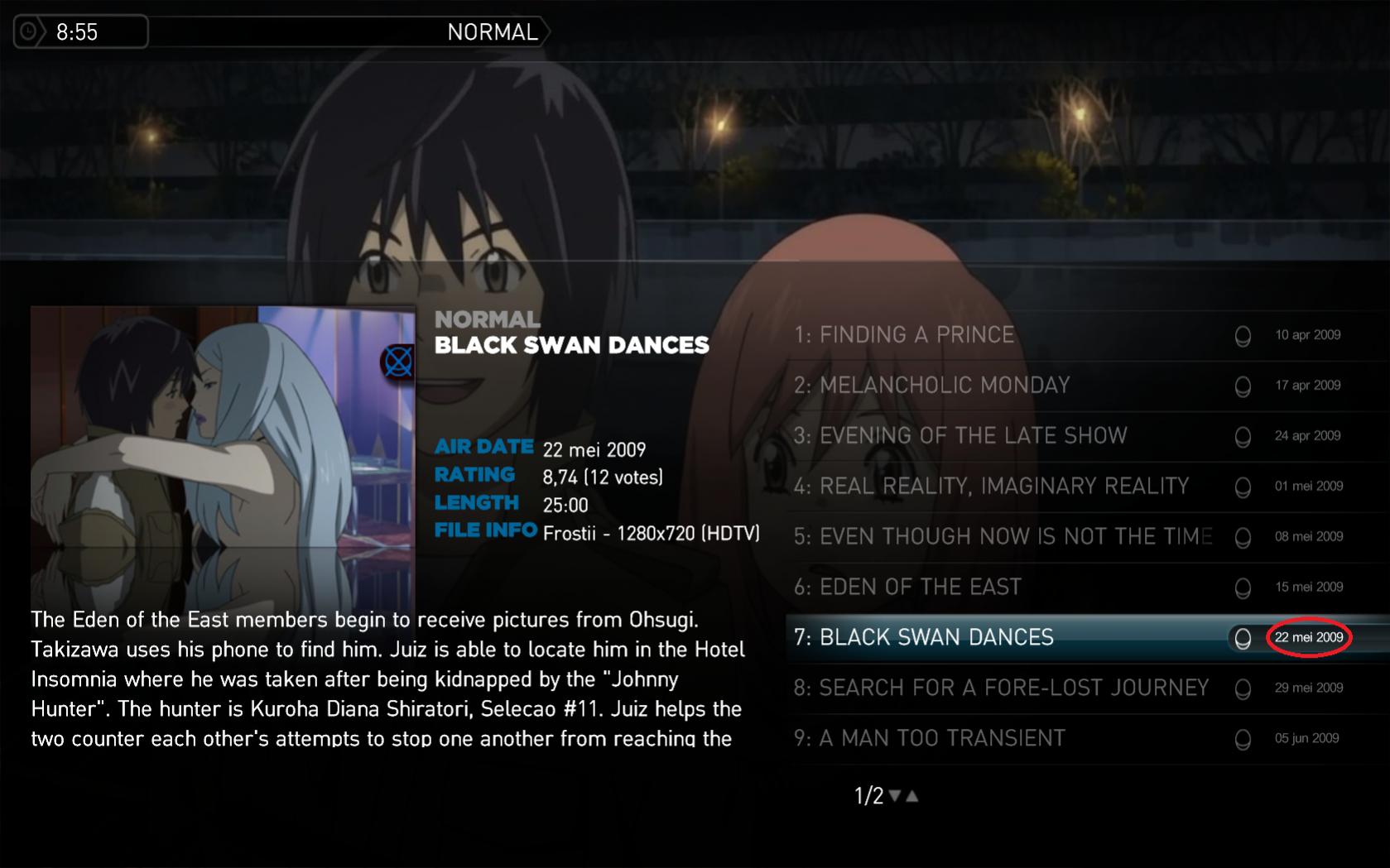
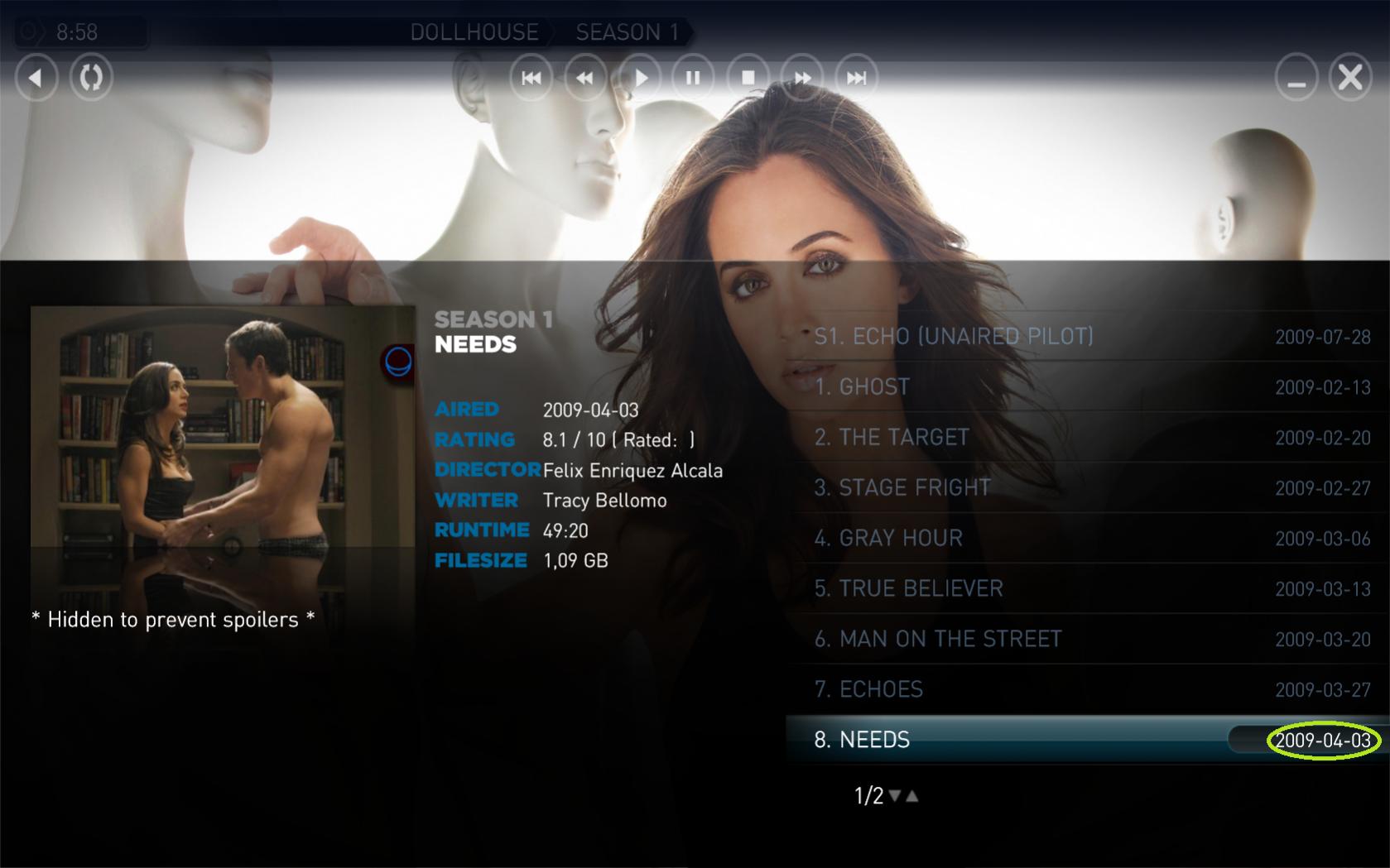
    as requested, a few screenshots for the date issue. As you can see, MediaPortal is set to english, but Anime2 uses dutch names for the months. MPTVseries uses numbers basically, so you never have the issue. (although the it could be day/month/year or month/day/year). Hope this helps.
     

    Attachments

    • WindowsDate.png
      WindowsDate.png
      46.3 KB
    • MPConfig.png
      MPConfig.png
      126.4 KB
    • MyAnimeDate.jpg
      MyAnimeDate.jpg
      147.9 KB
    • MPTVSeriesDate.jpg
      MPTVSeriesDate.jpg
      117 KB

    lwerndly

    Portal Pro
    January 14, 2008
    702
    278
    Home Country
    Australia Australia
    Release 2.0.14

    ** Installer removed - will be back with 2.0.15 **
    ZIP File

    Now available as an installer (thanks craige1).

    Advantages of the installer
    - Easier to use
    - Backs up your current database just in case there is a problem
    - Installs all the DLL's you need
    - Installs all the skin/media files automatically

    NOTE - I recommend that everyone turn back ON the option for the web service/cache. It should make the experience much better.

    FIXED: Buffer overflow problem with some messages from the AniDB API
    FIXED: Fixed empty tvdb and moviedb names from showing up on the context menu
    FIXED: Manually selecting "Check for Missing Episodes" on a group/series will now find all missing episodes even if you have a record for the last episode in the series. Solves issue where you had the last episode, but were missing previous ones
    FIXED: Bug in "Check for Missing Episodes" so that it actually works the first time and also will create local episodes when the AniDB episode is present already
    FIXED: Filmstrip now also restores the last selected item correctly
    FIXED: Smarter checking for user's internet connection and ignoring IPv6 network connections for Vista/Windows 7 users.
    FIXED: Force an API logout when the user closes MediaPortal, should fix many problems with sessions to AniDB
    FIXED: Bug that prevented episode data being downloaded in some scenarios
    FIXED: When getting episode info for the Missing Episodes functionality it now checks the database first to prevent unnecessary API calls
    FIXED: Run Import now checks to make sure that any image files from AniDB actually exist on your system and re-downloads them if needed ( Issue #77 )
    CHANGED: Re-arranged group menus so that Search TvDB/MovieD, AniDB and TvDB menus are now moved to a Databases sub-menu
    CHANGED: Web Service is now known as Web Cache
    CHANGED: Restoration of Web Cache
    CHANGED: admin screen so that groups without a TvDB association also takes into account MovieDB associations
    CHANGED: Web Cache now gets data using the same queue as AniDB to make sure data is retrieved in the right order
    ADDED: View how a series is related to other series, and navigate between them (prequels/sequels etc). Available under the "Series Info/Related Series" menu ( Issue #59 )
    ADDED: Can now move all episodes from one series to another by right clicking in the Manager tab on the Config screen.
    ADDED: View/edit whether a group is a favorite from the config screen
    ADDED: New group menu to allow deletion of group and any child series/episodes (Under the Edit Group sub-menu). "Change sort name" option also moved to this sub menu
    ADDED: Add ability to remove TVDB association from an anime ( Issue #70 )
    ADDED: Extra system info to start of log (OS version, Screen size and skin)
    ADDED: 'Find' is now also possible in filmstrip and banner view
    ADDED: Added text mode for 'find' function (toggle with ctrl+M)
    ADDED: Find mode and start word option is remebered on restart
    ADDED: New 'Calendar' window available from main menu. Shows series by month based on your current collection, as well as the the next 25 series to be released in the future.
    ADDED: Option to automatically update calendar once a day, and option to hide Restricted (R18) series
    ADDED: the ability to remove a MovieDB association from a group/series
    ADDED: User can now specify their own custom folder for the location of images and location of database ( Issue #52 )

    13_Calendar.jpg12_RelatedSeries.jpg
     

    marvenius

    Portal Pro
    September 3, 2008
    523
    47
    Belgium
    Home Country
    Netherlands Netherlands
    Thanks for the new release! Just did an install (using installer) on my other system. Since there is no anime present I did not configure the plugin (no anidb account, nor folder entry). Starting MP and selecting the plugin lead to a black screen in MP followed by a crash of MP (twice...) :)
    Snippet of the mediaportal.log:
    Code:
    2009-09-09 13:04:34.322080 [Info.][MPMain]: Exception   :System.NullReferenceException: Object reference not set to an instance of an object.
       at MyAnimePlugin2.MainWindow.hook_KeyUp(Object sender, KeyEventArgsEx e)
       at MyAnimePlugin2.KeyboardHook.OnHookInvoked(Object sender, HookEventArgs e)
       at MediaPortal.Hooks.Hook.OnHookInvoked(HookEventArgs e)
       at MediaPortal.Hooks.Hook.InternalHookDelegate(Int32 code, Int32 wParam, IntPtr lParam)
       at MediaPortal.Util.Win32API.PeekMessage(MSG& msg, IntPtr hwnd, Int32 msgMin, Int32 msgMax, Int32 remove)
       at MediaPortal.D3DApp.Application_Idle(Object sender, EventArgs e)
       at System.Windows.Forms.Application.ThreadContext.System.Windows.Forms.UnsafeNativeMethods.IMsoComponent.FDoIdle(Int32 grfidlef)
       at System.Windows.Forms.Application.ComponentManager.System.Windows.Forms.UnsafeNativeMethods.IMsoComponentManager.FPushMessageLoop(Int32 dwComponentID, Int32 reason, Int32 pvLoopData)
       at System.Windows.Forms.Application.ThreadContext.RunMessageLoopInner(Int32 reason, ApplicationContext context)
       at System.Windows.Forms.Application.ThreadContext.RunMessageLoop(Int32 reason, ApplicationContext context)
       at System.Windows.Forms.Application.Run(Form mainForm)
       at MediaPortalApp.Main(String[] args)
    2009-09-09 13:04:34.337705 [Info.][MPMain]: Exception   :Object reference not set to an instance of an object.
    2009-09-09 13:04:34.337705 [Info.][MPMain]:   site      :Void hook_KeyUp(System.Object, MyAnimePlugin2.KeyEventArgsEx)
    2009-09-09 13:04:34.337705 [Info.][MPMain]:   source    :Anime2
    2009-09-09 13:04:34.337705 [Info.][MPMain]:   stacktrace:   at MyAnimePlugin2.MainWindow.hook_KeyUp(Object sender, KeyEventArgsEx e)
       at MyAnimePlugin2.KeyboardHook.OnHookInvoked(Object sender, HookEventArgs e)
       at MediaPortal.Hooks.Hook.OnHookInvoked(HookEventArgs e)
       at MediaPortal.Hooks.Hook.InternalHookDelegate(Int32 code, Int32 wParam, IntPtr lParam)
       at MediaPortal.Util.Win32API.PeekMessage(MSG& msg, IntPtr hwnd, Int32 msgMin, Int32 msgMax, Int32 remove)
       at MediaPortal.D3DApp.Application_Idle(Object sender, EventArgs e)
       at System.Windows.Forms.Application.ThreadContext.System.Windows.Forms.UnsafeNativeMethods.IMsoComponent.FDoIdle(Int32 grfidlef)
       at System.Windows.Forms.Application.ComponentManager.System.Windows.Forms.UnsafeNativeMethods.IMsoComponentManager.FPushMessageLoop(Int32 dwComponentID, Int32 reason, Int32 pvLoopData)
       at System.Windows.Forms.Application.ThreadContext.RunMessageLoopInner(Int32 reason, ApplicationContext context)
       at System.Windows.Forms.Application.ThreadContext.RunMessageLoop(Int32 reason, ApplicationContext context)
       at System.Windows.Forms.Application.Run(Form mainForm)
       at MediaPortalApp.Main(String[] args)
    2009-09-09 13:04:34.337705 [Info.][MPMain]: MediaPortal stopped due to an exception Object reference not set to an instance of an object. Anime2    at MyAnimePlugin2.MainWindow.hook_KeyUp(Object sender, KeyEventArgsEx e)
       at MyAnimePlugin2.KeyboardHook.OnHookInvoked(Object sender, HookEventArgs e)
       at MediaPortal.Hooks.Hook.OnHookInvoked(HookEventArgs e)
       at MediaPortal.Hooks.Hook.InternalHookDelegate(Int32 code, Int32 wParam, IntPtr lParam)
       at MediaPortal.Util.Win32API.PeekMessage(MSG& msg, IntPtr hwnd, Int32 msgMin, Int32 msgMax, Int32 remove)
       at MediaPortal.D3DApp.Application_Idle(Object sender, EventArgs e)
       at System.Windows.Forms.Application.ThreadContext.System.Windows.Forms.UnsafeNativeMethods.IMsoComponent.FDoIdle(Int32 grfidlef)
       at System.Windows.Forms.Application.ComponentManager.System.Windows.Forms.UnsafeNativeMethods.IMsoComponentManager.FPushMessageLoop(Int32 dwComponentID, Int32 reason, Int32 pvLoopData)
       at System.Windows.Forms.Application.ThreadContext.RunMessageLoopInner(Int32 reason, ApplicationContext context)
       at System.Windows.Forms.Application.ThreadContext.RunMessageLoop(Int32 reason, ApplicationContext context)
       at System.Windows.Forms.Application.Run(Form mainForm)
       at MediaPortalApp.Main(String[] args)
    2009-09-09 13:04:34.353330 [Debug][MPMain]: Main: SaveLastActiveModule - enabled False
    2009-09-09 13:04:34.353330 [Info.][MPMain]: Main: Exiting
    2009-09-09 13:04:34.384580 [Info.][MPMain]:   PlugInManager.Stop()
    2009-09-09 13:04:34.384580 [Info.][MPMain]: PluginManager: stopping MediaPortal.Audioscrobbler.AudioscrobblerPlugin
    2009-09-09 13:04:34.400205 [Info.][MPMain]: PluginManager: stopping MediaPortal.ProcessPlugins.MusicDBReorg.MusicDBReorg
    2009-09-09 13:04:34.400205 [Info.][MPMain]: MusicDBReorg: stopped
    2009-09-09 13:04:34.400205 [Info.][MPMain]:   fonts.Dispose()
    2009-09-09 13:04:34.400205 [Debug][MPMain]: TextureManager: Dispose()
    2009-09-09 13:04:34.400205 [Info.][MPMain]: TexturePacker:Dispose()
    2009-09-09 13:04:34.400205 [Debug][MPMain]: Windowmanager: closing current window
    2009-09-09 13:04:34.400205 [Debug][MPMain]: Window: MyAnimePlugin2.MainWindow deinit
    2009-09-09 13:04:34.400205 [Debug][MPMain]: TextureManager: CleanupThumbs()
    2009-09-09 13:04:34.650203 [Debug][2]: FastImage: Cleaning up GDI+ before shutting down
    2009-09-09 13:04:34.650203 [Info.][2]: SQLiteClient: Closing database: VideoDatabaseV5.db3
    2009-09-09 13:04:34.650203 [Info.][2]: SQLiteClient: Closing database: TVSeriesDatabase4.db3
    2009-09-09 13:04:34.650203 [Info.][2]: SQLiteClient: Closing database: movingpictures.db3
    2009-09-09 13:04:34.650203 [Info.][2]: SQLiteClient: Closing database: AnimeDatabaseV20.db3
    2009-09-09 13:04:34.650203 [Info.][2]: SQLiteClient: Closing database: MusicDatabaseV11.db3
    When wanted, I will reproduce with a clean log.
    (and yes, I know that not configuring the plugin is a very unwanted situation, it just could happen to someone else as well. "Oh, will do that later, first watch a movie....")
     

    lwerndly

    Portal Pro
    January 14, 2008
    702
    278
    Home Country
    Australia Australia
    Thanks for the new release! Just did an install (using installer) on my other system. Since there is no anime present I did not configure the plugin (no anidb account, nor folder entry). Starting MP and selecting the plugin lead to a black screen in MP followed by a crash of MP (twice...) :)

    When wanted, I will reproduce with a clean log.
    (and yes, I know that not configuring the plugin is a very unwanted situation, it just could happen to someone else as well. "Oh, will do that later, first watch a movie....")

    Wow that didn't take long :)

    We'll have a patch tomorrow, with any other serious bugs that others find as well
     

    marvenius

    Portal Pro
    September 3, 2008
    523
    47
    Belgium
    Home Country
    Netherlands Netherlands
    Hang on... Also found out that the skin files were not copied in the Blue3 (nor Blue3Wide) skin directory....
    Selected those 2 in the installer.
    Will check when using the zip and copy them in manually...

    Edit: Just did that and no more crash. Just an empty Anime screen in Blue3 :)
    Edit2: skin files were actually installed but in C:\Program Files\...\MediaPortal\skins\Blue3 and Blue3wide.
    Using MP 1.1.0 on this system location has (obviously) changed to c:\Documents and Settings\..\MediaPortal\skins
     

    Ifrit30

    Portal Member
    September 3, 2009
    32
    0
    Home Country
    Germany Germany
    thanks for the new version!
    But still, I can't login.

    And btw. how are the episodes supposed to look?
    I've made it so: Series S01 E01
    like MPTVSeries.
     

    linkinstg

    Portal Member
    September 7, 2009
    8
    0
    Home Country
    thanks for the pluging, i still cant login to, i tried anything but i cant login to anidb, i tried change the client port (4566 and 4555) and nothing, i tried change the web service cache (anime.hobbydb.net and myanime.dyndns.org) and same thing, i cant download data from anidb :(
     

    bert_r

    Portal Pro
    April 7, 2009
    110
    16
    Home Country
    Belgium Belgium
    Hi Leo,

    as requested, a few screenshots for the date issue. As you can see, MediaPortal is set to english, but Anime2 uses dutch names for the months. MPTVseries uses numbers basically, so you never have the issue. (although the it could be day/month/year or month/day/year). Hope this helps.

    Thanks, this helped indeed. I fixed this issue in the next release.

    thanks for the new version!
    But still, I can't login.

    And btw. how are the episodes supposed to look?
    I've made it so: Series S01 E01
    like MPTVSeries.

    Could you post your MyAnime2.log file here, so we can find the problem with logging in?

    Episode names are completely irrelevant (apart from the extension). The plugin will hash the file and use this hash to search for the file on AniDB. This means that files which are not on AniDB (like self-encoded files) will not be recognized.

    thanks for the pluging, i still cant login to, i tried anything but i cant login to anidb, i tried change the client port (4566 and 4555) and nothing, i tried change the web service cache (anime.hobbydb.net and myanime.dyndns.org) and same thing, i cant download data from anidb :(

    Same as above: Could you post your MyAnime2.log file here?
     

    Users who are viewing this thread

    Top Bottom