
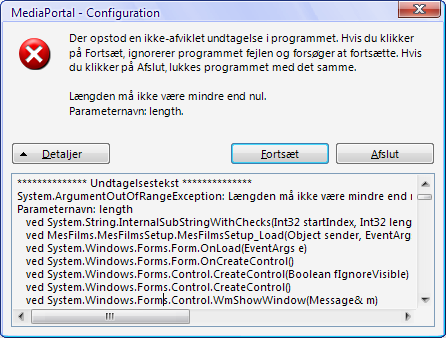
My Films 4.8.0c crashes Config (1 Viewer)
- Thread starter pilehave
- Start date

 Denmark



Users who are viewing this thread
Similar threads

i think info but I'm really not sure
i think info but I'm really not sure
When I import new films using Moving Pictures, it takes an incredibly long time for the information to be found and downloaded...


I switched back to MePo 1 some time ago, and havent really used it that much.
But i wanted to watch some old movies stored as ISO file.
Virtuel Clone drive is installed, and it can mount the ISO file.
However when i try to select it from MePo i only get an error that i cannot mount it.
[2026-06-07 14:56:35,994] [Error ] [MPMain ]...
I switched back to MePo 1 some time ago, and havent really used it that much.
But i wanted to watch some old movies stored as ISO...
I switched back to MePo 1 some time ago, and havent really used it that much.
But i wanted to watch some old movies stored as ISO...

updated both --> works!
Thanks!
updated both --> works!
Thanks!
this window opens and closes after some seconds when I try to "Authorize Application":
It does not create a Usercode.
Also...

Maybe the server is/was too busy when you tried to authenticate.
I occasionally run into that too, also with the opensubtitles api I regularly get 429's... there isn't much that can be done about it, except making sure the software isn't hammering the service and having patience...
Maybe the server is/was too busy when you tried to authenticate.
I occasionally run into that too, also with the opensubtitles api...
Hello,
Hello, when I try to authorize trakt configuration for mediaportal using the trakt plugin, I get the following error...
Just tried to install it from the extension manger, and the it works like a charm ...
Just tried to install it from the extension manger, and the it works like a charm ...
I just had to reinstall my MePo due to windows 11 upgrade.
And since i was told MePo 2 is not being maintaind, i thought well lets...