
My Films 5 - AMC Updater (1 Viewer)

Status
Not open for further replies.

z3us

Portal Pro
December 4, 2007
1,047
123
46
Home Country
Spain Spain
Re: AW: Re: MyFilms 5 - AMC Updater

Thanks, now works

Can you give me the steps you did - then I can debug (and fix) this case.
I cant remember. I play with config lot of times
 

z3us

Portal Pro
December 4, 2007
1,047
123
46
Home Country
Spain Spain
Re: MyFilms 5 - AMC Updater

Another thing (number 9999999999 lol).
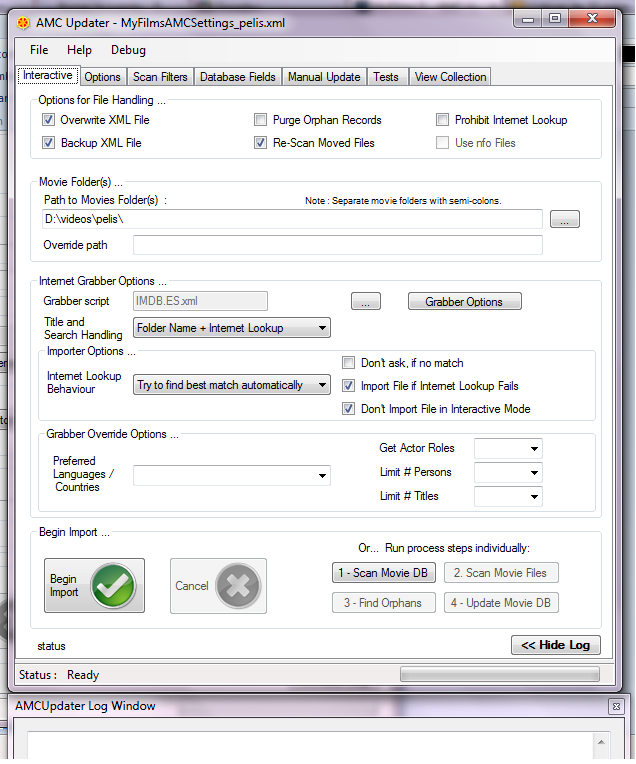
When I open AMCu, the log window is always attached at the bottom of the main amcu window and I cant see anything of the log Why?
 

Attachments

  • mf.png
    mf.png
    116.5 KB

Dadeo

Docs Group Manager
  • Premium Supporter
  • November 26, 2006
    5,340
    3,321
    Himalayas, India
    Home Country
    Canada Canada
    Re: MyFilms 5 - AMC Updater

    Hi z3us - I assume you realize you can move the window wherever you want? Just shift the whole window up, it should save your window position. You can also resize both the main and log windows, which is especially helpful in the View Collection Tab to see more of the movie list.

    You can also 'undock' the log window now and move it where you like and resize it.

    However, I think you are correct there is still an issue! To reproduce:
    1. Move the log window up beside the main window and resize (or not)
    2. Move the main window
    3. the log window jumps back to the bottom but preserves the size. So if you made it longer you cannot see much of it!
     

    z3us

    Portal Pro
    December 4, 2007
    1,047
    123
    46
    Home Country
    Spain Spain
    Re: MyFilms 5 - AMC Updater

    I know I can move the log window. What I say is that it is always in that position when I open amcu
     

    Dadeo

    Docs Group Manager
  • Premium Supporter
  • November 26, 2006
    5,340
    3,321
    Himalayas, India
    Home Country
    Canada Canada
    Re: MyFilms 5 - AMC Updater

    z3us you're right. I managed to save it in new position before, but now I can't - every time log window reverts to bottom and original size. So I am not sure what I did before. :confused:
     

    Guzzi

    Retired Team Member
  • Premium Supporter
  • August 20, 2007
    2,159
    750
    AW: Re: MyFilms 5 - AMC Updater

    z3us you're right. I managed to save it in new position before, but now I can't - every time log window reverts to bottom and original size. So I am not sure what I did before. :confused:
    Only the main window saves the position and size - not the log window.
     

    z3us

    Portal Pro
    December 4, 2007
    1,047
    123
    46
    Home Country
    Spain Spain
    z3us you're right. I managed to save it in new position before, but now I can't - every time log window reverts to bottom and original size. So I am not sure what I did before. :confused:
    Only the main window saves the position and size - not the log window.

    Yes, the log doesn't.
    When I open amcu, its always at the bottom, and I have to move and resize it.
    Enviado desde mi GT-I9000 usando Tapatalk
     

    Guzzi

    Retired Team Member
  • Premium Supporter
  • August 20, 2007
    2,159
    750
    AW: MyFilms 5 - AMC Updater

    z3us you're right. I managed to save it in new position before, but now I can't - every time log window reverts to bottom and original size. So I am not sure what I did before. :confused:
    Only the main window saves the position and size - not the log window.

    Yes, the log doesn't.
    When I open amcu, its always at the bottom, and I have to move and resize it.
    Enviado desde mi GT-I9000 usando Tapatalk
    I added log window size and position to the settings to be saved - so in next version it would recall the settings on app restart.
     

    Guzzi

    Retired Team Member
  • Premium Supporter
  • August 20, 2007
    2,159
    750
    AW: Re: AW: Re: MyFilms 5 - AMC Updater

    2 more things about manual update tab:
    - If u select operation "update record", cant continue updating: the "test params" button is always disabled
    I can't reproduce this - if I select it AND select the rules for the record selection, tzhe test button gets active here. I need more detailed info how to reproduce.
    Sometimes works and sometimes no.
    While doing further testings here, I found the root cause:
    This happens, if the grabber script you configured is not valid.
    The indicator for that (red marker) was not visible - I fixed that - so it is now more obvious and gives error message in popup for this case.
     

    z3us

    Portal Pro
    December 4, 2007
    1,047
    123
    46
    Home Country
    Spain Spain
    I will perform the update launching AMCu with a external shortcut.
    Is it still possible to launch AMCu in batch mode? what format should I use? I cant find anything in the wiki

    Sorry to repeat, but I didn't get any answer to this
    Thanks

    Enviado desde mi GT-I9000 usando Tapatalk
     
    Status
    Not open for further replies.

    Users who are viewing this thread

    Top Bottom