Canada
MediaPortal Version: 1.2.1 Release
MediaPortal Skin: StreamedMP/Amped
Windows Version: Win7 32bit
CPU Type: AMD Phenom II X6 1090T 3.20 GHz
HDD: 75GB WD, 1TB Hitachi, 2TB WD (all sata)
Memory: 4GB
Motherboard: ASUS M4a78
Video Card: ATI Radeon HD 3300 Graphics
Video Card Driver: ATI Catalyist 2009.0614.2131.36800
Sound Card: onboard
Sound Card AC3:
Sound Card Driver:
1. TV Card: Hauupage PVR-150-MCE
1. TV Card Type: analog
1. TV Card Driver:
2. TV Card: Hauupage PVR-150-MCE
2. TV Card Type: analog
2. TV Card Driver:
3. TV Card:
3. TV Card Type:
3. TV Card Driver:
4. TV Card:
4. TV Card Type:
4. TV Card Driver:
MPEG2 Video Codec:
MPEG2 Audio Codec:
h.264 Video Codec:
Satelite/CableTV Provider: Bell ExpressVU
HTPC Case:
Cooling:
Power Supply:
Remote: Microsoft MCE Remote
TV: 26" no-name LCD
TV - HTPC Connection: HDMI
I'm wondering why my TV Server records the show I want, and the show immediately after it?
For instance, tonight...
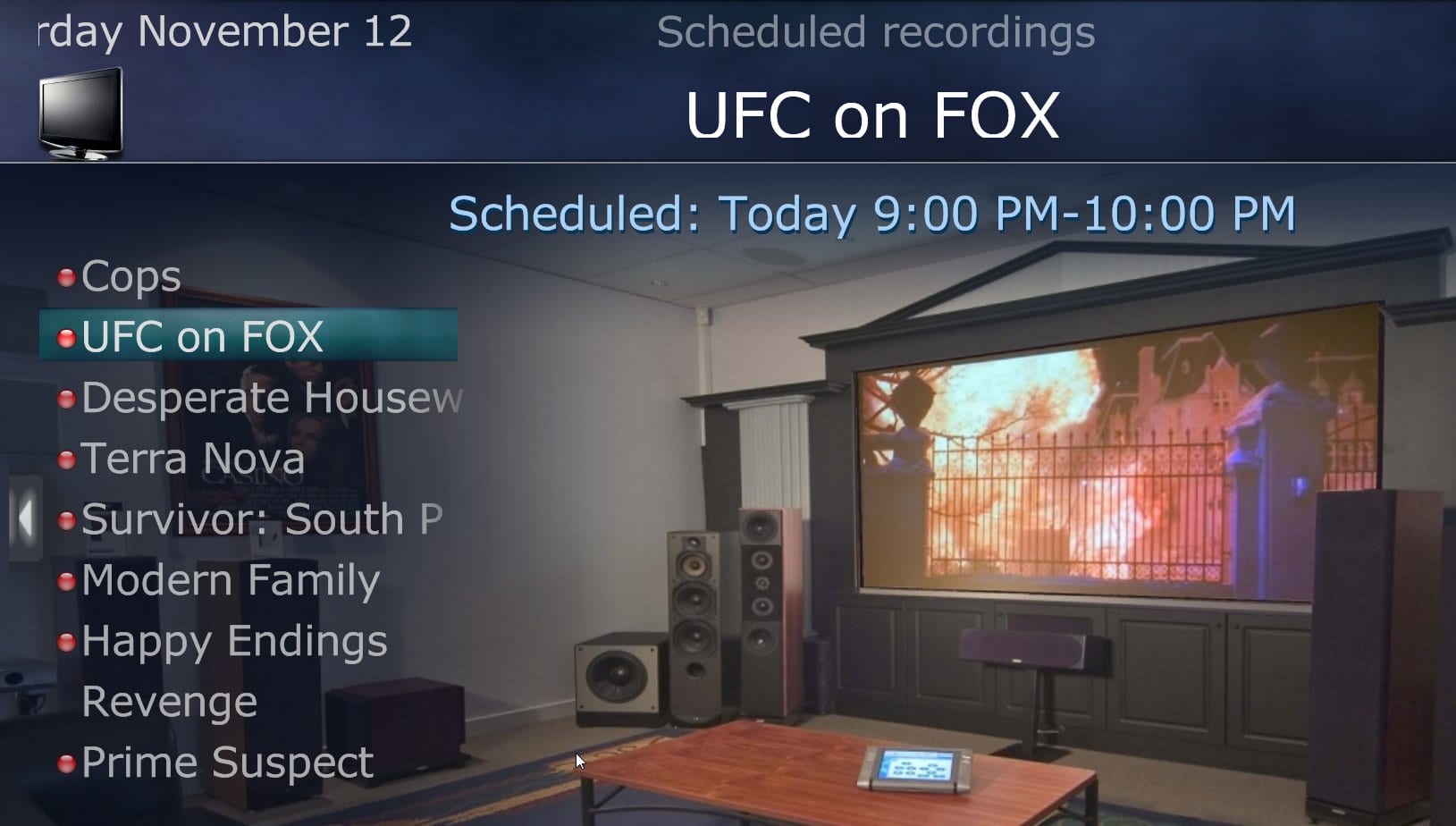
Grey's Anatomy is scheduled to record 9-10pm. I have my global configuration set up to start 1 minute early and end 1 minute late.
When you look at the TV Guide (or Upcoming Recordings) you see Grey's Anatomy and the next show after it highlighted in red. That means it records for TWO hours instead of 62 minutes.
This happens with other scheduled shows too. Modern Family, which is only 30 minutes, records the 30 minute show after it too, giving me a longer file than I need.
When you go back to Recorded TV to view these shows, you only see the title of the program you recorded. When you play it back, it will continue on to the next show.
What is with that? It's annoying to say the least.
MediaPortal Skin: StreamedMP/Amped
Windows Version: Win7 32bit
CPU Type: AMD Phenom II X6 1090T 3.20 GHz
HDD: 75GB WD, 1TB Hitachi, 2TB WD (all sata)
Memory: 4GB
Motherboard: ASUS M4a78
Video Card: ATI Radeon HD 3300 Graphics
Video Card Driver: ATI Catalyist 2009.0614.2131.36800
Sound Card: onboard
Sound Card AC3:
Sound Card Driver:
1. TV Card: Hauupage PVR-150-MCE
1. TV Card Type: analog
1. TV Card Driver:
2. TV Card: Hauupage PVR-150-MCE
2. TV Card Type: analog
2. TV Card Driver:
3. TV Card:
3. TV Card Type:
3. TV Card Driver:
4. TV Card:
4. TV Card Type:
4. TV Card Driver:
MPEG2 Video Codec:
MPEG2 Audio Codec:
h.264 Video Codec:
Satelite/CableTV Provider: Bell ExpressVU
HTPC Case:
Cooling:
Power Supply:
Remote: Microsoft MCE Remote
TV: 26" no-name LCD
TV - HTPC Connection: HDMI
I'm wondering why my TV Server records the show I want, and the show immediately after it?
For instance, tonight...
Grey's Anatomy is scheduled to record 9-10pm. I have my global configuration set up to start 1 minute early and end 1 minute late.
When you look at the TV Guide (or Upcoming Recordings) you see Grey's Anatomy and the next show after it highlighted in red. That means it records for TWO hours instead of 62 minutes.
This happens with other scheduled shows too. Modern Family, which is only 30 minutes, records the 30 minute show after it too, giving me a longer file than I need.
When you go back to Recorded TV to view these shows, you only see the title of the program you recorded. When you play it back, it will continue on to the next show.
What is with that? It's annoying to say the least.