Network speed problems (2 Viewers)

porky996t

MP Donator
  • Premium Supporter
  • May 21, 2008
    1,016
    81
    Bolton, Lancashire, England
    Home Country
    England England
    Hi Guys,

    Probably posted in wrong section, but here goes....I use a fixed wire network for server and all clients and it runs at 1Gb - problem is the server is only running at 100mbps. Whilst the setup is working fine and streaming well, I just cannot get the server to work at 1Gb.

    The server is using the onboard LAN - the mobo is an ASUS M5A99X EVO with Win7, this is running into a Cisco SG200 SmartSwitch with the Cisco router reporting the speed to be 100Mbps.

    Any ideas to get the speed up?

    Thanks in advance
     

    ChrisOfCatford

    MP Donator
  • Premium Supporter
  • August 2, 2006
    210
    6
    London UK
    Home Country
    United Kingdom United Kingdom
    Have you checked your cabling? 1 Gb lan is fussier than 10/100.
    Have you tried a separate LAN card? They are so cheap now, may be worth a try.
    Chris
     

    breese

    Retired Team Member
  • Premium Supporter
  • July 11, 2011
    3,902
    770
    67
    Arlington Heights, Illinois
    Home Country
    United States of America United States of America
    Porkey,
    Open a command prompt and do
    ipconfig /all
    It should show you the speed and Duplex
    Is the network actually at 100MB or is it at 1000MB
    If it is 100M, does the on-board have dual nic's? Some motherboards have a 1G and a 100M set of ports.


    I also see you mention a separate Cisco Router. If this is your internet connection (DSLL, whatever) most are only 100M to the net so it is going to report 100M connection.

    Now the question is, is the server talking at 1G and the Router is actually only able to do 100M?
     

    porky996t

    MP Donator
  • Premium Supporter
  • May 21, 2008
    1,016
    81
    Bolton, Lancashire, England
    Home Country
    England England
    Thanks for the replies Chris and breese...

    The network is actually 1000Mb - this is what the router and clients report back.

    The Cisco router runs the server/client (whole house) network and is connected into a Billion wireless ADSL router for the wifi/adsl connection - the Billion router is only 100Mbps.

    I did the ipconfig/all and it showed the various addresses, but no indication of speed and duplex.

    I thought that with the mobo being a recent one, it would have a reasonable LAN port built in.

    Hmmmm... I'll change the server > router cable and then try playing with various LAN adapter properties to see if I can get this thing to work.
     

    jonm

    Portal Pro
    January 12, 2009
    429
    26
    Wales
    Home Country
    Wales Wales
    An ASUS mobo will almost certainly have a realtek Gbit lan port on it, I've never had much luck with them, I tend to stick an Intel card in and use that instead.
    Check in Control Panel | Network and Internet | Network connections, then right click your adapter then properties then configure, under advanced look for link speed and duplex, if it's set to auto neg try setting it to 1000 Full, if it then fails to connect at all, you can suspect your cabling.
     

    breese

    Retired Team Member
  • Premium Supporter
  • July 11, 2011
    3,902
    770
    67
    Arlington Heights, Illinois
    Home Country
    United States of America United States of America
    sorry, my fault.
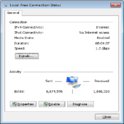
    Right click on Network and click on properties.
    Click on Change Adapter Settings
    Double click on the network adapter in your server
    You should get a screen like this.
    LocalAreaConnecton.jpg

    This will tell you what speed the server is connected to your local area network
     

    porky996t

    MP Donator
  • Premium Supporter
  • May 21, 2008
    1,016
    81
    Bolton, Lancashire, England
    Home Country
    England England
    Hi Guys,

    Thanks for the added input and @jonm your experience of Realtek Gbit LAN ports. (This is what is on the mobo)

    The adapter is set to 1Gb but is only working at 100mbps - tired a different cable, still at 100mbps.

    I think I will bite the bullet and go with one of these >>here<<
     

    jonm

    Portal Pro
    January 12, 2009
    429
    26
    Wales
    Home Country
    Wales Wales
    It might be worth trying another port on your switch if you have one free, could be a dodgy port maybe, I had a similar problem with a Netgear switch last year, a couple of its ports just wouldn't connect to anything at Gbit speed.
     

    breese

    Retired Team Member
  • Premium Supporter
  • July 11, 2011
    3,902
    770
    67
    Arlington Heights, Illinois
    Home Country
    United States of America United States of America
    My new server is an Asus M5A88-V EVO with the Realtek Gbit Network port.
    I went to the Asus site and grabbed the latest available drivers when I built mine and have not had an issue.
    Verify what drivers (MS or Realtek) are being used.
    MS likes to override drivers....
     

    porky996t

    MP Donator
  • Premium Supporter
  • May 21, 2008
    1,016
    81
    Bolton, Lancashire, England
    Home Country
    England England
    Thanks Guys... I'll try the new drivers and spare port.

    Top Tip - Don't install new Ethernet Drivers whilst accessing the server via Remote Desktop Connection! :oops::oops::oops:

    Let me go and get a spare keyboard and monitor, attach them to the server and then I can report back!

    EDIT - Different port and upgraded drivers and still at 100Mbps :( I'll await the new LAN card.
     
    Last edited:

    Users who are viewing this thread

    Top Bottom