[NEW] MyFilms v4.7.9a (1 Viewer)

zebons

Portal Pro
January 2, 2006
1,484
114
I hink you arent understanding me because my poor english.
With a example:

I have a subfolder called "Bourne" in my main films folder, with three files inside: Bourne identity.avi, Bourne supremacy.avi, Bourne ultimatum.avi


- After importing from internet, AMCupdater will write as translated titles: "Bourne\el caso bourne", "bourne\el mito de Bourne", "bourne\el ultimatum de Bourne". So the hierarchy "Bourne" group is automatically stablished

- With Myfilms, the translated titles will be: "el caso Bourne", "el mito de Bourne", "el ultimatum de Bourne", and we will have three ungrouped entries.

Im requesting for MyFilms the option of working like AMCu so that it would write the subfolder as group with the translated or original title (I suppose it depends of the field chose as master in the MF config)
Can you attach an xml example database ?

- Prueba.xml is the xml generated by AMC updater after importing from internet
- Prueba2.xml is the file generated by MyFilms after importing from internet.

Both of them use the same script and the same movies folder, with a subfoldercontaining the three Bourne films. Look at the "translated films"
MyFilms has 2 methods to update Movie Information thru Internet : single movie update or the whole database update. What kind of update are you talking about ?
 

z3us

Portal Pro
December 4, 2007
1,047
123
46
Home Country
Spain Spain
As long as I know, the whole database update (located in the "change view menu" dont import info from internet, only adds to the database new films found in the Hard Disk, Am I true?
I was talking about the single movie update (located in the update option in the detailed movie screen)
 

bounguine

Portal Pro
November 7, 2005
233
15
52
St.Petersburg
Home Country
Russian Federation Russian Federation
I have almost 2K of movies and series, that's why if I open the plugin with the movies view, it takes quite a long time to fill the page with all my movies.
So to escape this I chose "Category" as a "Default view" and checked "Display Always that view when using the config" in "Optional 1".

It works like this:
entering the plugin > chosing one of the genres > choosing one of the movies in that genre > description of the movie > watching.

But when I go back to the main menu using ESC from the description page, the page with all movies opens and MP hands for a while.
Can you do something to prevent opening all the movies.

PS
In the last release "Default view" option isn't working for me.
I see only a blank page
 

arryo

Portal Pro
July 12, 2008
162
4
Hi,

Could you tell me how to enable Fanart. Should I put all the pictures in one folder and name the files according to movie title or should i put the picture in each individual movie folder. I tried to put every pictures in one folder but somehow it didn;t work

Thanks
 

zebons

Portal Pro
January 2, 2006
1,484
114
I have almost 2K of movies and series, that's why if I open the plugin with the movies view, it takes quite a long time to fill the page with all my movies.
So to escape this I chose "Category" as a "Default view" and checked "Display Always that view when using the config" in "Optional 1".

It works like this:
entering the plugin > chosing one of the genres > choosing one of the movies in that genre > description of the movie > watching.

But when I go back to the main menu using ESC from the description page, the page with all movies opens and MP hands for a while.
Can you do something to prevent opening all the movies.

PS
In the last release "Default view" option isn't working for me.
I see only a blank page
When you use ESC from the detail screen, you'd return on the category list previously choosen, another ESC on the Category selectio and only after ESC loading all the movies.. don't it ?
Instead ESC, use the H key and you'll escape MyFilms directly without return on all movies...
You also can use the multiple configuration on the same database by selecting movies and when you enter in MyFilms plugin, if you haven't define a default config, a menu'll be displayed to choose the right config...
 

bounguine

Portal Pro
November 7, 2005
233
15
52
St.Petersburg
Home Country
Russian Federation Russian Federation
When you use ESC from the detail screen, you'd return on the category list previously choosen, another ESC on the Category selectio and only after ESC loading all the movies.. don't it ?
Instead ESC, use the H key and you'll escape MyFilms directly without return on all movies...
You also can use the multiple configuration on the same database by selecting movies and when you enter in MyFilms plugin, if you haven't define a default config, a menu'll be displayed to choose the right config...

Thank you, Friend.
But I thought that pressing ESC always shows the previous page.
In my case when I enter the plugin and go to an exact movie through several pages, I never see a page with all movies.
But when I come back with ESC, I always see "all movies" page.
Why? I didn't browse it before.

And another thing I wrote was that "Default view" option in 4.7.9.1096 stopped working.
I see only blank page.
To stop it I uncheck this option and always see a page with all movies :(
On the previous release that feature works.
 

zebons

Portal Pro
January 2, 2006
1,484
114
When you use ESC from the detail screen, you'd return on the category list previously choosen, another ESC on the Category selectio and only after ESC loading all the movies.. don't it ?
Instead ESC, use the H key and you'll escape MyFilms directly without return on all movies...
You also can use the multiple configuration on the same database by selecting movies and when you enter in MyFilms plugin, if you haven't define a default config, a menu'll be displayed to choose the right config...

Thank you, Friend.
But I thought that pressing ESC always shows the previous page.
In my case when I enter the plugin and go to an exact movie through several pages, I never see a page with all movies.
But when I come back with ESC, I always see "all movies" page.
Why? I didn't browse it before.

And another thing I wrote was that "Default view" option in 4.7.9.1096 stopped working.
I see only blank page.
To stop it I uncheck this option and always see a page with all movies :(
On the previous release that feature works.
Bug fixed... can you try with the dll joined and tell me what is working or not ?
 

arryo

Portal Pro
July 12, 2008
162
4
Hi,

Could you tell me how to enable Fanart. Should I put all the pictures in one folder and name the files according to movie title or should i put the picture in each individual movie folder. I tried to put every pictures in one folder but somehow it didn;t work

Thanks

Could someone help me with this, thanks
 

z3us

Portal Pro
December 4, 2007
1,047
123
46
Home Country
Spain Spain
Hi,

Could you tell me how to enable Fanart. Should I put all the pictures in one folder and name the files according to movie title or should i put the picture in each individual movie folder. I tried to put every pictures in one folder but somehow it didn;t work

Thanks

Could someone help me with this, thanks

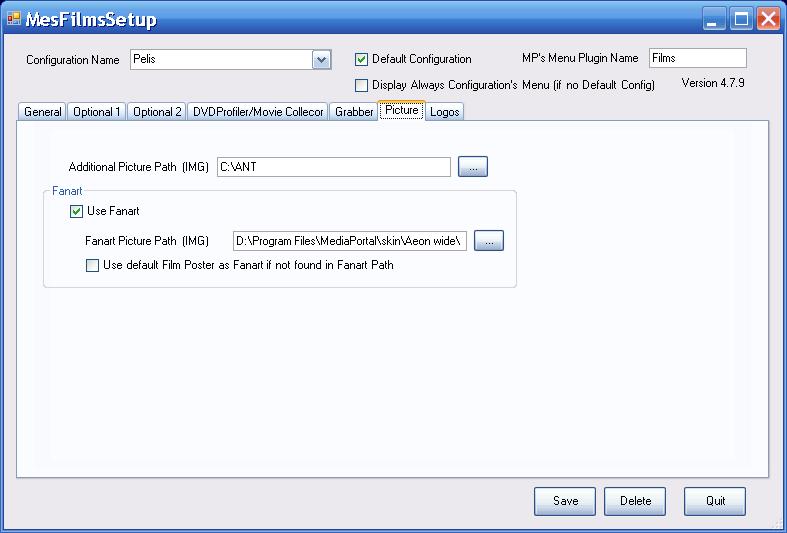
You must put the pictures in the folder that you define in the MF config (see attached pic)
The name of the pictures must be the original/translated title (test with both)
 

Attachments

  • mf.JPG
    mf.JPG
    48.1 KB

Boiler

Portal Pro
July 29, 2007
160
7
Home Country
Switzerland Switzerland
i was wondering if i do something wrong...

i upgraded to rc3; upgraded the monochrome skin and installed the myfilms plugin. in the main view, i use the big icons view and all covers are shown nicely. but when i select a movie, the details view is all screwed up: only the year, the genre and the summary/description are shown, all the rest (interestingly including covers??) are not shown, there are only variables.

what could be the problem?
 

Users who are viewing this thread

Top Bottom