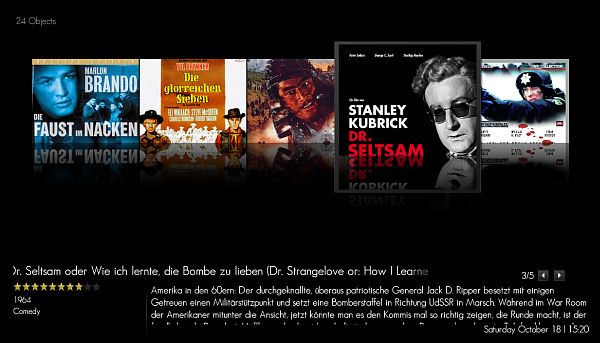
[NEW] MyFilms v4.7.9a (9 Viewers)

z3us

Portal Pro
December 4, 2007
1,047
123
46
Home Country
Spain Spain
I am sure that the problem is with films that haven a original title assigned.
Go to AMC, and open your collection xml file. Right click at the left, in the movies list, and select group by-Original title. Then, look at the top and bottom entry, if you have some <none> entries.
 

Eyep0p

Portal Pro
June 24, 2007
146
3
Home Country
Germany Germany
Hi Zebons!

The Blue3 skinfiles are not using those cool animations of Blue3 or am i wrong? Would be great if you can build it in.
 

carmenm

Portal Pro
April 15, 2008
258
4
Home Country
France France
the fanart support is appreciated :)

would it be possible to have it pick up the fanart art by IMDB number instead? It should be more precise this way and the fanart will always display even if we alter the title of the movie.
Please, think about users who don't use IMDB !!!
That plugin isn't base on IMDB but on AMC and a great functionality of that software is to be open : you can choose with AMC scripts on which site you grab informations. So if you don't use IMDB, you don't have the unique IMDB number for your movies...

I agree with you that not everyone uses IMDB numbers but i think looking for *[imdbNumber]* for fanart should exist! It doesnt interfer with other ways of naming fanarts.
And i hope that if a downoad fanart feature arrives it will allow to save by IMDBNumber.
 

Helios61

Retired Team Member
  • Premium Supporter
  • January 30, 2008
    4,586
    875
    64
    NRW
    Home Country
    Germany Germany
    Support for "Purevision 4:3" and "PureVision HD"

    Helli Zebons!

    Will there be support for the "Purevision 4:3" and "PureVision HD" Skins in the upcoming Release?

    Best Regards
    Helios
     

    crusoli

    Portal Pro
    February 12, 2008
    54
    3
    Home Country
    Germany Germany
    Any idea why my covers look crippled since updating?
     

    Attachments

    • Zwischenablage01.jpg
      Zwischenablage01.jpg
      40.6 KB

    Mishref

    Portal Member
    December 25, 2007
    11
    0
    I was getting a 'could not find file' error after upgrading to 4.7.3, so I did a fresh install of MP RC3 (even deleted all left over dirs). I installed MyFilmes and launched the configuration screen.
    I still get an error on save. I get the 'your XML file is valid with 103 movies..', but then this exception.

    See the end of this message for details on invoking
    just-in-time (JIT) debugging instead of this dialog box.

    ************** Exception Text **************
    System.IO.FileNotFoundException: Could not find file 'C:\Documents and Settings\All Users\Application Data\Team MediaPortal\MediaPortal\MyFilms.xml'.
    File name: 'C:\Documents and Settings\All Users\Application Data\Team MediaPortal\MediaPortal\MyFilms.xml'
    at System.IO.__Error.WinIOError(Int32 errorCode, String maybeFullPath)
    at System.IO.File.InternalCopy(String sourceFileName, String destFileName, Boolean overwrite)
    at MesFilms.MesFilmsSetup.ButSave_Click(Object sender, EventArgs e)
    ...

    Ok I worked it out. Had to cancel the MyFilms install, and then it created an empty myfiles.xml, then on 2nd configuration run of MyFilmes, I can save. Possibly a bug...

    Same issue here .. unless the file (myfilms.xml) existed in the appdata folder beforehand, it would throw an error (an not save).
     

    zebons

    Portal Pro
    January 2, 2006
    1,484
    114
    The new version v4.7.5 is out as mpi file. See first post.

    Hi Zebons!

    The Blue3 skinfiles are not using those cool animations of Blue3 or am i wrong? Would be great if you can build it in.

    Done. Install the 4.7.5 mpi file ;)
     

    MortenFT

    Portal Member
    January 19, 2008
    5
    0
    Home Country
    Norway Norway
    Can't get it to work at all - Using DVD Profiler

    I have just installed the latest version (4.7.5.1043) and I am using DVD Profiler.

    When I export to XML and try to set up the MyFilms plugin, it seems to work. However, when I go into the plugin through MP, I can't find any movies.

    It seems like I can add a location for the disc on the "Personal Information" section of the movies, so I add the path for each of the discs.

    I have included an XML file with 3 DVD's in - noen of these are visible when i go into the plugin.

    I tried to locate the configuration file for the plugin, but I don't know where I can find it.

    Please help me to set this up,as I would really like to use DVD Profiler with MP.

    -mortenft
     

    Users who are viewing this thread

    Top Bottom