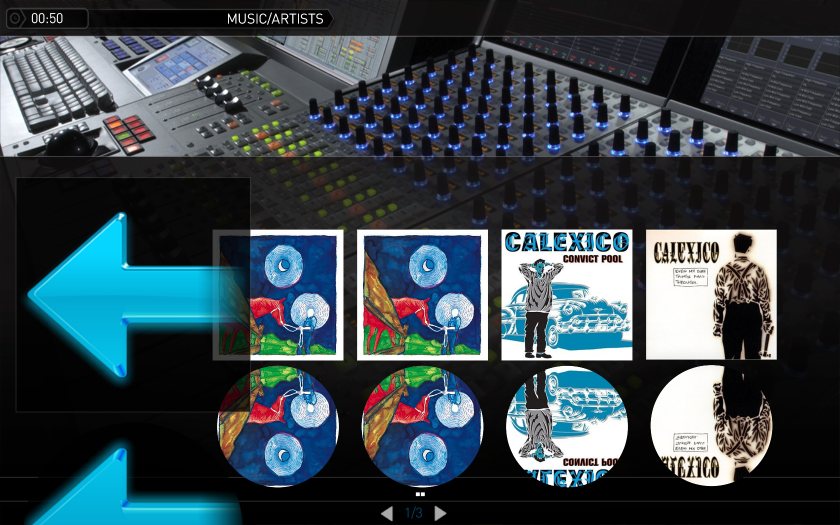
New Skinelements in ThumbnailPanel (1 Viewer)

emphatic

Design Group
  • Team MediaPortal
  • August 25, 2006
    3,758
    1,250
    Alingsås
    Home Country
    Sweden Sweden
    ...works perfekt !

    ...if you have a background that is one solid color. :rolleyes:

    Yes SpragelKnas, it's not what I hoped for, masking capabilities would be much better. Perhaps in MP 2 though.

    Nevertheless, big thanks for this anyway to the devs.
    Emph
     

    2BitSculptor

    Super Moderator
  • Team MediaPortal
  • January 23, 2008
    2,007
    1,052
    South Central Wisconsin
    Home Country
    United States of America United States of America
    This is a greatly appreciated addition... as I had always thought it should be from the beginning.

    The imagemask-effect feature is still needed for thumbs, textures and other graphics elements as well... maybe something for the future. As I have said before. Similar code is already there that is used for the reflection-effect, it just needs to be adapted to the thumb/texture element itself. And still be additionally reflected in the reflection effect.

    Chuck
     

    Bavarian

    Retired Team Member
  • Premium Supporter
  • April 4, 2005
    698
    167
    Germany, Bayern
    Home Country
    Germany Germany
    Btw why cant we have masks. The thumbmask works fine in filmstrip. Why not for thumbnail panels?

    :sorry: I do not understand what you are trying to say.


    Can you please explain want a thumbmask is doing and what skinelement in filmstrip is corresponding with this thumbmask you mentioned above?

    :D
     
    J

    joostzilla

    Guest
    Btw why cant we have masks. The thumbmask works fine in filmstrip. Why not for thumbnail panels?

    :sorry: I do not understand what you are trying to say.


    Can you please explain want a thumbmask is doing and what skinelement in filmstrip is corresponding with this thumbmask you mentioned above?

    :D

    You are right. I wasnt clear about that. What i tried to say has already been said in the post above yours :D
    It is the way the thumb reflection is masked out.
     

    trevor

    Portal Pro
    October 17, 2006
    1,601
    952
    Chelmsford
    Home Country
    United Kingdom United Kingdom
    Hi Emph,

    let me start with the definition of one panel item:

    "Old" ThumbnailPanel draws:
    1) Folder
    2) Thumb


    "New" ThumbnailPanel draws:
    1) Folder
    2) Thumb
    3) Frames

    In other words, the skin engine is drawing first the Folder, then on top the Thumb and then on top the Frame.
    This means that some parts of the Frames need transparency otherwise you will not be able to see the Thumbs.


    This is actually no differnet from the manual method currently in use, just saves the skinner having to create an additional control for the mask, just combines these two controls into one??

    What is needed is a the mask to be applied to the thumb image, creating a masked thumb image and this resulant image to be drawn...
     

    Bavarian

    Retired Team Member
  • Premium Supporter
  • April 4, 2005
    698
    167
    Germany, Bayern
    Home Country
    Germany Germany
    OK guys,

    help me to understand mask a little bit more in detail.

    On which image should the mask be put? Folder\Thumb\Frames
    What kind of color are used? Black\White\Transparent\...
    What kind of operation should with a mask be done? Delete\Invert\...
    ...
     

    2BitSculptor

    Super Moderator
  • Team MediaPortal
  • January 23, 2008
    2,007
    1,052
    South Central Wisconsin
    Home Country
    United States of America United States of America
    I think the effect should be able to be aplied to any image as needed.

    For an image control that is used for a displayed texture or a backdrop image (whether an artist thumb, an album cover, a DVD poster or fanart), a mask could be used to replace the need for a vignette overlay image, where you want the edges of the image on all sides to fade away to show the background, regardless of the aspect (a problem you face with vignette overlay images)

    For a thumb in Icon views or Filmstrip, a mask could be used to give the thumb rounded corners, or scalloped edges (or whatever shape border). This would also have to be reflected in the reflection effect. The mask would auto size to the proportions of the thumb.

    I think a way would be to use something similar to the thumbs control/flipY/diffuse control, only not use the flipY factor, and display the thumb with the Image_Mask.png (named whatever) applied directly to the thumb.

    <thumbs textureDiffuse="Image_Mask.png"></thumbs>
    or, to add a reflection for the masked thumb:
    <thumbs textureDiffuse="Image_Mask.png" FlipY="true" Diffuse="Thumb_Mask.png"></thumbs>

    or for an image displayed on a screen:

    <texture textureDiffuse="Image_Mask.png">#selectedthumb</texture>
    or, to add a reflection for the masked texture:
    <texture textureDiffuse="Image_Mask.png" FlipY="true" Diffuse="Thumb_Mask.png">#selectedthumb</texture>

    Just a thought.

    Chuck
     

    trevor

    Portal Pro
    October 17, 2006
    1,601
    952
    Chelmsford
    Home Country
    United Kingdom United Kingdom
    OK guys,

    help me to understand mask a little bit more in detail.

    On which image should the mask be put? Folder\Thumb\Frames
    What kind of color are used? Black\White\Transparent\...
    What kind of operation should with a mask be done? Delete\Invert\...
    ...

    This is done already - if only for the reflection in filmstrip

    This code, taken from the filmstrip control in the lastest StreamedMP, applies the mask we want to the reflection, see attached screen shot (also attached the mask)

    <frame>Picture_cover.png</frame>
    <frameFocus>Picture_cover.png</frameFocus>
    <background>Coverbig.png</background>
    <thumbs flipY="true" diffuse="cdcover_mask.png"></thumbs>
    <InfoImage flipY="true" diffuse="Thumb_Mask.png"></InfoImage>
    <showFrame>yes</showFrame>
    <showFolder>yes</showFolder>
    <showBackGround>no</showBackGround>

    What would be good is if this same logic can be applied to any image/thumb...basicly exactly what 2BitSculptor said.

    Hope this makes sense.
     

    Attachments

    • mask-example.jpg
      mask-example.jpg
      101.3 KB
    • cdcover_mask.png
      cdcover_mask.png
      10.4 KB

    catavolt

    Design Group Manager
  • Team MediaPortal
  • August 13, 2007
    14,896
    11,786
    Königstein (Taunus)
    Home Country
    Germany Germany
    This change obviously broke the <infoImage> tags (no infoimage shown, only when focused). When entering the <frame> tags, all is fine again. You should have mentioned this side effect, because skinners are forced to apply this change to maintain the old functionality.
    But with this change it looks far better. :D
    BTW: I used this function a long time? the tags only were a bit different: <frame> instead of <frameNoFocus> and <showframe>yes instead of true?
     

    Users who are viewing this thread

    Top Bottom