- September 18, 2006
- 847
- 53
- Home Country
-
 Belgium
MediaPortal Version: 1.2.2
MediaPortal Skin: Default
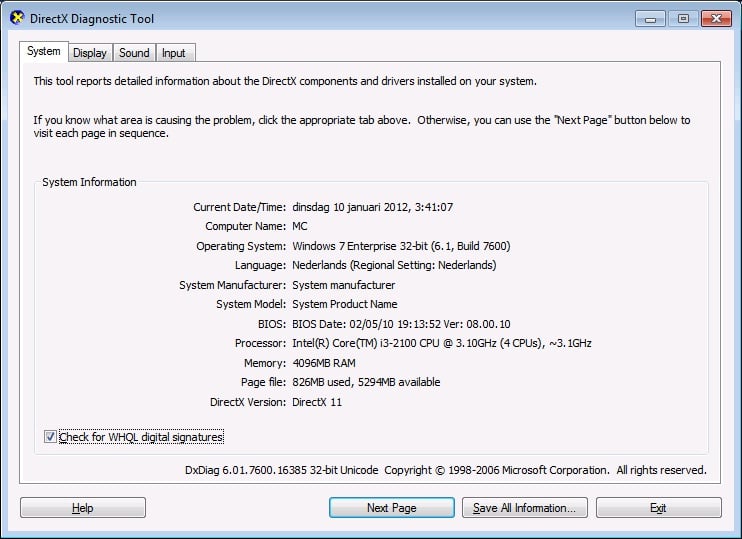
Windows Version: W7 32b
CPU Type: i3 2100 @ stock
HDD: Intel SSD 320/40Gb | Samsung 500GB SpinPoint F3 Sata II + Samsung 2TB Spinpoint F4
Memory: Kingston Hyper blu DDR3 1333 4GB
Motherboard: Asus P8H67M-Pro
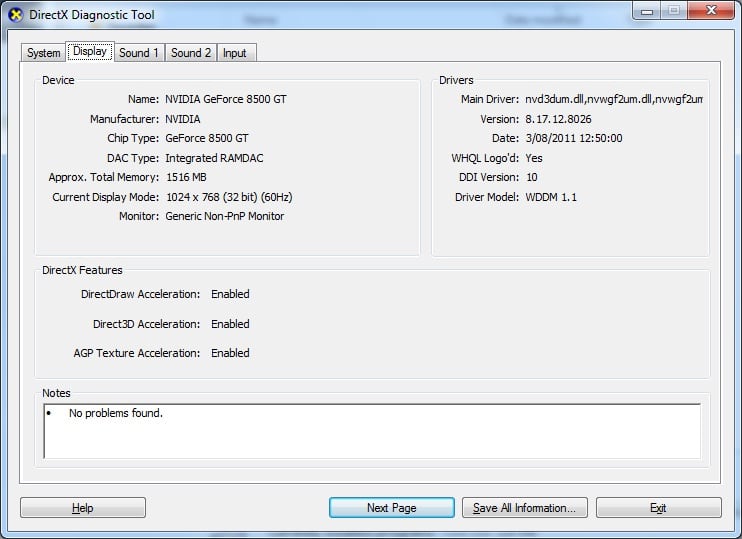
Video Card: Asus EN8500GT Silent/HTP/256M
Video Card Driver: 8.17.12.8562
Sound Card: Onboard Realtek ALC892
Sound Card Driver: 6.0.1.6446
1. TV Card: Hauppauge Win/TV PVR 350
1. TV Card Type: Analog
1. TV Card Driver: 1.18.21.23257
HTPC Case: Antec Fusion
Cooling: Boxed cpu cooler & 2x120mm case fans
Power Supply: Standard
Remote: Hauppauge silver 45 buttons
TV: Sony KV-29FX20B
TV - HTPC Connection: (TV) Scart -> Scart convertor -> S-Video of EN8500GT
Hi guys,
I updated my system and started from scratch but this is probably my worst experience in installing/configuring MP.
The system seems ok but MP gives me a lot of woes.
Over the years I have collected multiple versions of drivers for myself and for a friend who's system I have installed so I was a little puzzled regarding the tv card.
It seems I have the right version for the tuner but still struggling with the remote - although this is a minor problem right now.
I've had lockups by opening the MP configuration, even the splashscreen remaining visible over the config screen.
In the meantime, I have reinstalled a few times and the last time I even removed everything - including sql + db. I reinstalled vga driver, directx did a clean MP download and let the setup process download/install the components.
Now, the system freezes on 'initializing DirectX' with almost default settings, no plugins but xmltv to have a guide to be able to test live tv and configured the folder locations.
The system is almost completely up-to-date with hotfixes, drivers are the latest ones and no additional software, ....
Any help is greatly appreciated!
P²
MediaPortal Skin: Default
Windows Version: W7 32b
CPU Type: i3 2100 @ stock
HDD: Intel SSD 320/40Gb | Samsung 500GB SpinPoint F3 Sata II + Samsung 2TB Spinpoint F4
Memory: Kingston Hyper blu DDR3 1333 4GB
Motherboard: Asus P8H67M-Pro
Video Card: Asus EN8500GT Silent/HTP/256M
Video Card Driver: 8.17.12.8562
Sound Card: Onboard Realtek ALC892
Sound Card Driver: 6.0.1.6446
1. TV Card: Hauppauge Win/TV PVR 350
1. TV Card Type: Analog
1. TV Card Driver: 1.18.21.23257
HTPC Case: Antec Fusion
Cooling: Boxed cpu cooler & 2x120mm case fans
Power Supply: Standard
Remote: Hauppauge silver 45 buttons
TV: Sony KV-29FX20B
TV - HTPC Connection: (TV) Scart -> Scart convertor -> S-Video of EN8500GT
Hi guys,
I updated my system and started from scratch but this is probably my worst experience in installing/configuring MP.
The system seems ok but MP gives me a lot of woes.
Over the years I have collected multiple versions of drivers for myself and for a friend who's system I have installed so I was a little puzzled regarding the tv card.
It seems I have the right version for the tuner but still struggling with the remote - although this is a minor problem right now.
I've had lockups by opening the MP configuration, even the splashscreen remaining visible over the config screen.
In the meantime, I have reinstalled a few times and the last time I even removed everything - including sql + db. I reinstalled vga driver, directx did a clean MP download and let the setup process download/install the components.
Now, the system freezes on 'initializing DirectX' with almost default settings, no plugins but xmltv to have a guide to be able to test live tv and configured the folder locations.
The system is almost completely up-to-date with hotfixes, drivers are the latest ones and no additional software, ....
Any help is greatly appreciated!
P²