No audio compressor filter found (3 Viewers)

Buteo

Portal Member
January 7, 2008
18
0
Nuenen
Home Country
Netherlands Netherlands
TV-Server Version: tvengine3-03-05-2008--12-15h--Rev17749
MediaPortal Version: MediaPortal-svn--03-04-2008--05-05-Rev17723.exe
MediaPortal Skin:
Windows Version: XP SP2
CPU Type:
HDD:
Memory:
Motherboard: ACER L5100
Motherboard Chipset:
Motherboard Bios:
Video Card:
Video Card Driver:
Sound Card:
Sound Card AC3:
Sound Card Driver:
1. TV Card: Analog MPC788 (YUAN)
1. TV Card Type:
1. TV Card Driver:
2. TV Card:
2. TV Card Type:
2. TV Card Driver:
3. TV Card:
3. TV Card Type:
3. TV Card Driver:
4. TV Card:
4. TV Card Type:
4. TV Card Driver:
MPEG2 Video Codec: ???? (how to determine?)
MPEG2 Audio Codec: ???? (how to determine?)


During scanning for TV Channels there are a lot of error messages in de log files. Msg's about "No audio compressor filter found".
Looking to the problem now for a long time. Has anyone a direction to solve the problem?

PS: with other software like Beyond TV I do see TV Channels... :mad:

Thanks for your reply...

Christian
 

Buteo

Portal Member
January 7, 2008
18
0
Nuenen
Home Country
Netherlands Netherlands
Hi fasuxe,

Thanks for your reply.
I'll noticed the posting aswell. The posting was started in 2005-02-25, so three years ago, and if I understand it correctly, it was only for supporting MediaPortal and not for TvServer.
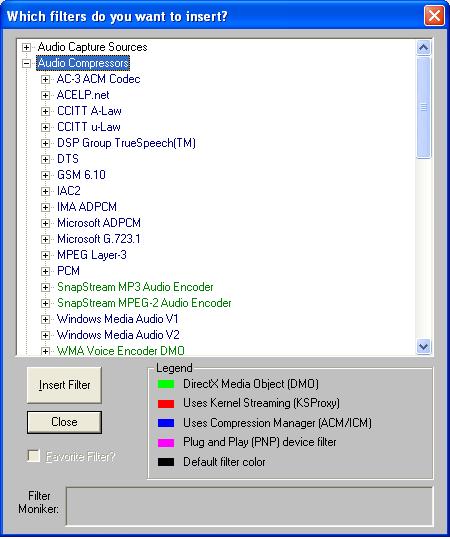
However, witch filters should I add? Please see my screenshot from graphedit.

Thanks for your help.

Christian
 

Attachments

  • GraphEdit.JPG
    GraphEdit.JPG
    47.3 KB

fasuxe

Portal Pro
January 22, 2008
66
1
Home Country
United States of America United States of America
The filters you need, depend on your card. Generally theres a capture filter, a tv video filter, a crossbar filter, possibly a tv audio filter. If its a hardware encoder, most of the filters should be under the categories "WDM Streaming ..... " If your card needs software encoders, i.e. intervideo, you should be able to find them by name, or under directshow filters. If you dont mind setting up UltraVNC and sending me a private message with your ip address and vnc password, ill take a look at it for you. Im sure we could get it working. If you can get the graph built correctly yourself, save the graph as an xgf file(xml graph file) and append the GUIDs of the filters to the end of the file, then post it here.
 

dman_lfc

Retired Team Member
  • Premium Supporter
  • July 28, 2004
    1,772
    30
    UK
    Home Country
    New Zealand New Zealand
    Install WinDVR 3 trial and you get great MPEG-2 Video & AUdio Encoders supported by TVServer and configurable via MediaPortal configuration.

    DMAN
     

    Buteo

    Portal Member
    January 7, 2008
    18
    0
    Nuenen
    Home Country
    Netherlands Netherlands
    Installing WinDVR 3 trial helped a bit. Channels are scanned and found! But while previewing the channel in the TV Server Management console I get a msgbox 'preview failed: NoVideoAudioDetected'.
     

    Buteo

    Portal Member
    January 7, 2008
    18
    0
    Nuenen
    Home Country
    Netherlands Netherlands
    Sorry, forgot to post them. Here they are...

    In the TV.log special notice to:

    Code:
    2008-03-07 19:12:54.609375 [11]: card: WaitForTimeShiftFile - waiting _eventAudio & _eventVideo
    2008-03-07 19:12:58.359375 [11]: card: WaitForTimeShiftFile - new observer based method didn't work, using the old one as fall back!
    2008-03-07 19:13:05.906250 [11]: card: timeshifting fileSize:0 TIMEOUT

    Christian
     

    Buteo

    Portal Member
    January 7, 2008
    18
    0
    Nuenen
    Home Country
    Netherlands Netherlands
    Hi fasuxe.

    Here are the graphs that we build with GrapEditor... Just in case you need them...
    And thanks again for your great help.

    Christian
     

    Attachments

    • our nice graph.GRF.txt
      30.7 KB

    fasuxe

    Portal Pro
    January 22, 2008
    66
    1
    Home Country
    United States of America United States of America
    Here is the TVServer.dll. Stop the TVServer service. Rename the original file and place this one in the folder. Then start the TVServer service. Try to timeshift. Make sure to post the tv.log.
     

    Users who are viewing this thread

    Top Bottom