- December 26, 2010
- 3
- 0
- Home Country
-
 United Kingdom
This is a duplicate of a post I put in General support - that no-one answered... maybe have better luck here ???
MediaPortal Version: 1.2.1.0
MediaPortal Skin: default
Windows Version: 7
Acer 8100 laptop
Intel Pentiuim M 2gh
2gb ram
ATI Radeon Mobilty X700 graphics (runs glass fine) Win Experience 4.1
Windows Experience 3,7 overall
Guys
Can someone throw some light on a problem I am having. Searched and read on here but not found a solution !
I have a headless server which is serving to several clients perfectly OK (so not a problem at the server end !!)
I have installed win7 on an Acer 8100 laptop (which was on XP and ran mediaportal 1.1 fine)
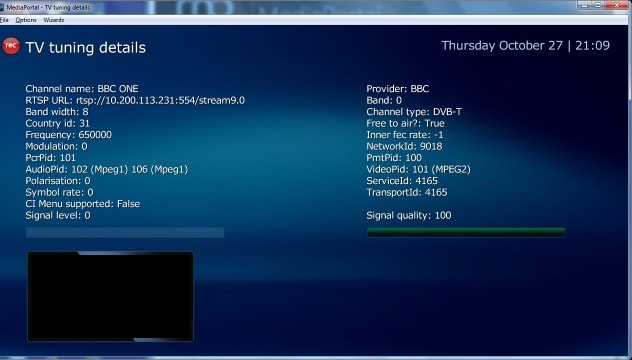
Since the upgrade when going into the TV screen all I get is a blank screen. If i left click and get up the tuning info all seems OK. see screenshot If I copy the url into vlc - it plays the stream in vlc fine !!
I saw some issues relating to skins in the logs - have change the skin to default but that did not help.
Have SAF6 installed - as do all the other clients on the network so dont think it is a codec issue
Can someone give me some poimters on what else to check
Thanks
MediaPortal Version: 1.2.1.0
MediaPortal Skin: default
Windows Version: 7
Acer 8100 laptop
Intel Pentiuim M 2gh
2gb ram
ATI Radeon Mobilty X700 graphics (runs glass fine) Win Experience 4.1
Windows Experience 3,7 overall
Guys
Can someone throw some light on a problem I am having. Searched and read on here but not found a solution !
I have a headless server which is serving to several clients perfectly OK (so not a problem at the server end !!)
I have installed win7 on an Acer 8100 laptop (which was on XP and ran mediaportal 1.1 fine)
Since the upgrade when going into the TV screen all I get is a blank screen. If i left click and get up the tuning info all seems OK. see screenshot If I copy the url into vlc - it plays the stream in vlc fine !!
I saw some issues relating to skins in the logs - have change the skin to default but that did not help.
Have SAF6 installed - as do all the other clients on the network so dont think it is a codec issue
Can someone give me some poimters on what else to check
Thanks