(Old) My Emulators (2 Viewers)

ajp8164

Portal Pro
January 9, 2008
575
1,166
Atlanta, GA
Home Country
United States of America United States of America
Spruced up MyEmulators a bit...

Hi Chreekar (and all),

I have made the following changes to the MyEmulators plugin (v2.5 source taken from this thread immediately preceeding the version that corrects the games thumbs location). I don't know exactly what needs to be done to contribute these changes (if ya'll want them!) via svn so I am attaching the source code here as well.

Feature/changes:

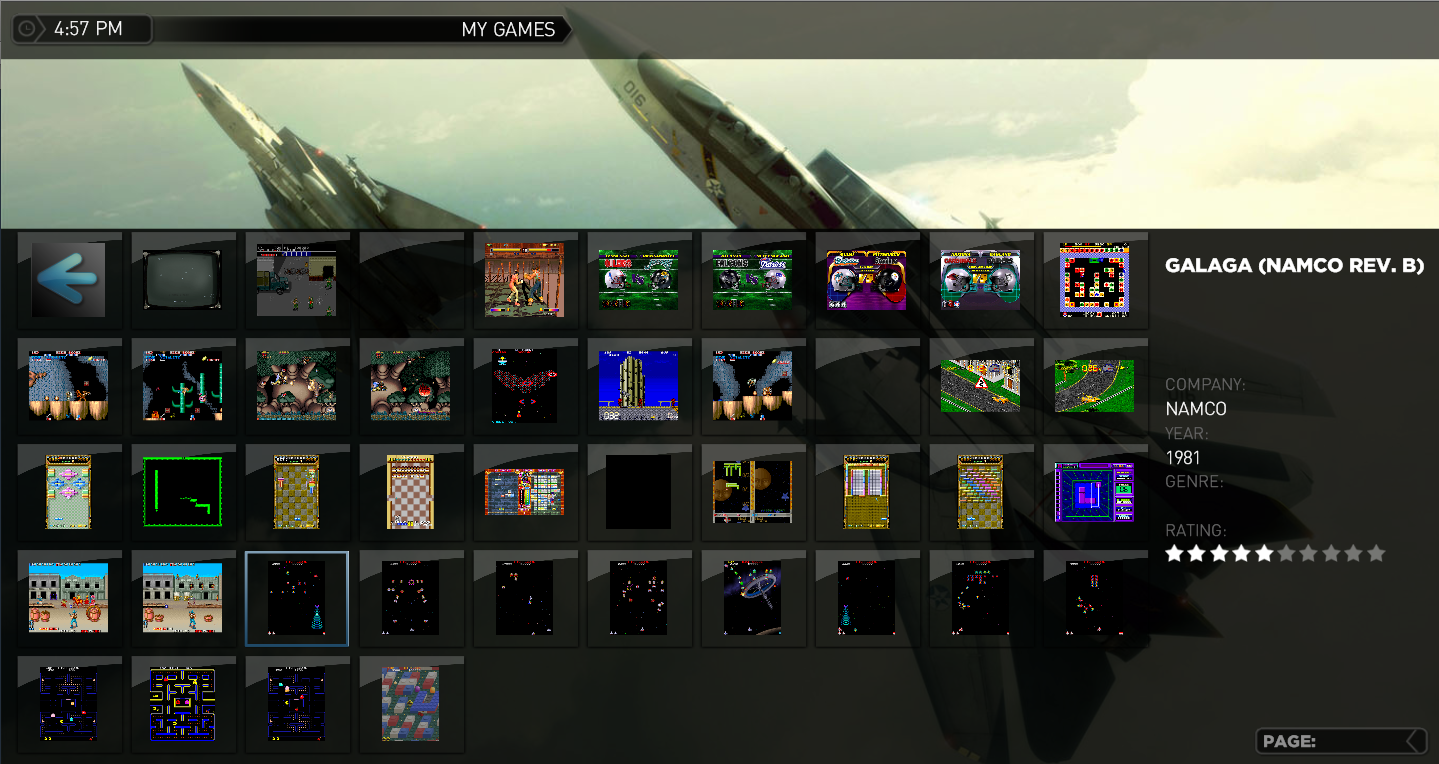
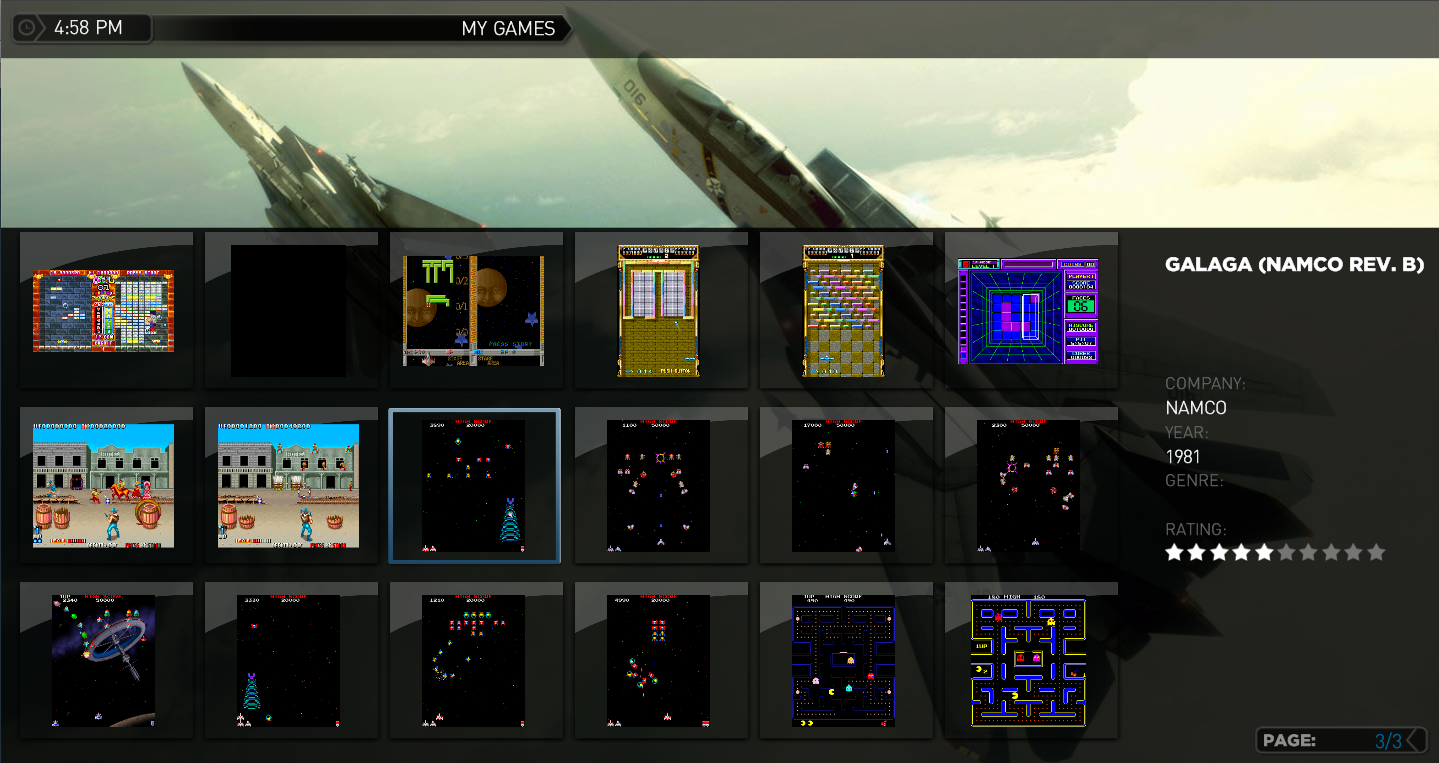
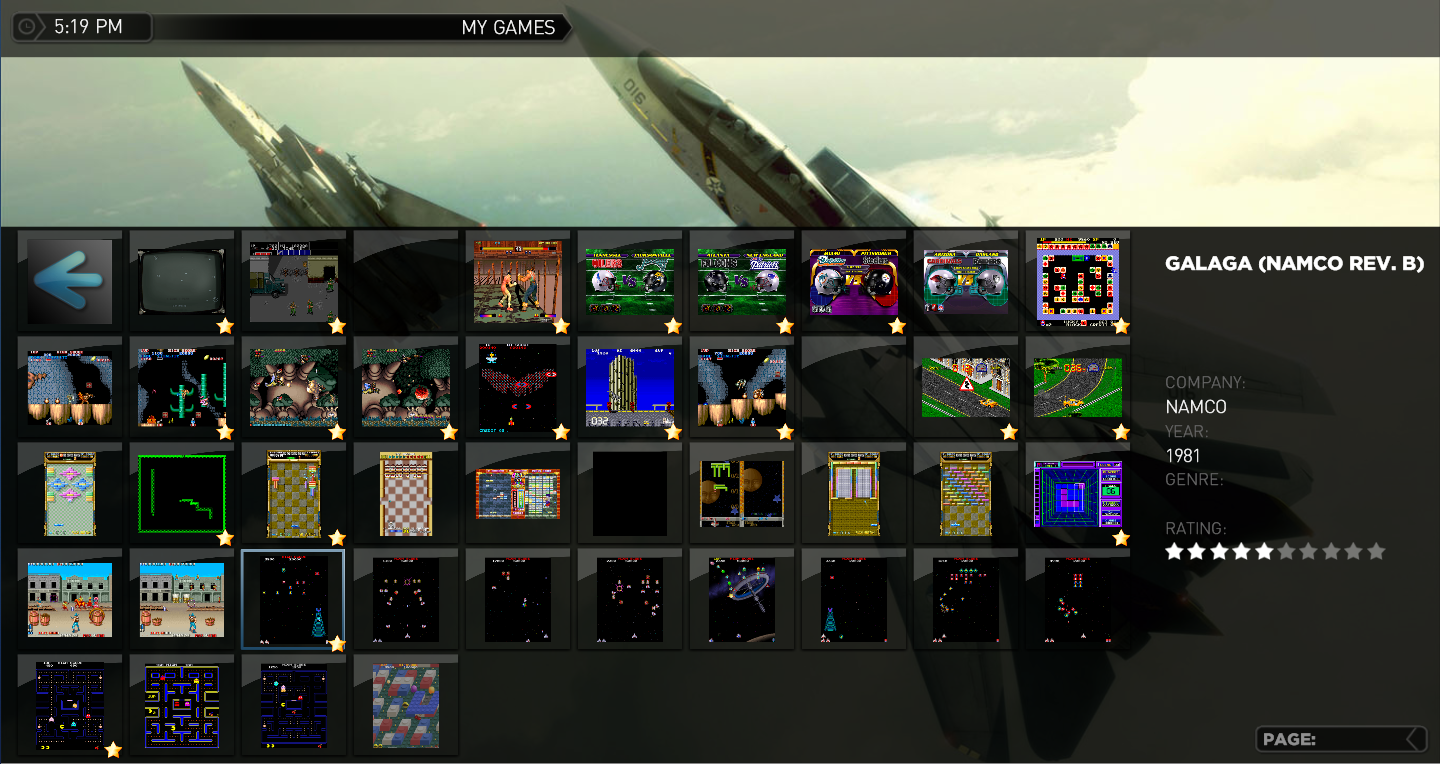
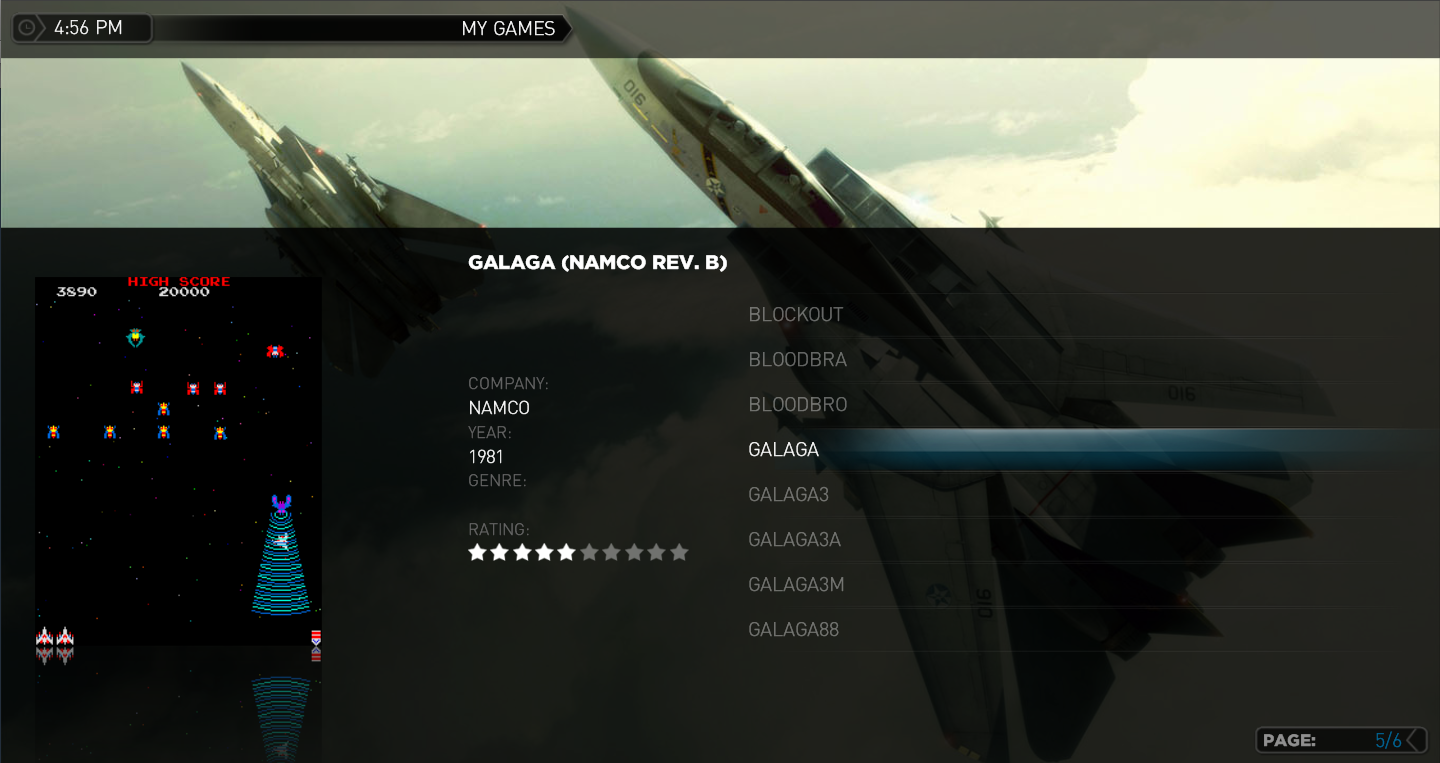
1.) List, small thumbs, and large thumb views all display game information including description, company, year, genre, and rating. I did not make any changes for film strip view though that may only require that the skin xml file be changed. To enable this capability the plugin now exposes the following MP GUI properties which are then consumed by the skin xml file.

#game_description
#game_company
#game_yearmade
#game_genre

Using these properties avoids having to use the IDs 40-43 to display this information.

To get the ratings to display at two different locations in the same window (in different views) I duplicated the ratings images and there is now a second set with IDs 111-120 (original IDs are 101-110). Had to do this because you can use an ID only once in a given MP window (my experience tells me this rather than any explicit instruction). I'm open if there is a better way to implement this without duplicate IDs.

2.) For the StreamedMP skin I added the page title ribbon (not sure what it's really called); reads "My Games". Getting this to work requires that the MP language file contain the following entry (and of course you can make the title text anything you like):

<String id="102497" prefix="My ">Games</String>


3.) To the StreamedMP skin I added the page count overlay to the lower right corner. Creates a more consistent user experience.

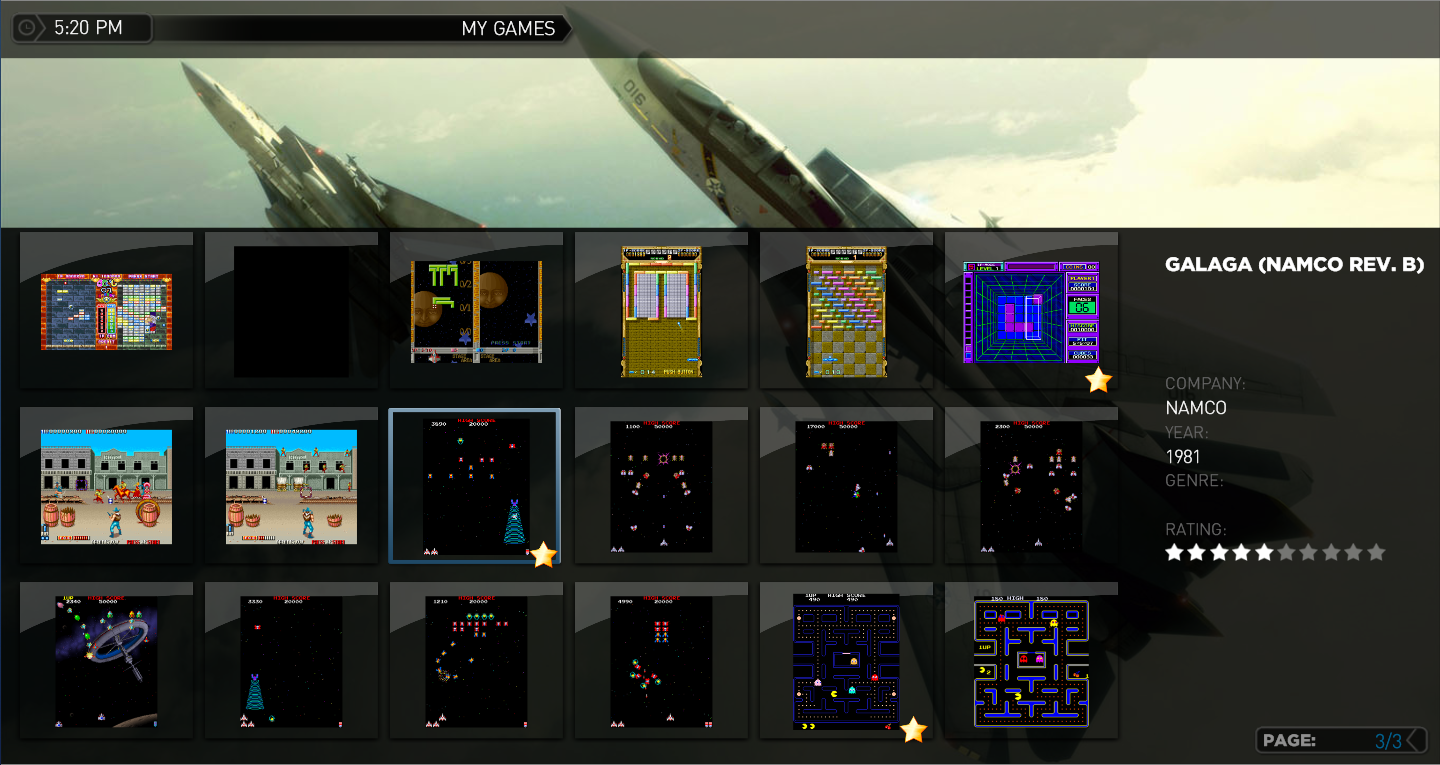
I wanted to also implement an overlay in the thumbs panel for displaying a heart icon on those games that are marked as a favorite. There would have to be a change to the GUIThumbnailPanel MP class for this to work well; for example; add the capability to overlay the game image with another image (transparent with a heart in a corner for example). The only way to implement this without changing MP classes would be to implement the same transparent overlay image but to have the plugin programmatically merge the game thumb and overlay (a cache can avoid performance problems but it's not a straight forward solution and certainly not scalable for others that may want to decorate thumbnail grids - except if the capability were factored into its own, separate plug in ;-)

See the attached thumbs for StreamedMP skin implementation of these features (attached MyEmulators.xml is for StreamedMP skin).

Chreekar - if you like/agree with these features, please integrate them into your source base (shouldn't take you too long ;-)

ps. I don't have a genre set for the game selected in the screenshots.

Thanks for a great plugin!!

-Andy
 

Attachments

  • list.png
    list.png
    636.1 KB
  • sm icons.png
    sm icons.png
    813.2 KB
  • lg icons.png
    lg icons.png
    699.5 KB

Chreekar

Community Plugin Dev
November 11, 2006
234
52
Stockholm
Home Country
Sweden Sweden
Wow! The posted images looked great. I'll have a look at your code as soon as I can.

rkooten: It looks at though the .dat files have pretty much the same structure as the file format I intended to use. So perhaps you would have to search-and-replace some node names, but after that you would be able to use them.
 

joz

Portal Pro
March 17, 2008
1,353
306
Home Country
Netherlands Netherlands
Only a question but is it hard to make PlugIns work with other Skins?
Well I would say no!
But I'm a web/mobile developer and already really familair with programming, xml/html (which really in my mind isn't programming, but just designing stuff with a tool) and alike.

You should grab a skin file and just modify that to your likings. Take a look at other blue3 xml files to see how it's done.

If you comeup with something don't hesitate to share! I'm all about the "open source thought" :)
If you do, screenies are important ;)
 

ajp8164

Portal Pro
January 9, 2008
575
1,166
Atlanta, GA
Home Country
United States of America United States of America
Game images decorated with favourite icon!

Hi Chreekar (and all),

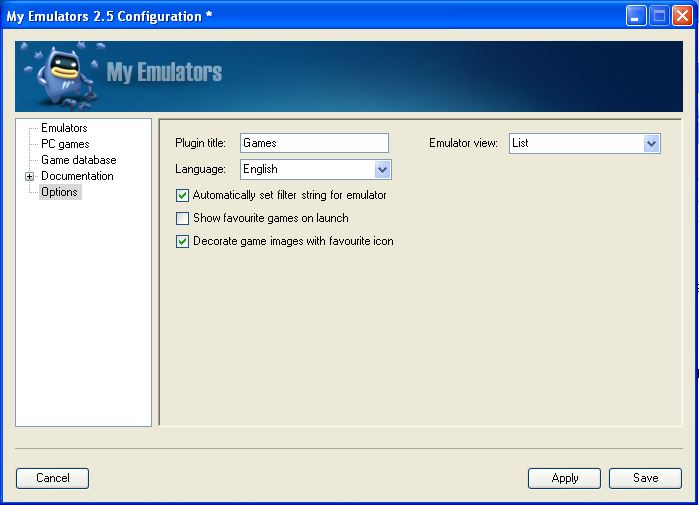
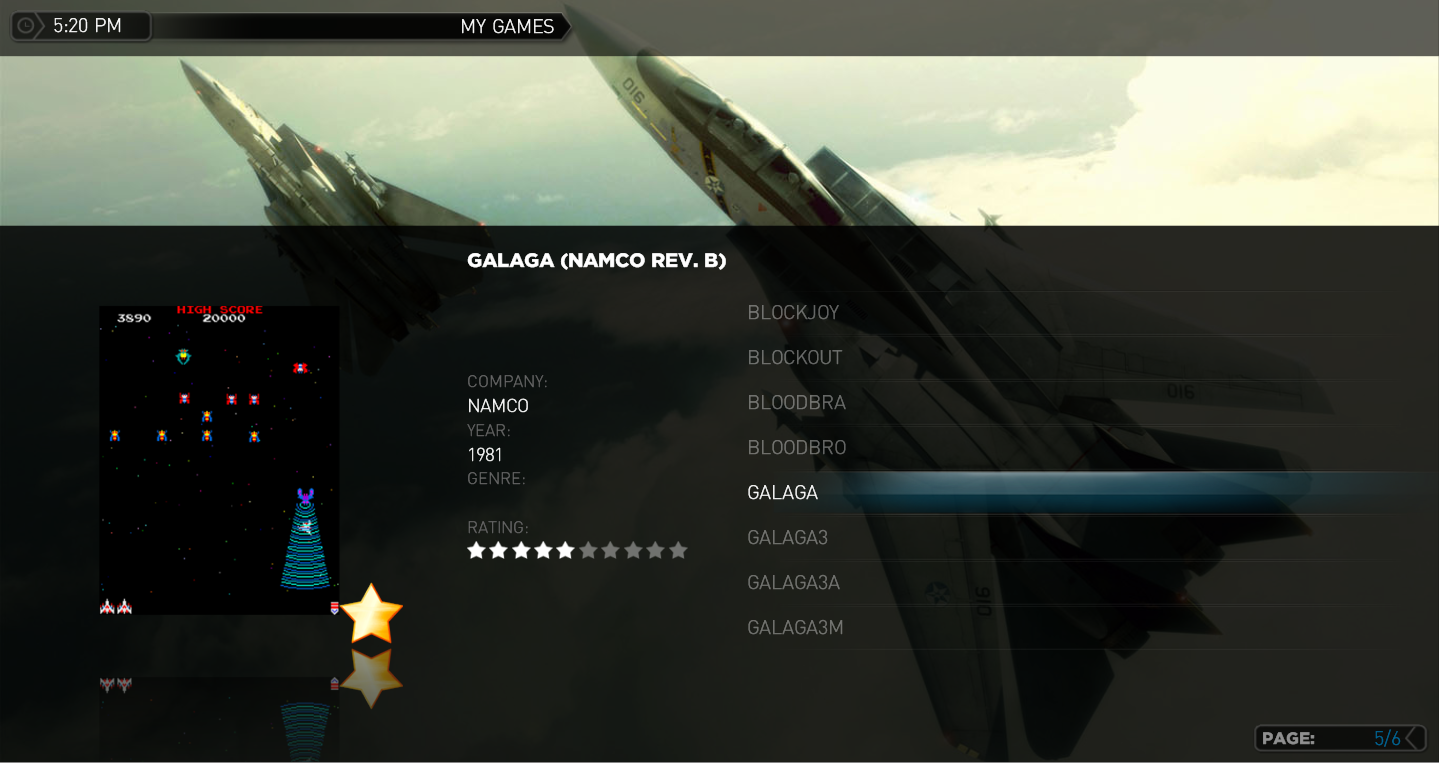
In my last post (https://forum.team-mediaportal.com/my-emulators-247/my-emulators-12771/index57.html#post339823) I added a few features to the presentation capabilities of MyEmulators and noted that I would like to have the game images decorated to indicate whether they were favourite or not. I decided to tackle this challenge and have created a first version for this capability. See the attached screenshots for an example using the StreamedMP skin.

To enable this feature you will need to:

1.) Visit the MyEmulators configuration panel and check a new checkbox labeled "Decorate"...
2.) Create or designate an existing image to use as your "favourite decoration". Name the image "favourite.png" and place it in the skins Media directory. I just reused an existing star image.

That's it! You do not need to make any changes to your skin xml file.

I also updated this source code drop to fix the games images location; you must place your game images under a sub-directory of the games directory named for your emulator, for example thumbs/MyEmulators/games/MAME).

The plugin does all the hard work :D It creates two new directories in the directory where the game images are stored: /favourites and /insets. These directories are really just a cache used to hold decorated (in /favourites) and undecorated (in /insets) images. Having both directories allows for uniform sizing of the game images when the decoration feature is enabled.

The first time you navigate from the emulators page to a games page after enabling the decoration feature MP may look like it has stalled - the gui will be frozen while the plugin creates images and stores them in the /favourites and /insets directory. If you hundreds or thousands of games you will have to be patient and wait for it to complete. It would be nice to pre-cache these images or even have a progress bar but I have not addressed doing either :sorry: This is a one time, first time operation so you should be able to live through it :)

Chreekar - Unless you have made significant code changes you may want to consider replacing your source base with this copy (if you like the changes etc...) I made numerous edits to multiple classes and added a new class (ImageUtils). I did move forward your correction to fix the game image path as noted above.

I have attached the source code and the StreamedMP xml file (unchanged from last post).

Hope you guys like this! I had fun working on it!

-Andy
 

Attachments

  • options.png
    options.png
    74.9 KB
  • list.png
    list.png
    659.3 KB
  • sm-thumb.png
    sm-thumb.png
    898.8 KB
  • lg-thumb.png
    lg-thumb.png
    757.4 KB

emphatic

Design Group
  • Team MediaPortal
  • August 25, 2006
    3,758
    1,250
    Alingsås
    Home Country
    Sweden Sweden
    Hi Chreekar (and all),

    In my last post (https://forum.team-mediaportal.com/my-emulators-247/my-emulators-12771/index57.html#post339823) I added a few features to the presentation capabilities of MyEmulators and noted that I would like to have the game images decorated to indicate whether they were favourite or not. I decided to tackle this challenge and have created a first version for this capability. See the attached screenshots for an example using the StreamedMP skin.

    To enable this feature you will need to:

    1.) Visit the MyEmulators configuration panel and check a new checkbox labeled "Decorate"...
    2.) Create or designate an existing image to use as your "favourite decoration". Name the image "favourite.png" and place it in the skins Media directory. I just reused an existing star image.

    That's it! You do not need to make any changes to your skin xml file.

    I also updated this source code drop to fix the games images location; you must place your game images under a sub-directory of the games directory named for your emulator, for example thumbs/MyEmulators/games/MAME).

    The plugin does all the hard work :D It creates two new directories in the directory where the game images are stored: /favourites and /insets. These directories are really just a cache used to hold decorated (in /favourites) and undecorated (in /insets) images. Having both directories allows for uniform sizing of the game images when the decoration feature is enabled.

    The first time you navigate from the emulators page to a games page after enabling the decoration feature MP may look like it has stalled - the gui will be frozen while the plugin creates images and stores them in the /favourites and /insets directory. If you hundreds or thousands of games you will have to be patient and wait for it to complete. It would be nice to pre-cache these images or even have a progress bar but I have not addressed doing either :sorry: This is a one time, first time operation so you should be able to live through it :)

    Chreekar - Unless you have made significant code changes you may want to consider replacing your source base with this copy (if you like the changes etc...) I made numerous edits to multiple classes and added a new class (ImageUtils). I did move forward your correction to fix the game image path as noted above.

    I have attached the source code and the StreamedMP xml file (unchanged from last post).

    Hope you guys like this! I had fun working on it!

    -Andy

    While you're at it, would it be possible to use the "pretty" names for games as the list items?
    Instead of Galaga (the romname) you'll have Galaga (Namco Revision B) (description).

    Emph
     

    ajp8164

    Portal Pro
    January 9, 2008
    575
    1,166
    Atlanta, GA
    Home Country
    United States of America United States of America
    Display game description (v. title) in list view

    While you're at it, would it be possible to use the "pretty" names for games as the list items?
    Instead of Galaga (the romname) you'll have Galaga (Namco Revision B) (description).

    Emph

    You can do this (successfully, now - if you use the attached plugin). The way to accomplish this is to make sure your game database (via the plugin Configuration tool) contains "pretty text" in the 'Title' field of the database. You can either hand edit this in the Configuration tool (ugh!) or you can use the Update database script that I found posted in this forum at https://forum.team-mediaportal.com/...ng-description-year-company-48884/#post332576. I have modified the script that was posted so that it populates the Title column and the Description column with the description text. I have attached the script (Update.bat.rar); you'll need to refer to the post for complete instructions.

    Again, no changes made to the plugin for this to work (except to correct a few bugs that prevented this from working).

    In light of this change, I have changed my StreamedMP skin xml to remove the bold description from the page in lieu of the description now being displayed in the list. Use attached file if interested.

    -Andy
     

    stanik

    Portal Pro
    October 10, 2006
    146
    4
    Home Country
    Czech Republic Czech Republic
    Bug with epsxe

    Hi,

    just already trying update to version 2.5 frome older.

    I have a problem with configuration for ePSX.exe.
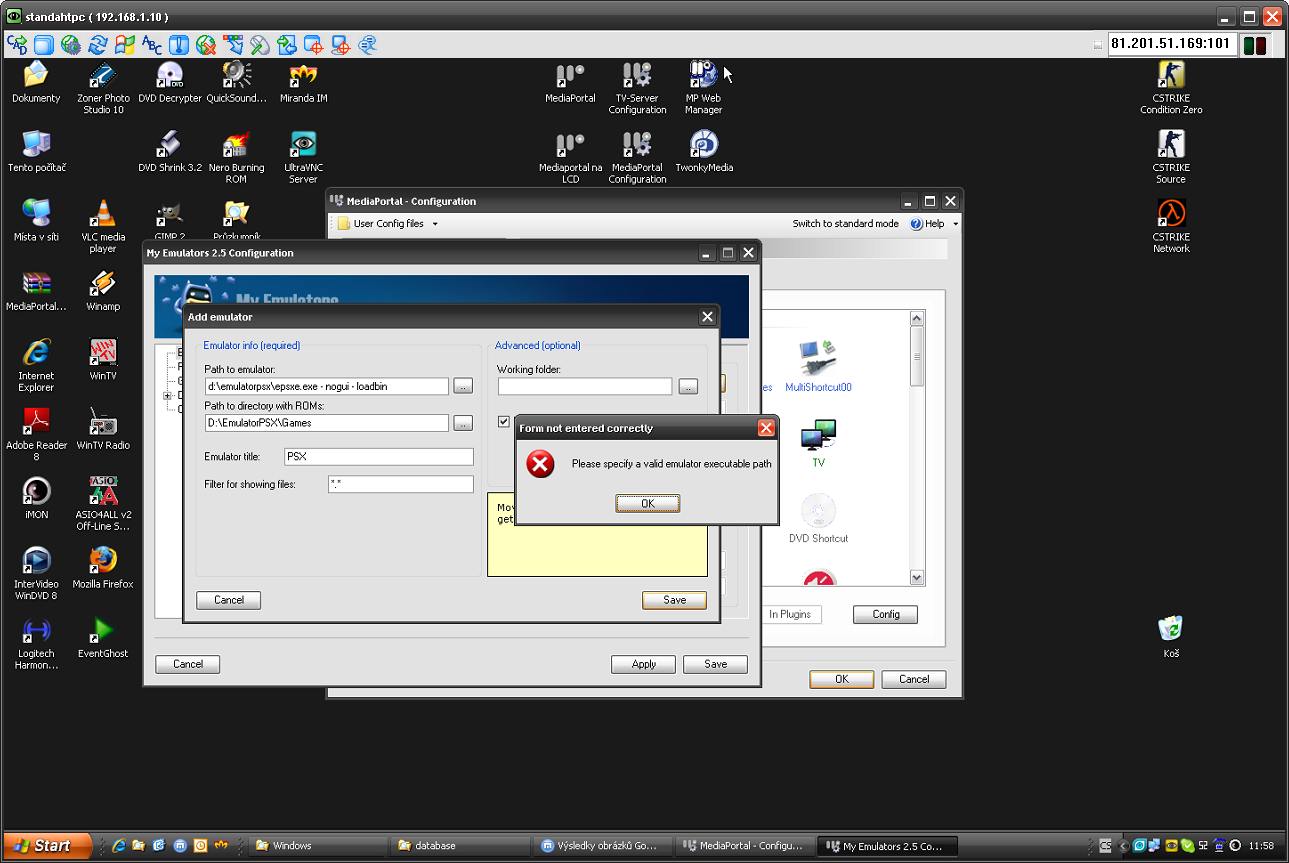
    I am trying configure Path to Emulator for ePSXe with arguments "- nogui - loadbin"
    (working in older version of MyEmulator plugin), but with this arguments I have error (form not entered correctly - please specify a valid emulator executable path) when I try save my config (see attached image).

    How can fix this problem?

    ajp8164: where I can find you version plugin, but not in source, but release (simple myemulator.dll).

    Thx for any help
    Stanik
     

    Attachments

    • MyEmulatorBug.jpg
      MyEmulatorBug.jpg
      117.4 KB

    ajp8164

    Portal Pro
    January 9, 2008
    575
    1,166
    Atlanta, GA
    Home Country
    United States of America United States of America

    stanik

    Portal Pro
    October 10, 2006
    146
    4
    Home Country
    Czech Republic Czech Republic
    Thx Andy

    Unfortunately your version plugin have same problem, when I trying set path to emulator with arguments (-nogui -loadbin).

    :-(
     

    Users who are viewing this thread

    Top Bottom