(Old) My Emulators (2 Viewers)

Chreekar

Community Plugin Dev
November 11, 2006
234
52
Stockholm
Home Country
Sweden Sweden
I try to save and it's like it checks what I entered in "Path to emulator" to see if it's actually a file, and since the switch isn't a file it says I didn't enter a valid path.

Yeah, you're totally right. The plugin supports the switches and you are not supposed to use a .bat file for it. I've made the error to check if the emulator executable exists, and if there is anything else except the path (like switches) it will fail and refuse to save.

:sorry:

Will not be able to fix it until Christmas unfortunately. I've made some changes to the source code that I won't be able to upload yet either, but when I do I will incorporate the cool new features that ajp8164 has made :)
 

ajp8164

Portal Pro
January 9, 2008
575
1,166
Atlanta, GA
Home Country
United States of America United States of America
I try to save and it's like it checks what I entered in "Path to emulator" to see if it's actually a file, and since the switch isn't a file it says I didn't enter a valid path.

Yeah, you're totally right. The plugin supports the switches and you are not supposed to use a .bat file for it. I've made the error to check if the emulator executable exists, and if there is anything else except the path (like switches) it will fail and refuse to save.

:sorry:

Will not be able to fix it until Christmas unfortunately. I've made some changes to the source code that I won't be able to upload yet either, but when I do I will incorporate the cool new features that ajp8164 has made :)

gamingexpert/stanik -

Since I am in there looking at the source anyway...

Try the attached plugin. I simply commented out the check that denies the saving of the options if the "Path to emulator" string is not a valid file location (for now, you'll have to ensure that it is valid. I checked the code that launches the emulator and it appears that it should work just fine with arguments. So, try setting your path to emulator to something like:

d:\emulatorpsx\epsxe.exe -nogui -loadbin d:\emulatorpsx\bios\spch7502.bin

The plugin will then start a process with the a command that looks like the following:

d:\emulatorpsx\epsxe.exe -nogui -loadbin d:\emulatorpsx\bios\spch7502.bin "path-to-rom\myrom.zip"

The rom path will only be quoted it you select the "use quotes in paths" checkbox (needed if your have "Program Files" in your rom path).

I did not test this - so let us know if it works!

-Andy
 

Diablokiller

Portal Member
August 14, 2008
40
0
Home Country
Germany Germany
damnit, I don't understand xml files, although I've never seen them before, completely new to me:)
Is there someone with working .xml Files for Blue3?
Or can someone make a nice one who understand xml?:)

Looking for MyPrograms Blue3 too, isn't there an easy way to get Plugins work with other skins?
 

gamingexpert

Portal Pro
August 10, 2007
74
6
Home Country
United States of America United States of America
Diablokiller, there is a Blue3 skin included in the latest SVN release here, it's in the file myEmulators.rar, in the skins folder.

I'm pretty sure that skin is just a reworked BlueTwo skin file. That's how I make plugins work in other skins, I just copy the skin from the BlueTwo folder then change the position and dimensions of things until they look right.


Chreekar, any reason why the other skin files aren't included with the plugin anymore? I only see the Blue3 file.


ajp8164, it seems to work now. The settings save, and games are launching correctly, thanks.
 

Chreekar

Community Plugin Dev
November 11, 2006
234
52
Stockholm
Home Country
Sweden Sweden
I haven't tried them in a long time so I just assumed they were outdated. But I will probably gather the files from the skinning thread before release.
 

woutervh

New Member
January 15, 2008
1
0
Hello fellows.

Why not using a wiki to collect information and to group things? I just made some sort of kick-off:
http://mediaportal.wik.is
Maybe just check it out and we'll see if we're getting somewhere with it. If nobody is interested, then don't bother :)

Grtz,
Wouter
 

quixote23

MP Donator
  • Premium Supporter
  • December 12, 2008
    64
    6
    Vancouver
    Home Country
    Canada Canada
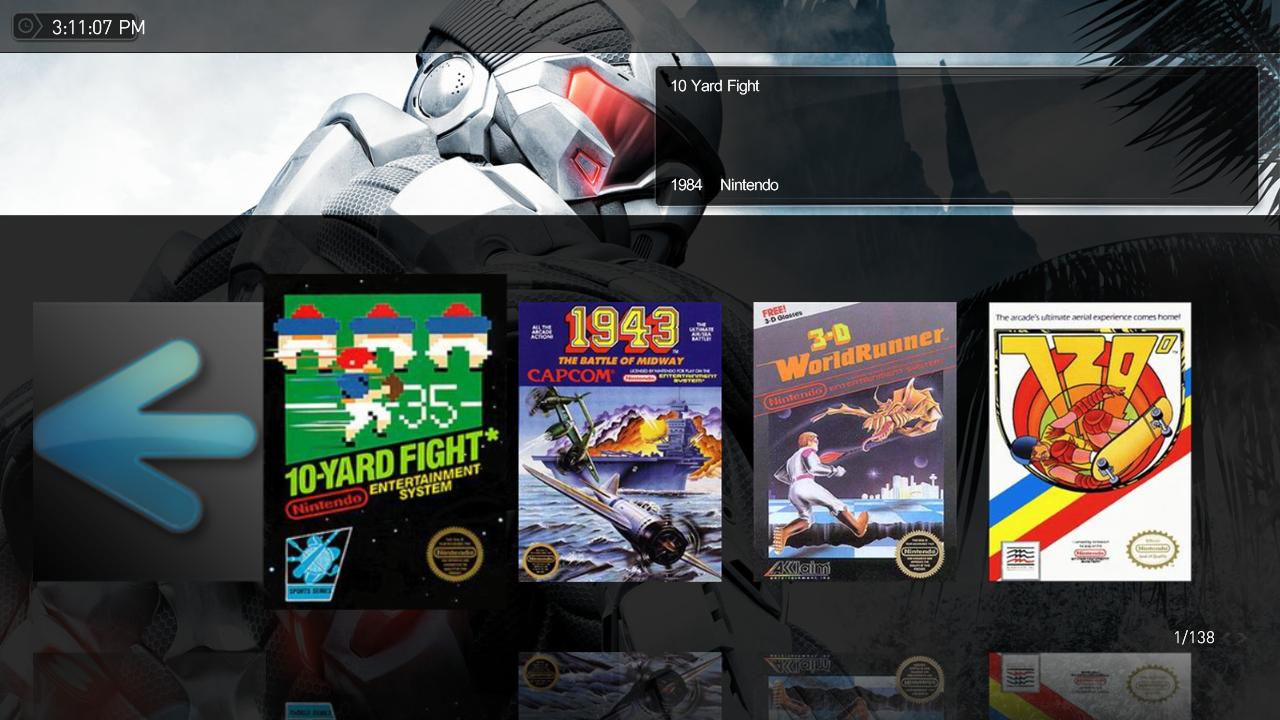
    Not sure if this is a plugin issue or a skinning issue - if it's the latter, let me know and I'll bring it up in the MediaStream thread instead. =) Anyway, my problem is that, while I get info drawn from the .db3 file, I don't see the "title, year, description" &c. text that should appear next to it. Screenshot attached.

    In my error.log, I get the lines:

    2008-12-18 15:09:23.516553 [ERROR][MPMain]: SQLiteClient: query returned CONSTRAINT INSERT INTO Info VALUES('version',2.5)
    2008-12-18 15:09:23.518506 [ERROR][MPMain]: SQLiteClient: cmd:sqlite3_finalize err:CONSTRAINT detailed:column name is not unique query:INSERT INTO Info VALUES('version',2.5)
    2008-12-18 15:09:32.477894 [ERROR][MPMain]: Exception :confused:ystem.IndexOutOfRangeException: Index was outside the bounds of the array.
    at MediaPortal.GUI.Library.GUITextureManager.GetFileName(String fileName)
    at MediaPortal.GUI.Library.GUITextureManager.Load(String fileNameOrg, Int64 lColorKey, Int32 iMaxWidth, Int32 iMaxHeight)
    at MediaPortal.GUI.Library.GUIImage.AllocResources()

    Which I suspect may have something to do with the problem (though being a Mediaportal noob and knowing nothing about sql, I could be way off about).

    Any suggestions?
     

    Attachments

    • MyEmulators.jpg
      MyEmulators.jpg
      125.6 KB

    emphatic

    Design Group
  • Team MediaPortal
  • August 25, 2006
    3,758
    1,250
    Alingsås
    Home Country
    Sweden Sweden
    Not sure if this is a plugin issue or a skinning issue - if it's the latter, let me know and I'll bring it up in the MediaStream thread instead. =) Anyway, my problem is that, while I get info drawn from the .db3 file, I don't see the "title, year, description" &c. text that should appear next to it. Screenshot attached.

    In my error.log, I get the lines:

    2008-12-18 15:09:23.516553 [ERROR][MPMain]: SQLiteClient: query returned CONSTRAINT INSERT INTO Info VALUES('version',2.5)
    2008-12-18 15:09:23.518506 [ERROR][MPMain]: SQLiteClient: cmd:sqlite3_finalize err:CONSTRAINT detailed:column name is not unique query:INSERT INTO Info VALUES('version',2.5)
    2008-12-18 15:09:32.477894 [ERROR][MPMain]: Exception :confused:ystem.IndexOutOfRangeException: Index was outside the bounds of the array.
    at MediaPortal.GUI.Library.GUITextureManager.GetFileName(String fileName)
    at MediaPortal.GUI.Library.GUITextureManager.Load(String fileNameOrg, Int64 lColorKey, Int32 iMaxWidth, Int32 iMaxHeight)
    at MediaPortal.GUI.Library.GUIImage.AllocResources()

    Which I suspect may have something to do with the problem (though being a Mediaportal noob and knowing nothing about sql, I could be way off about).

    Any suggestions?

    I noticed this too when I did the .xml file, it seems to happen everytime the page scrolls. Like, the first two show the correct one but then the window at the top does not update. It does change when you start a game though. Am I right?

    Emph
     

    quixote23

    MP Donator
  • Premium Supporter
  • December 12, 2008
    64
    6
    Vancouver
    Home Country
    Canada Canada
    I noticed this too when I did the .xml file, it seems to happen everytime the page scrolls. Like, the first two show the correct one but then the window at the top does not update. It does change when you start a game though. Am I right?

    It's not the information inside the box (that I guess is being pulled from the db3) file that I'm having a problem with necessarily, but with the actual words "title", "description", "year" and so forth. In ajp8164's linked images here, you see the title, company, last played, genre, etc. I am using a slightly different skin (can't remember if it's the one emphatic posted most recently or not) and I'm in Filmstrip but even in the other views I don't get any of that on-screen. Most annoying is not having a title, as I'm relying then on the screenshot to figure out what game is highlighted.
     

    emphatic

    Design Group
  • Team MediaPortal
  • August 25, 2006
    3,758
    1,250
    Alingsås
    Home Country
    Sweden Sweden
    I noticed this too when I did the .xml file, it seems to happen everytime the page scrolls. Like, the first two show the correct one but then the window at the top does not update. It does change when you start a game though. Am I right?

    It's not the information inside the box (that I guess is being pulled from the db3) file that I'm having a problem with necessarily, but with the actual words "title", "description", "year" and so forth. In ajp8164's linked images here, you see the title, company, last played, genre, etc. I am using a slightly different skin (can't remember if it's the one emphatic posted most recently or not) and I'm in Filmstrip but even in the other views I don't get any of that on-screen. Most annoying is not having a title, as I'm relying then on the screenshot to figure out what game is highlighted.

    Oh, I'm just waiting for the next release by the author himself with the added functionality from ajp8164 before I change the .xml to use those new functions. Not all users search through the forums for SVN/beta versions of the plugins.

    Emph
     

    Users who are viewing this thread

    Top Bottom