
ORIGINAL THREAD (OLD): About the X-Factor Skin (5 Viewers)

Status
Not open for further replies.

revned

Portal Member
May 7, 2009
33
1
Bergen op Zoom
Home Country
Netherlands Netherlands
Hi cul8er,

First of all, thank you very much for this fantastic skin. But i got a few questions:

- When i open TV series it takes about 2-3 seconds before my covers show up, it also takes a while to load the details of the selected TV series (only upon opening the plugin, when navigating through the series the info changes immediately, the image takes a half second, but that's no problem). Also when going to the index of TV series from a selected series it takes 2 seconds before info and images appear. This only happens on the index page on TV series. Moving Pictures works fine. I'm using the filmstrip view.

- Personally I don't like the glass effect on the image box in TV series. Is it possible to turn this off?

- The movie description in Moving Pictures is very difficult to read with some fanarts using filmstrip. Is it possible to make the background in the box a little bit darker?

Besides these (little) problems, this skin is excellent, so now i'm gonna run off to the poll to help you get a well deserved "Hot Skin"!!
 

doveman

Portal Pro
February 12, 2008
2,326
178
Home Country
United Kingdom United Kingdom
Great work on this skin cul8er. Just a couple of issues with it here:

It's rather unresponsive on my system when exiting a screen (TV Series, Moving Pictures, My Plugins, TV Guide). Sometimes I hear the skin sound straight away and sometimes not until just before the screen changes, but it takes about 4 seconds before the screen actually changes back to Home. On other skins, this happens immediately.

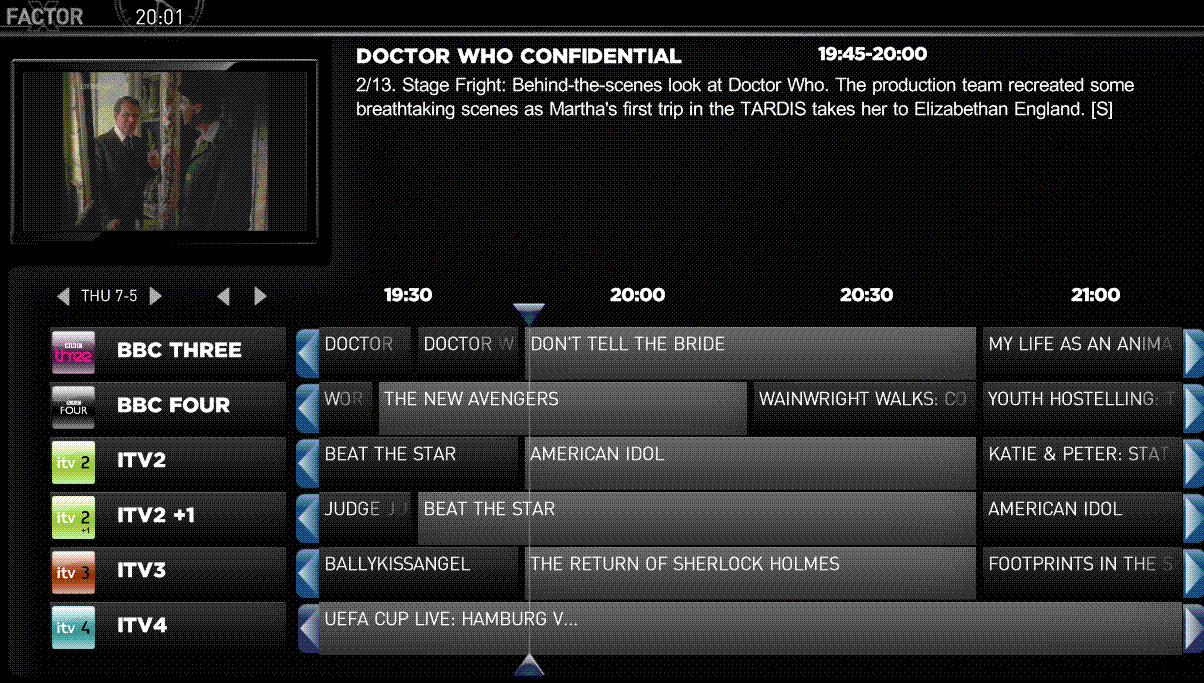
In TVGuide, the times along the top of the guide are not aligned with the timeline and so are are rather confusing. The attached image, taken at 20:01, shows this. Another change to TVGuide which I think would make it more friendly and enable quicker browsing of the guide is if PageUp/PageDown would display the previous/next 6 channels rather than just scrolling up/down by one channel.

Fan art is not being displayed in TV Series List View, which I thought I read was meant to be working. It just shows the X-Factor default backdrop all the time. Even this is barely visible to me, so unless this was brightened up in some way I wouldn't be that bothered about it anyway, although I do like to see the fan art.
 

Attachments

  • X-Factor TV Guide Timeline.GIF
    X-Factor TV Guide Timeline.GIF
    84 KB

mknoppert

Portal Member
May 4, 2009
25
2
Home Country
Netherlands Netherlands
Doveman,


In TVGuide, the times along the top of the guide are not aligned with the timeline and so are are rather confusing. The attached image, taken at 20:01, shows this. Another change to TVGuide which I think would make it more friendly and enable quicker browsing of the guide is if PageUp/PageDown would display the previous/next 6 channels rather than just scrolling up/down by one channel.

I don't think that you're problem with the timeline is a x-factor problem.
There is here in the skin forum a threat about this problem.


Maurits
 

demomanTNA

Portal Member
August 8, 2007
27
1
45
Home Country
United States of America United States of America
Hi demomanTNA,

Can you please attach your BasicHome.xml and the xfactor.xml file (xfactor.xml is located in the folder where the cache also is, somewhere under documents and settings or programdata).

Best Regards
cul8er

Here's the two files you asked for.
 

Attachments

  • BasicHome.xml
    30.6 KB
  • XFactor.xml
    30.6 KB

Nephilim

Extension Developer
February 8, 2007
805
499
Home Country
Italy Italy
Hi cul8er,

i can't find the item for mVids in the Xfactor plugin configuration. Am I blind or you missed it? ;)

Bye,
Nephilim
 

camoura

Portal Pro
May 29, 2007
97
0
I'm testing r191.

1- It takes a while when returning to home screen (it was happening before too - r172)

2- When in tvseries, banner view, if the series has more than 1 season, when you exit episode view, screen flashes the background(the one with the guy from friends) and then returns to banner view. It does not happen if the series has only one season.

3- In r172, you could see banner view being populated. Now, it populates the banners without showing anything and then shows all at once, hence the apparent slowdown when showing the banners. r172 way of showing is better.

4- TVseries, filmstrip view, when scrolling all the way to the right it just stop. Fine. all the way to left it goes to the top menu. not good. When going up, goes to the top menu. Fine. when going down, it zooms out the cover and does nothing. not good. it should do nothing.


Personal taste:

1- TVSeries: Did not like filmstrip view. It should show only cover and fanart as background.

2- Moving pictures: did not like the little window in filmstrip view. Release date and run time could appear on the botton. get rid of the details. it will show when you select the movie anyway.

3- Moving pictures thunbnail view, when going to the top menu, all covers and botton text should be dimmed. TVSeries is already that way, but botton text is not dimmed.


I just tried moving pictures and tvseries.

Hope I could point out my findings clearly.


Thanks !!
 

wolfie smith

Portal Member
December 9, 2007
13
0
Can Someone help me about my post on page 42 please in making the wallpaper i have for my games fullscreen in my emulators
 

hrox

Portal Member
March 6, 2007
37
1
Home Country
Israel Israel
Great skin, love it...
I think I have found a bug in My Lyrics -
when the lyrics expand to more than one page I can't find the buttons to scroll to the prev/next page.

Is it me being blind, or are the buttons really missing?
 

cul8er

Retired Team Member
  • Premium Supporter
  • August 31, 2006
    2,159
    2,679
    Home Country
    Sweden Sweden
    Hi,

    To all;
    1. I have got some feedback on the moving picture filmstrip view. what do you think. Should I have the little info box with date, genre and plot or should I remove it.
    2. I'm have redone the following (and will make a new release soon);
    * TVSeries delay on open is much due to the fact that I have nine covers where most skins have five. I have remade this and also added a greate idea from emphatic related to fading the covers when scrolling ;)
    * EMulator and Video listview now is semi transparent so you see the fanart "fullscreen".
    * TVGuide, I have made some changes so that timeline is easier to understand (at least in my opinion).
    * TVSeries, the fanart now is fullscreen. See if you like this better than the previous version. This also fixed the "glitch" when comming from episode and back in thumbs view.
    * TVSeries navigation in filmstrip as reported by camoura
    * TVSeries thumbnail view now have less items as the number I had made it slow in loading.
    * Moving Picture and TVSeries now has the same kind of fading when moving to and from the menu.
    * MVids is added to the menu editor
    * Menu editor now has mandatory field check so that all items that are required are actually filled with values. Should prevent the creation of invalid basichome menues.

    hrox;
    You are correct, there are no buttons, I will look at this. Thank you for your report.

    demomanTNA;
    I have attached the new version of the menu editor. Please repace your existing one with this and then try to generate the menu again. What I can see in your files are that not all required fields have values. Please let me know if this fixes your problem.

    best regards
    cul8er
     

    Attachments

    • Menu_Editor.rar
      30.6 KB

    demomanTNA

    Portal Member
    August 8, 2007
    27
    1
    45
    Home Country
    United States of America United States of America
    The fixed version works. Thanks! :D

    To anyone using the fix make sure (obviously) that you delete you cache for the skin along with the cached XFavor.xml before you use this new version.

    Okay onto my next question.... how can I have it so certain plugins have their own seperate wallpaper? I managed to learn how to change the general default ones that I didn't care for but now I'd like to get it so, say, the Arcsoft plugin has its own specifc one instead of having the same one that Movies use?

    Here are the three I have done so far for TV Shows, Movies, and Music. I also attached the one I plan on using for Arcsoft.
     

    Attachments

    • arcdefault.jpg
      arcdefault.jpg
      114.7 KB
    • tvdefault.jpg
      tvdefault.jpg
      673.4 KB
    • movies_default.jpg
      movies_default.jpg
      482.6 KB
    • musicdefault.jpg
      musicdefault.jpg
      590.6 KB
    Status
    Not open for further replies.

    Users who are viewing this thread

    Top Bottom