I recently noticed that all of my tv shows with the exception of one when paused is missing the tv show image on the right side of the screen above the paused menu. Is there something that I am missing? I'd like the same thing for the rest of my shows when I have to pause them. Thanks in advance!

You are using an out of date browser. It may not display this or other websites correctly.
You should upgrade or use an alternative browser.
You should upgrade or use an alternative browser.
Paused OSD Missing ClearArt TV Show Image (1 Viewer)
- Thread starter GhozTFacE
- Start date

 United Kingdom
Re: Paused OSD Missing TV Show Image
A picture tells a thousand words, Press F11 in that screen (both) so can compare, pictures are saved in pictures\mediaportal\date, upload and attach to post using advanced + function, preview to check done.
Then we would need clean logs after above test (see signature link)
Thanks
A picture tells a thousand words, Press F11 in that screen (both) so can compare, pictures are saved in pictures\mediaportal\date, upload and attach to post using advanced + function, preview to check done.
Then we would need clean logs after above test (see signature link)
Thanks
- Thread starter
- #3
Re: Paused OSD Missing TV Show Image
Thank You for the help I really appreciate it. I've uploaded the two screenshots you wanted to see. The first is the screenshot with the image about the osd that I mentioned. The second is a screenshot of one that has nothing there. Thanks again.
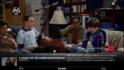
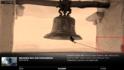
Thank You for the help I really appreciate it. I've uploaded the two screenshots you wanted to see. The first is the screenshot with the image about the osd that I mentioned. The second is a screenshot of one that has nothing there. Thanks again.
Re: Paused OSD Missing TV Show Image
That is a clearart image, so that is what is missing, maybe clearart does not exist for other series.
Sorry going out, pretty sure someone else will step in.
That is a clearart image, so that is what is missing, maybe clearart does not exist for other series.
Sorry going out, pretty sure someone else will step in.

- Moderator
- #5
Re: Paused OSD Missing TV Show Image
You need to add the image yourself to that directory, there is also an external app which can download these for you found here: https://forum.team-mediaportal.com/...ically-download-clearart-v0-2-released-84965/
The directory in question is:
You need to add the image yourself to that directory, there is also an external app which can download these for you found here: https://forum.team-mediaportal.com/...ically-download-clearart-v0-2-released-84965/
The directory in question is:
Code:
C:\ProgramData\Team MediaPortal\MediaPortal\thumbs\ClearArt
- Moderator
- #6
AW: Paused OSD Missing ClearArt TV Show Image
Hello!
ClearArt you can mainly get from fanart.tv. You have to put the ClearArt you downloaded in C:\ProgramData\Team MediaPortal\MediaPortal\thumbs\ClearArt I think. This folder should be already available and you should see the Big Bang Theory image (80379.png) in there.. To identify the images they have to be saved by Series ID. Big Bang Theory has the ID 80379, thats why the image also has to be 80379.png
Now for example we have a look at Breaking Bad. We search for the series on fanart.tv -> breaking bad | Search Results | fanart.tv.
Lets see which ClearArts are available: Shows | Breaking Bad | fanart.tv
Now you can choose which one you like most and click on download. Be careful! You should download ClearART not ClearLOGOs.
When you have downloaded your favourite ClearArt don't forget to name it like the ID of the serie. (The ID of the serie you see in the webaddress -> http://fanart.tv/shows/?id=81189)
After all this you only have to put your downloaded clearart image file in C:\ProgramData\Team MediaPortal\MediaPortal\thumbs\ClearArt
PS: The folder structure is for Win7. In XP you have to search for your clearart folder, I don't know if its the same path.
PPS: The folder in XP could be: C:\Documents and Settings\All Users\Application Data\Team MediaPortal\MediaPortal\thumbs\ClearArt
Hello!
ClearArt you can mainly get from fanart.tv. You have to put the ClearArt you downloaded in C:\ProgramData\Team MediaPortal\MediaPortal\thumbs\ClearArt I think. This folder should be already available and you should see the Big Bang Theory image (80379.png) in there.. To identify the images they have to be saved by Series ID. Big Bang Theory has the ID 80379, thats why the image also has to be 80379.png
Now for example we have a look at Breaking Bad. We search for the series on fanart.tv -> breaking bad | Search Results | fanart.tv.
Lets see which ClearArts are available: Shows | Breaking Bad | fanart.tv
Now you can choose which one you like most and click on download. Be careful! You should download ClearART not ClearLOGOs.
When you have downloaded your favourite ClearArt don't forget to name it like the ID of the serie. (The ID of the serie you see in the webaddress -> http://fanart.tv/shows/?id=81189)
After all this you only have to put your downloaded clearart image file in C:\ProgramData\Team MediaPortal\MediaPortal\thumbs\ClearArt
PS: The folder structure is for Win7. In XP you have to search for your clearart folder, I don't know if its the same path.
PPS: The folder in XP could be: C:\Documents and Settings\All Users\Application Data\Team MediaPortal\MediaPortal\thumbs\ClearArt
- Thread starter
- #7
Thank you for the replies. I was able to get V3 of MPClearArtLoader because V2 had an issue with Win7 64 bit. Thank you for the thorough explanation I really appreciate it and it worked like a charm. I guess the hardest part is knowing what things are called because I would've never known that it was called ClearArt or that MP supported anything like this. Thanks again for the quick responses.
Users who are viewing this thread
Online now: 2 (members: 0, guests: 2)