Problem with visual studio 2005/2008 and sourcecode (1 Viewer)

ltfearme

Community Plugin Dev
  • Premium Supporter
  • June 10, 2007
    6,767
    7,241
    Sydney
    Home Country
    Australia Australia
    Ok, it seems your not using trunk version of MediaPortal. You need to do this as we are now using GUIInternalWindow which is only in trunk. You will also notice that the trunk version of mediaportal wont need any converting.

    I will update the dev guide to remove the choice to download 1.0.2 source.
     

    RoChess

    Extension Developer
  • Premium Supporter
  • March 10, 2006
    4,434
    1,897
    Ok, it seems your not using trunk version of MediaPortal. You need to do this as we are now using GUIInternalWindow which is only in trunk. You will also notice that the trunk version of mediaportal wont need any converting.

    I will update the dev guide to remove the choice to download 1.0.2 source.
    But the compiled result can still be used on a MediaPortal v1.0.2 setup right?
     

    ltfearme

    Community Plugin Dev
  • Premium Supporter
  • June 10, 2007
    6,767
    7,241
    Sydney
    Home Country
    Australia Australia
    Dont know as I havent tested it yet, but this change has not been out in the wild yet. The tvseries 2.3/2.4 branch doesnt have this change and I compile against 1.0.2 for that.
     

    kreker

    Portal Member
    April 15, 2008
    46
    0
    mmm i re checkout with the correct repo and added the common-mp-tve3
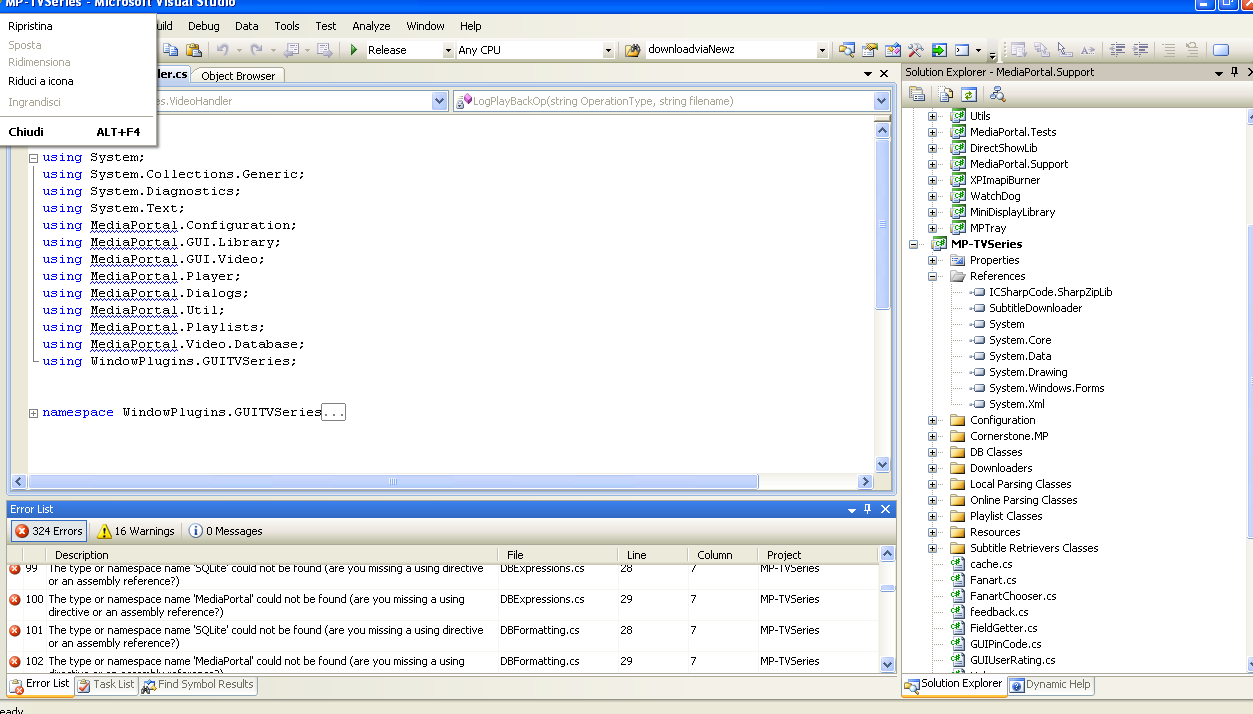
    now I have 323 errors, all namespace are missing when I build but in object browser I see all correct!
    what the hell is going on!??!?!

    I have also this
    Error 13 The command ""C:\Documents and Settings\Utente\Documenti\Visual Studio 2008\Projects\MPPlugin\MediaPortal\xbmc\PostBuild.bat" "C:\Documents and Settings\Utente\Documenti\Visual Studio 2008\Projects\MPPlugin\" Debug" exited with code 4. MediaPortal

    The problem it's in mptvseries project, it can't find the reference to mediaportal names but there is!! In the other part of the project is use fine!
    what I have to do?
     

    Attachments

    • Schermata 2010-01-19 a 20.35.17.png
      Schermata 2010-01-19 a 20.35.17.png
      112.2 KB

    ltfearme

    Community Plugin Dev
  • Premium Supporter
  • June 10, 2007
    6,767
    7,241
    Sydney
    Home Country
    Australia Australia
    From you screenshot the references are missing, you need to add them. You should add the following project references:

    Core
    Databases
    Dialogs
    Utils
    WindowsPlugins
     

    kreker

    Portal Member
    April 15, 2008
    46
    0
    mmm why they aren't added in the csproj file?
    btw I have still one hope the past error
    Error 4 The command ""C:\Documents and Settings\Utente\Documenti\Visual Studio 2008\Projects\MPPlugin\MediaPortal\xbmc\PostBuild.bat" "C:\Documents and Settings\Utente\Documenti\Visual Studio 2008\Projects\MPPlugin\" Release" exited with code 4. MediaPortal (MediaPortal\MediaPortal)
     

    ltfearme

    Community Plugin Dev
  • Premium Supporter
  • June 10, 2007
    6,767
    7,241
    Sydney
    Home Country
    Australia Australia
    The references should of been in there, not sure why they were not for you. I will double check when I have some time.

    Your last error, is due to where you saved your solution file. Try editing the post build step for the project 'MediaPortal' to suit your paths. If you followed the Development Guide to the letter I believe it should be:

    "$(ProjectDir)PostBuild.bat" "$(SolutionDir)..\MediaPortal" $(ConfigurationName)

    The First parameter refers to where your base development directory is for MediaPortal, since we saved our tvseries solution in the tvseries folder we step back one directory. You can put a hardcoded path instead if you like.
     

    kreker

    Portal Member
    April 15, 2008
    46
    0
    ok now it's work!
    thanks all for help!:)
    I have a problem btw, i had to hardcode the path because it can understand "..\"....how to solve this?
     

    Users who are viewing this thread

    Top Bottom