
PureVisionHD 1080 (13 Viewers)

Terrabyte

Portal Pro
May 15, 2007
547
2
48
Home Country
Germany Germany
AW: PureVisionHD (16:9)

Could you please write a german private message of the description to install the Skin.

I think i have now done all the thinks to do but now MP does not start.

THIS SKIN IS OUTDATED sais a red popup an than comes what i have done below:

I cannot translate the folder names you gave in the DL Description.
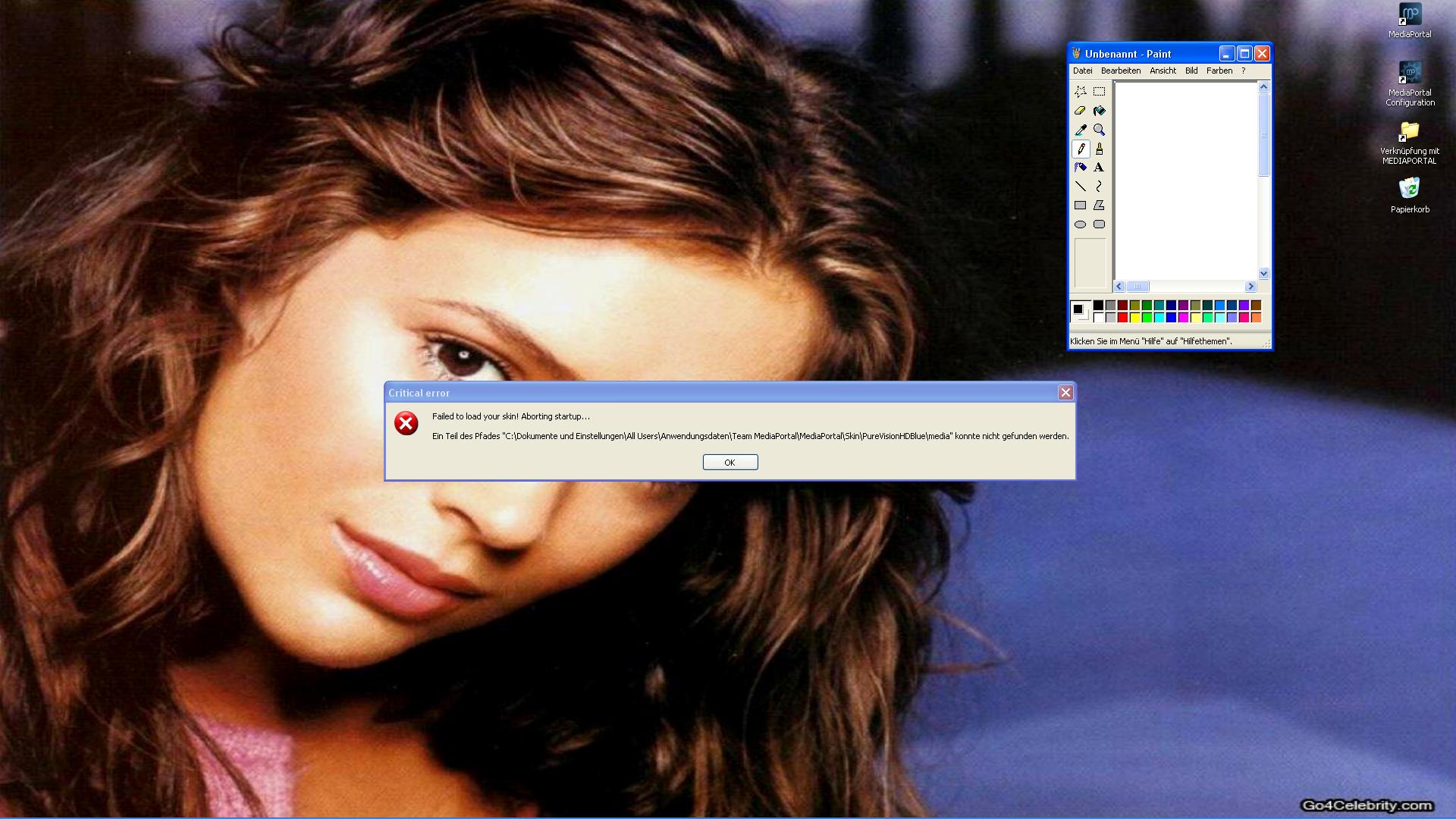
 

Attachments

  • tod.JPG
    tod.JPG
    219.5 KB

catavolt

Design Group Manager
  • Team MediaPortal
  • August 13, 2007
    14,782
    11,604
    Königstein (Taunus)
    Home Country
    Germany Germany
    AW: PureVisionHD (16:9)

    Which Windows - XP or Windows 7/Vista? Configure your WinExplorer to show hidden files and folders also.
     

    Terrabyte

    Portal Pro
    May 15, 2007
    547
    2
    48
    Home Country
    Germany Germany
    AW: PureVisionHD (16:9)

    I use WIN XP Prof SP3 and got the latest security updates asi had to install before using 1.1.0.0 Beta 1.

    I am now very unhappy, i did everything step by step ones more but MP does not start.

    So now i do not know what to do... :( :( :(

    By the way, i do not know what folder you mean exactly when you write:

    ...\%config dir%\MediaPortal\Skins

    is that:
    C/Dokumente und Einstellungen/All users/.... ???
    So i did it correctly

    %windir%/fonts

    is that
    C/Windows/Fonts?

    So i did it correctly

    ...\%program dir%\Team MediaPortal\MediaPortal\Plugins\Windows

    is that
    C/Programm/Team Media Portal/Media Portal/Plugins/Windows

    so i did it correctly

    But nothing works now
     

    catavolt

    Design Group Manager
  • Team MediaPortal
  • August 13, 2007
    14,782
    11,604
    Königstein (Taunus)
    Home Country
    Germany Germany
    AW: PureVisionHD (16:9)

    All you described above is correct. Maybe you have to reinstall MP. If any user out there with XP could help Terrabyte, please?
     

    edsche

    Community Plugin Dev
    January 7, 2007
    606
    360
    39
    Ulm
    Home Country
    Germany Germany
    Re: AW: PureVisionHD (16:9)

    I use WIN XP Prof SP3 and got the latest security updates asi had to install before using 1.1.0.0 Beta 1.

    I am now very unhappy, i did everything step by step ones more but MP does not start.

    So now i do not know what to do... :( :( :(

    By the way, i do not know what folder you mean exactly when you write:

    ...\%config dir%\MediaPortal\Skins

    is that:
    C/Dokumente und Einstellungen/All users/.... ???
    So i did it correctly

    %windir%/fonts

    is that
    C/Windows/Fonts?

    So i did it correctly

    ...\%program dir%\Team MediaPortal\MediaPortal\Plugins\Windows

    is that
    C/Programm/Team Media Portal/Media Portal/Plugins/Windows

    so i did it correctly

    But nothing works now

    %config dir% is C:\Dokumente und Einstellungen\All Users\Anwendungsdaten\Team MediaPortal\
    %windir% is C:\Windows\
    %programm dir% is C:\Programme\
     

    edsche

    Community Plugin Dev
    January 7, 2007
    606
    360
    39
    Ulm
    Home Country
    Germany Germany
    Terrabyte you've installed the skin to the wrong path

    your path is: C:\Dokumente und Einstellungen\All Users\MediaPortal\Skins
    but it should be C:\Dokumente und Einstellungen\All Users\Anwendungsdaten\Team MediaPortal\MediaPortal\skin
     

    Terrabyte

    Portal Pro
    May 15, 2007
    547
    2
    48
    Home Country
    Germany Germany
    AW: PureVisionHD (16:9)

    Maybe the error comes from the SVN?

    Terrabyte you've installed the skin to the wrong path

    your path is: C:\Dokumente und Einstellungen\All Users\MediaPortal\Skins
    but it should be C:\Dokumente und Einstellungen\All Users\Anwendungsdaten\Team MediaPortal\MediaPortal\skin

    Hi Chris,

    did it - same error message as posted

    All you described above is correct. Maybe you have to reinstall MP. If any user out there with XP could help Terrabyte, please?

    So you say it`s better not to use the Skin with XP or it`s better not to use the SVN with XP?

    What shall i do after the new installation?
     

    edsche

    Community Plugin Dev
    January 7, 2007
    606
    360
    39
    Ulm
    Home Country
    Germany Germany
    Is there a C:\Dokumente und Einstellungen\All Users\Anwendungsdaten\Team MediaPortal\MediaPortal\skin\PureVisionHDBlue\media folder?
     

    Terrabyte

    Portal Pro
    May 15, 2007
    547
    2
    48
    Home Country
    Germany Germany
    AW: PureVisionHD (16:9)

    yup, is it, but without the /media at the end

    Sorry, not Blue but PureVisionHD without blue

    Maybe we shoult talk about the dll files.

    I searched in the PurevisionHD Folder and put it into:

    C/Programme/Team Mediaportal/Mediaportal/Plugins/Windows

    also i put all the dlls from the required plugins folder into that.

    Was that correct?
     

    Users who are viewing this thread

    Top Bottom