
You are using an out of date browser. It may not display this or other websites correctly.
You should upgrade or use an alternative browser.
You should upgrade or use an alternative browser.
PureVisionHD 1080 (20 Viewers)
- Thread starter catavolt
- Start date
 Germany

- Thread starter
- Moderator
- #822
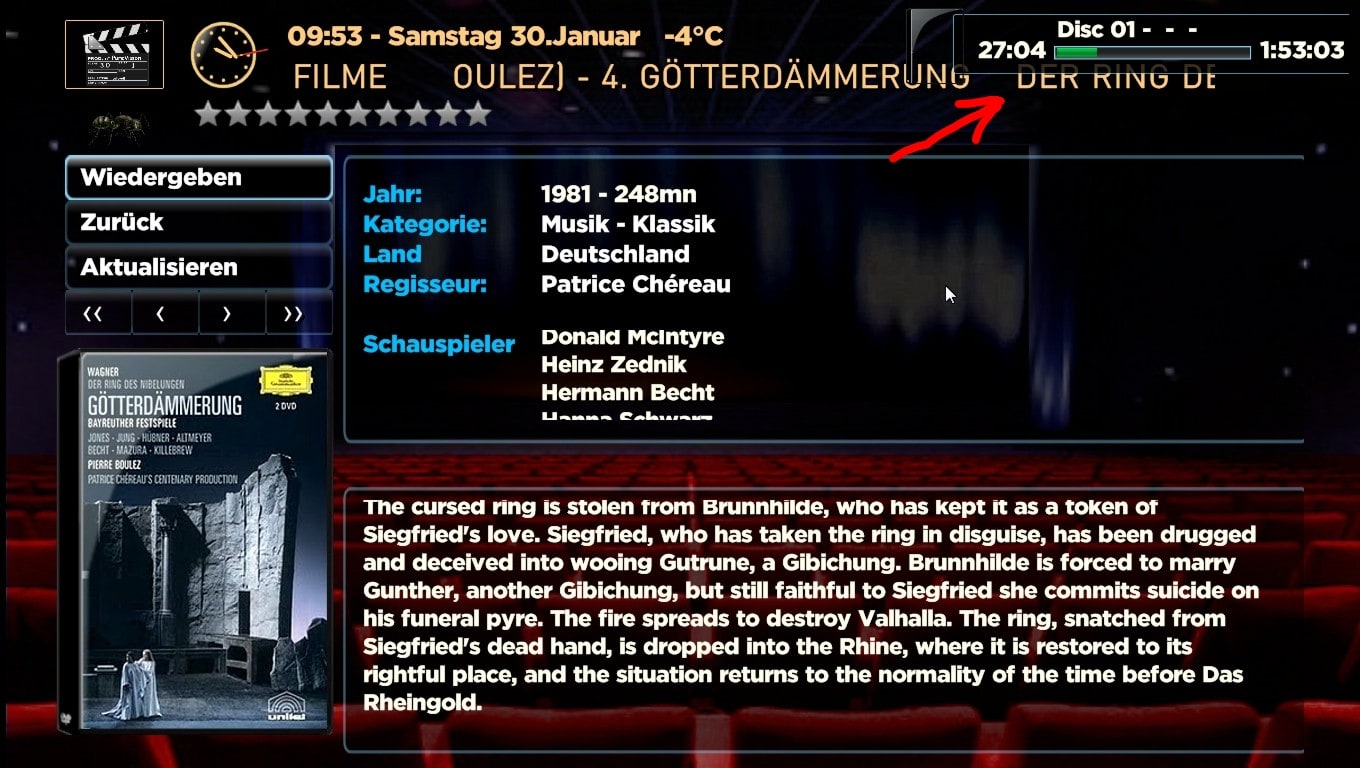
AW: PureVisionHD (16:9)
Hmm, I have to put the overlay somewhere, so it wil always overlap something. Only solution would be to shorten the text in the header line, but then you would have more text scrolling... I think we can live with that
Hmm, I have to put the overlay somewhere, so it wil always overlap something. Only solution would be to shorten the text in the header line, but then you would have more text scrolling... I think we can live with that
- Thread starter
- Moderator
- #823
New Testversion PVHD 3.5
Hi to all,
would you please test this new testversion of PureVisionHD 3.5? (You should use 1.1.0 BETA and SVN 24923 which was just released)
New: Better clock, bigger fonts in some areas, new styled MyFilms, nicer BG for Wikipedia, Shoutcast has new buttons NowPlaying and Lyrics, fixed VideoEditor (although plugin itself doesn´t work well), completely overworked all MediaInfo logos, a lot of small enhancements in a lot of screens etc.
And it is prepared for HTPCInfo 0.9.0 (just released)!
Hope you´ll enjoy it!
Hi to all,
would you please test this new testversion of PureVisionHD 3.5? (You should use 1.1.0 BETA and SVN 24923 which was just released)
New: Better clock, bigger fonts in some areas, new styled MyFilms, nicer BG for Wikipedia, Shoutcast has new buttons NowPlaying and Lyrics, fixed VideoEditor (although plugin itself doesn´t work well), completely overworked all MediaInfo logos, a lot of small enhancements in a lot of screens etc.
And it is prepared for HTPCInfo 0.9.0 (just released)!
Hope you´ll enjoy it!

Hi Catavolt, noticed when going into Music Menu>Music>Playlists> select a playlist all ok and music starts. Highlight on first song on list but cannot left arrow (in order to shuffle etc.) until I go to third entry on list then I can. Any entry after that highlights the "Back" button bottom left and I can't go up, wierd! Hope this helps, regards and
- Thread starter
- Moderator
- #825
AW: PureVisionHD (16:9)
for your thourough evaluation! Here is the fix:
for your thourough evaluation! Here is the fix:
AW: PureVisionHD (16:9)
Hi catavolt!
Thamks for the new testversion! All seems to work fine here! I like the new Myfilms (hope an update of myfilms will come soon) and the new logos very much!
Best regards
Helios
Hi catavolt!
Thamks for the new testversion! All seems to work fine here! I like the new Myfilms (hope an update of myfilms will come soon) and the new logos very much!
Best regards
Helios
Re: AW: PureVisionHD (16:9)
The fix works fine but I've found some more. 1/ Music Menu>Music, can left arrow from list, can go down but not up. 2/ Music Menu>Radio, can only go left from 3rd entry, goes down but not up. 3/ Plugins>HTPCInfo No usage bar on HardDisk, change view from Overview(default)>Details>Guages>Overview and it's there. 4/ SUDOKU screen numbers unreadable, left menu goes down but not up. I hope you don't think I'm too fussy or trying to be smart, just trying to help, I think PVHD is the greatest.Best Regards Baron
The fix works fine but I've found some more. 1/ Music Menu>Music, can left arrow from list, can go down but not up. 2/ Music Menu>Radio, can only go left from 3rd entry, goes down but not up. 3/ Plugins>HTPCInfo No usage bar on HardDisk, change view from Overview(default)>Details>Guages>Overview and it's there. 4/ SUDOKU screen numbers unreadable, left menu goes down but not up. I hope you don't think I'm too fussy or trying to be smart, just trying to help, I think PVHD is the greatest.
Best Regards Baron
- Thread starter
- Moderator
- #828
AW: PureVisionHD (16:9)
Again Baron, only this way we can assure that PVHD works as expected. Will have a look in those issues and fix. The Sudoku issue is my fault - deleted the respective tiles .
Relating to HTPCInfo: the bars are only shown on gauges view. Make sure using the last Version 0.9 of HTPCInfo plugin.
Again
Baron, only this way we can assure that PVHD works as expected. Will have a look in those issues and fix. The Sudoku issue is my fault - deleted the respective tiles .Relating to HTPCInfo: the bars are only shown on gauges view. Make sure using the last Version 0.9 of HTPCInfo plugin.
Hi catavolt,
The testversion is great ! Thanks.
I have a question however about the textcolors. In the MovingPictures thread I already posted about it here:
https://forum.team-mediaportal.com/...colors-unwatched-all-movies-77260/#post572769
As I wrote there, I cannot find the entries that ZealotSix mentions. Am I looking in the wrong place ?
The testversion is great ! Thanks.
I have a question however about the textcolors. In the MovingPictures thread I already posted about it here:
https://forum.team-mediaportal.com/...colors-unwatched-all-movies-77260/#post572769
As I wrote there, I cannot find the entries that ZealotSix mentions. Am I looking in the wrong place ?
Users who are viewing this thread
Online now: 18 (members: 0, guests: 18)