
Restart MediaPortal on resume (1 Viewer)

vecnar

Portal Pro
April 21, 2008
129
10
Home Country
Ireland Ireland
As you were able successfully run restart.vbs script it means that it is working but not after standby and i don't know why. But i would try creating a scheduled task pointing to vbscript on resume and disable restart mp on resume in configuration window. Below is url where person explains how to create a task in windows 7
How to run a script on system resume in Windows 7
 

craigparris1

Portal Pro
May 20, 2008
189
15
Home Country
So the fact that running restart.vbs manually runs fine, but is stalling after the "kill" when MediaPortal kicks it off seems to point towards my original suggestion .... that "taskkill" is also killing the script component that MediaPortal started.

I haven't had a chance to review this on my own install yet ..... anyone else seeing the same thing?

Cheers,
Craig
 

vecnar

Portal Pro
April 21, 2008
129
10
Home Country
Ireland Ireland
So the fact that running restart.vbs manually runs fine, but is stalling after the "kill" when MediaPortal kicks it off seems to point towards my original suggestion .... that "taskkill" is also killing the script component that MediaPortal started.

Craig
You are wrong as when restart.vbs is executed mp closes and loads again so taskkill is not killing the script component.
It doesn't work after resume from standby.
 

Infidelus

Portal Pro
August 12, 2006
103
6
Home Country
United Kingdom United Kingdom
As you were able successfully run restart.vbs script it means that it is working but not after standby and i don't know why. But i would try creating a scheduled task pointing to vbscript on resume and disable restart mp on resume in configuration window. Below is url where person explains how to create a task in windows 7
How to run a script on system resume in Windows 7

I had tried something similar before, just hadn't accounted for the powershell bit.

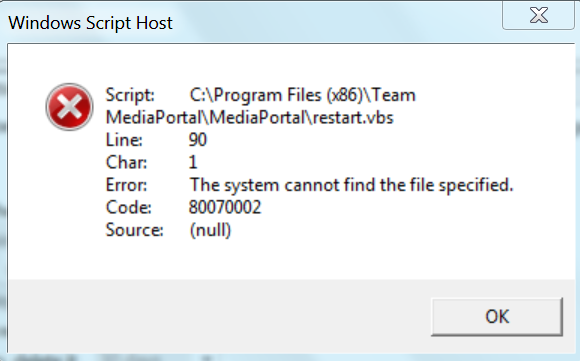
Tried again with powershell set to unrestricted. No joy, I'm still getting the same error I was before. Error screenshot attached as well as exported task so you can see if I've missed something in the task setup.
 

Attachments

  • Windows Script Host.PNG
    Windows Script Host.PNG
    60.3 KB
  • Restart MediaPortal.xml
    30.7 KB

craigparris1

Portal Pro
May 20, 2008
189
15
Home Country
So the fact that running restart.vbs manually runs fine, but is stalling after the "kill" when MediaPortal kicks it off seems to point towards my original suggestion .... that "taskkill" is also killing the script component that MediaPortal started.

Craig
You are wrong as when restart.vbs is executed mp closes and loads again so taskkill is not killing the script component.
It doesn't work after resume from standby.

That was my point ..... when you MANUALLY run the script it works OK, because it wasn't MediaPortal itself that started the script. When MediaPortal starts the script (which is what happens when you have the "restart on resume" option set within MediaPortal) it is MediaPortal itself that kicks off the script ..... but then, because of the /T parameter on taskkill, I'm suggest that the script itself gets terminated, as it's a child process of MediaPortal. Therefore it can never get to the command in the script file that starts MediaPortal again.

Sorry, still haven't got around to checking my own install to verify. Will try and do that tonight.

Cheers,
Craig
 

xmamx

Portal Member
June 10, 2008
15
10
Home Country
New Zealand New Zealand
I have just rebuilt to windows 7 x64 with mediaportal 1.1.0 rc2 and i am also having this same issue. Mediaportal wont run after resume, pressing green button on remote makes it run still. On a side note I installed MTS and it crashed windows, uninstalled it and mediaportal didnt run (so just be carefull if you decide to use it). For the moment I will just have to press green button. Sorry cant post logs at the moment.

Cheers :)
 

vecnar

Portal Pro
April 21, 2008
129
10
Home Country
Ireland Ireland
Hi craigparris1,

Maybe yo u are right but in order to confirm it just do a test and you will know if it is the case. Remove /t from restart.vbs and check if it is stuck on resume.
 

philsu

New Member
February 20, 2009
2
0
Home Country
Finland Finland
Hello,
I have the same problem- Mediaportal doesn't restart after resuming from S3 when the option is ticked under general setup.
I have been following this thread, so I've disabled UAC, running as an administrator and set the running of scripts to unrestricted.

Still doesn't restart. Exactly the same as the other reports- PC will resume, basic home displayed on TV (only two thirds of the screen though :) )then MP will close, but.... that's it. No restart. I can start MP by using the green button on the remote though.

I need to use the restart on resume function as an easy way to get around MP resuming at a reduced display resolution 'cause I'm running the HDMI through my Onkyo. EDID over-ride doesn't work for me, or delaying startup on resume.

Once MP has been running ok, you can run the restart.vbs manually and MP will close and then resume. The problem only occurs on resume from S3.

I have also tried to trigger restart.vbs using task scheduler on resume, but get the same error as above 'Line 90, column 1' problem.

Sorry if I'm repeating everything that's been done above, I just want to make clear that my problen is the same.

Any help would be appreciated.:D

Will post logs if it helps.

Forgot to say, running Windows 7 32 Bit HP.
 

Infidelus

Portal Pro
August 12, 2006
103
6
Home Country
United Kingdom United Kingdom
Glad it's not just me then having the problem :)

Hopefully someone will work out what's going wrong so it can be fixed.
 

craigparris1

Portal Pro
May 20, 2008
189
15
Home Country
Hi guys,

OK, I still haven't had a chance to test this on my own MP setup, but I did just take a moment at work to knock up a quick .Net app which essentially replicates what MediaPortal is doing - that is, my app does this:

1. starts up with a form containing a single button
2. click on the button - it runs a vbscript the same as MP's restart.vbs
3. the vbscript attempts to kill the running app, then restart it again

If I start the .Net app, then run the script in a separate command prompt window, it kills the app and then restarts it. If I use the button within the app to run the script, then it kills the app but does not restart it (log entries are the same as those users who are having MP restart problems - the kill command is logged, then no more entries).

If I remove the /T parameter from the "taskkill" command, then use the button to run the script, it kills the app and restarts it successfully (with log entries as expected).

I believe, therefore, this proves my earlier suggestion that the /T parameter is killing MediaPortal AND the restart script, so it never actually gets to the line in the script to start MediaPortal again.

My next suggestion would be to remove the /T parameter on "taskkill" in the restart.vbs script file, and monitor how that goes. Obviously, removing the /T will also mean that other child processes started by MediaPortal (aside from the restart script) will also not be terminated (and may then have duplicate instances started when MP starts again), but I don't know if this will actually be an issue or not. Plug-ins and the like should be instantiated as objects from DLLs, so they should be automatically killed when MP closes - it will be a possible problem where users have 3rd-party players or things that MP might not automatically close.

Anyhow, I do know that my own system has "tskill" on it, so I haven't personally experience the "taskkill" problem ..... but I'm also not aware of any stray executables where I have multiple copies running because MP keeps starting new ones. And my MP box is pretty much suspended and restarted just about every day (and invariably I'm on the console from time to time, and have never come across multiple instances of orphan processes).

Cheers,
Craig

In fact, if I can work out how to log this is a bug, I will do so.

Cheers,
Craig
 

Users who are viewing this thread

Top Bottom