SAF v4.00 ''stable'' (StandAlone Filters) - DXVA ready (H.264 and VC-1). (8 Viewers)

Should i integrate FFDshow in to SAF?

  • Yes

    Votes: 406 85.5%
  • No

    Votes: 69 14.5%

  • Total voters
    475

hoborg

Portal Pro
June 13, 2008
4,413
1,644
Nový Jičín
Home Country
Czech Republic Czech Republic
Where can I get MpegMux.ax ? Prefer a reliable "source" as opposed to random web downloads.

Thanks Hoborg!

MpgMux.ax is for GB-PVR usage only. This filter mux recordings to MPG. In MP1.10 will be no MPG recoding any longer, so it is useless for MP users.
 

JSorrentino

Portal Pro
September 30, 2008
90
4
Home Country
United States of America United States of America
Going back a step to the XVID problem, I just did some quick testing, and removed 3.49a, installed the newer beta, and same result. "Unable to Play"...

Reverted back to 3.47 and also had the same result.

I just put the new beta in, considering the file won't play. Still no resolve for the XVID problem, I'm kind of stumped now on this.

JS

PS. The AVI plays fine on other computer through VLC/MediaPlayer, just not this MP Box.

The MP machine is dedicated, and will not play (pretty much anything) unless you use MP, as I only have SAF installed. Could there be some other codec or whatnot missing that can be causing this? Do you recommend I install something like VLC and see if it plays on the MP dedicated HTPC?
 

hoborg

Portal Pro
June 13, 2008
4,413
1,644
Nový Jičín
Home Country
Czech Republic Czech Republic
In your FAQ it says:
Q: What video container SAF can play?
A: SAF can play:
-*.AVI
-*.MKV
-*.MP4
-*.MPG
-*.m2ts
SAF cannot play:
-*.ASF and *.WMV (microsoft format) - you should be able to play this format by default OS decoders
-*.WMV with HD video (VC-1) wil use DXVA if available
-*.MOV - you need to install QuickTime Source DirectShow Filter (QuickTime DirectShow Source Filter - MediaLooks)
-*.RM - you need to install Real Alternative (Download Real Alternative)
-*.TP - MediaPortal have its own support


This must be incomplete, right?
how about for instance the containers .flv, .ts and .wmv (without hd video)?
And what does SAF cannot play: WMV with HD video (VC-1) wil use DXVA if available mean?

And another thing. You say:
Q: Can SAF handle video streams?
A: Yes, using Online Videos MP plugin, MP4, FLV, WMV and MOV streams are suported (maybe AVI too)
So in the first question and aswer you say it doesn't support wmv and mov files, and here you say it does...how does this work?

What decoders do you recommend to use with .asf and .wmv containers?

Can other decoders be chosen to decode x264 content, or do I have to use the mpc-hc decoder after installing SAF to decode x264, for instance CoreAVC, DivX h264 decoder, PowerDVD h264 decoder, etc.?

I would like to know as much as possible before cleaning out my system, which has almost everything working, before starting to install SAF...

Yes, you are right, FAQ is uncomplete. I simply didnt remembar all format, will update it.

WMV, ASF are microsoft container and decoders are part of OS, so you OS will handle such formats.

Yes, you can istall other decoders, but you will end in codec mess...

Cyberling MPEG2 muxer

Hm ok... and now?


He means Cyberlink. I *assume* this can be pulled from the PDVD trial, but not sure on the export key to grab and rename.

JS

MpgMux.ax is not in PowerDVD. And yes, it is Cyberlink.

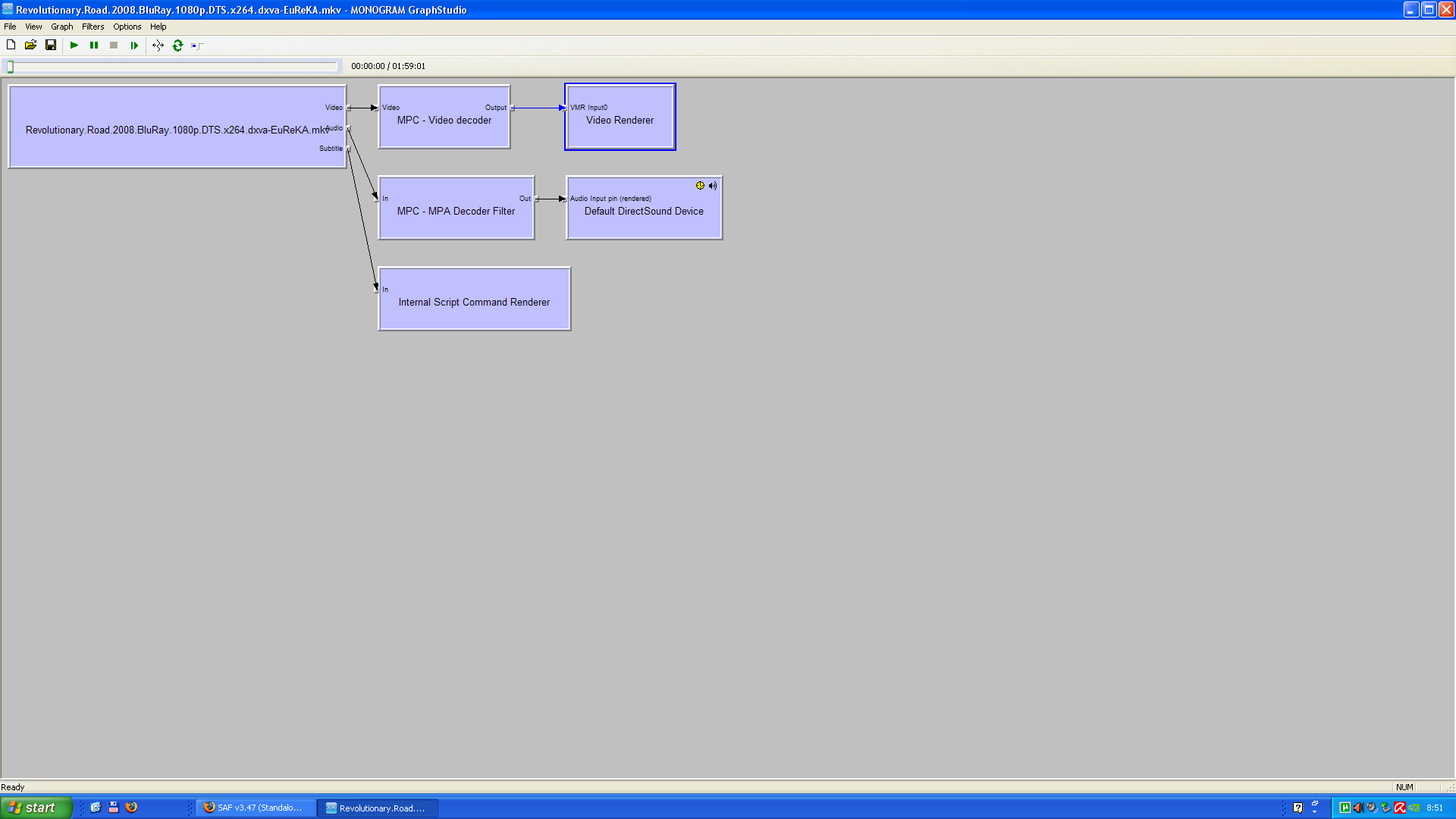
i got a problem, hoborg any idea why the graph looks like this i wanna use cyberlink codec for h264 material but it wont use it

using SAF 3.49

EDIT:

its ok figured it out sorry

Becouse MS decoder overide Cyberlink - you need to unregister this MS decoder first.

Going back a step to the XVID problem, I just did some quick testing, and removed 3.49a, installed the newer beta, and same result. "Unable to Play"...

Reverted back to 3.47 and also had the same result.

I just put the new beta in, considering the file won't play. Still no resolve for the XVID problem, I'm kind of stumped now on this.

JS

PS. The AVI plays fine on other computer through VLC/MediaPlayer, just not this MP Box.

The MP machine is dedicated, and will not play (pretty much anything) unless you use MP, as I only have SAF installed. Could there be some other codec or whatnot missing that can be causing this? Do you recommend I install something like VLC and see if it plays on the MP dedicated HTPC?

Did you enabled AVI suport in Haali install?
 

JSorrentino

Portal Pro
September 30, 2008
90
4
Home Country
United States of America United States of America
In your FAQ it says:
Q: What video container SAF can play?
A: SAF can play:
-*.AVI
-*.MKV
-*.MP4
-*.MPG
-*.m2ts
SAF cannot play:
-*.ASF and *.WMV (microsoft format) - you should be able to play this format by default OS decoders
-*.WMV with HD video (VC-1) wil use DXVA if available
-*.MOV - you need to install QuickTime Source DirectShow Filter (QuickTime DirectShow Source Filter - MediaLooks)
-*.RM - you need to install Real Alternative (Download Real Alternative)
-*.TP - MediaPortal have its own support


This must be incomplete, right?
how about for instance the containers .flv, .ts and .wmv (without hd video)?
And what does SAF cannot play: WMV with HD video (VC-1) wil use DXVA if available mean?

And another thing. You say:
Q: Can SAF handle video streams?
A: Yes, using Online Videos MP plugin, MP4, FLV, WMV and MOV streams are suported (maybe AVI too)
So in the first question and aswer you say it doesn't support wmv and mov files, and here you say it does...how does this work?

What decoders do you recommend to use with .asf and .wmv containers?

Can other decoders be chosen to decode x264 content, or do I have to use the mpc-hc decoder after installing SAF to decode x264, for instance CoreAVC, DivX h264 decoder, PowerDVD h264 decoder, etc.?

I would like to know as much as possible before cleaning out my system, which has almost everything working, before starting to install SAF...

Yes, you are right, FAQ is uncomplete. I simply didnt remembar all format, will update it.

WMV, ASF are microsoft container and decoders are part of OS, so you OS will handle such formats.

Yes, you can istall other decoders, but you will end in codec mess...

He means Cyberlink. I *assume* this can be pulled from the PDVD trial, but not sure on the export key to grab and rename.

JS

MpgMux.ax is not in PowerDVD. And yes, it is Cyberlink.

i got a problem, hoborg any idea why the graph looks like this i wanna use cyberlink codec for h264 material but it wont use it

using SAF 3.49

EDIT:

its ok figured it out sorry

Becouse MS decoder overide Cyberlink - you need to unregister this MS decoder first.

Going back a step to the XVID problem, I just did some quick testing, and removed 3.49a, installed the newer beta, and same result. "Unable to Play"...

Reverted back to 3.47 and also had the same result.

I just put the new beta in, considering the file won't play. Still no resolve for the XVID problem, I'm kind of stumped now on this.

JS

PS. The AVI plays fine on other computer through VLC/MediaPlayer, just not this MP Box.

The MP machine is dedicated, and will not play (pretty much anything) unless you use MP, as I only have SAF installed. Could there be some other codec or whatnot missing that can be causing this? Do you recommend I install something like VLC and see if it plays on the MP dedicated HTPC?

Did you enabled AVI suport in Haali install?

Yes, I did enable AVI support. I actually removed SAF, then Halii and completely reinstalled.

Doing some more testing now. Just played another AVI and it worked fine, but this particular one did not. Not seeing anything major that's different either.

File plays fine in VLC and MediaPlayer on another computer. This HTPC will play it in VLC, but audio only in Mediaplayer because I dont have a codec for video in Mediaplayer to test with.

JS

EDIT: Also tried to use MPC (selected on 3.49 install) - no good, and reinstalled again with XVID - no good. I'm stumped.
 

hoborg

Portal Pro
June 13, 2008
4,413
1,644
Nový Jičín
Home Country
Czech Republic Czech Republic
Yes, I did enable AVI support. I actually removed SAF, then Halii and completely reinstalled.

Doing some more testing now. Just played another AVI and it worked fine, but this particular one did not. Not seeing anything major that's different either.

File plays fine in VLC and MediaPlayer on another computer. This HTPC will play it in VLC, but audio only in Mediaplayer because I dont have a codec for video in Mediaplayer to test with.

JS

EDIT: Also tried to use MPC (selected on 3.49 install) - no good, and reinstalled again with XVID - no good. I'm stumped.

Mux not working avi in to MKV by mkv merge, split it in MKV merge and post small example.
 

shackrock

Portal Pro
December 27, 2008
291
12
Raleigh, NC
Home Country
United States of America United States of America
Question to all with DTS via SPDIF problem:

Is this problem you are fighting with?

Hm, thats a little bit curios.... i dont change anything. Blade ok, Demo not. Than i put blade in, ok... than i put demo in, not ok. Check setup all ok. Restart, after restard demo ok...

but is there a way to simulate surround via headphone with software settings?

Can be your soundcard settings too.


This is definitely the problem I'm having with DTS of SPDIF...... if the fix is to use spdifer, is there anyway that spdifer can be included in the SAF pack? ...
 

csabakon

Portal Member
May 22, 2009
14
0
Home Country
Hungary Hungary
Question to all with DTS via SPDIF problem:

Is this problem you are fighting with?

Hm, thats a little bit curios.... i dont change anything. Blade ok, Demo not. Than i put blade in, ok... than i put demo in, not ok. Check setup all ok. Restart, after restard demo ok...

but is there a way to simulate surround via headphone with software settings?

Can be your soundcard settings too.


This is definitely the problem I'm having with DTS of SPDIF...... if the fix is to use spdifer, is there anyway that spdifer can be included in the SAF pack? ...

Hi, I just tested spdifer and it did not helped me at all. I still have problems with DTS and with Dolby also

I have also problem with SAF. 3.47 and with the new beta 11

Hoborg any Idea?
 

Attachments

  • htpc.PNG
    htpc.PNG
    83.9 KB

shackrock

Portal Pro
December 27, 2008
291
12
Raleigh, NC
Home Country
United States of America United States of America
Question to all with DTS via SPDIF problem:

Is this problem you are fighting with?


Can be your soundcard settings too.


This is definitely the problem I'm having with DTS of SPDIF...... if the fix is to use spdifer, is there anyway that spdifer can be included in the SAF pack? ...

Hi, I just tested spdifer and it did not helped me at all. I still have problems with DTS and with Dolby also

I have also problem with SAF. 3.47 and with the new beta 11

Hoborg any Idea?

On that other forum thread, it mentions having to be sure you DISABLE DTS in AC3filter (or any other filter you may be using)...and ENABLE DTS in spdifer.... otherwise they compete and performance doesn't change. I'm not sure how to disable DTS from the SAF audio filter(s)...so I'm not sure you REALLY had it working right. I can't figure it out, either. haha.
 

Users who are viewing this thread

Top Bottom