SAF v4.00 ''stable'' (StandAlone Filters) - DXVA ready (H.264 and VC-1). (5 Viewers)

Should i integrate FFDshow in to SAF?

  • Yes

    Votes: 406 85.5%
  • No

    Votes: 69 14.5%

  • Total voters
    475

hoborg

Portal Pro
June 13, 2008
4,413
1,644
Nový Jičín
Home Country
Czech Republic Czech Republic
Hello, nice to hear it is working to you. :)
Well, best thing you can do is split non working video by MKVmerge and post some examples here, so i can look on them. This takes just few clicks.

About your VSFilter problem - VSfilter only load when needed, thats mean only when video have subtitles, or can by loaded by differen splitter then Haali.
Are you sure your video don't have subtitles?

I think i will create a section with video examples, and split them to working and non working with SAF...

I dumped a sample for you to look at. I checked it with graphstudio and nothing else is loading. I also used id changer and set it to 4.1 and that made no difference. Any insight you can give would be awesome. Thanks for your time!

When I had VSFilter/DirectVobSub installed two DirectShow filters showed up, "DirectVobSub" and "DirectVobSub (forced auto-loading version)" (checked with Radlight filter manager from here). I wonder if you check the option shown in this image it will turn the forced auto loading version off that seemed to cause the problem with DXVA/acceleration?

Thanks for tip, but this screen is from some very old DirectVobSub version. I newer enable this so i try it and it have no efect. When i start video without subtitles, DirectVobSub don't load.
I never see "forced auto load" directvobsub in my graph. It seems this is the troublemaker, so if you can create graph and show detailed info about this filter, i should be able to fix it in future SAF relase. I was not able to reproduce such problem, so i need your help.
 

thebalance

MP Donator
  • Premium Supporter
  • August 11, 2008
    113
    0
    Home Country
    United Kingdom United Kingdom
    Hoborg,

    On my problem with MediaPortal playback I have some more detail and would be grateful if you can see where my problem lies please.

    I've followed the instructions again and have removed PowerDVD 8 and installed SAF2.4.

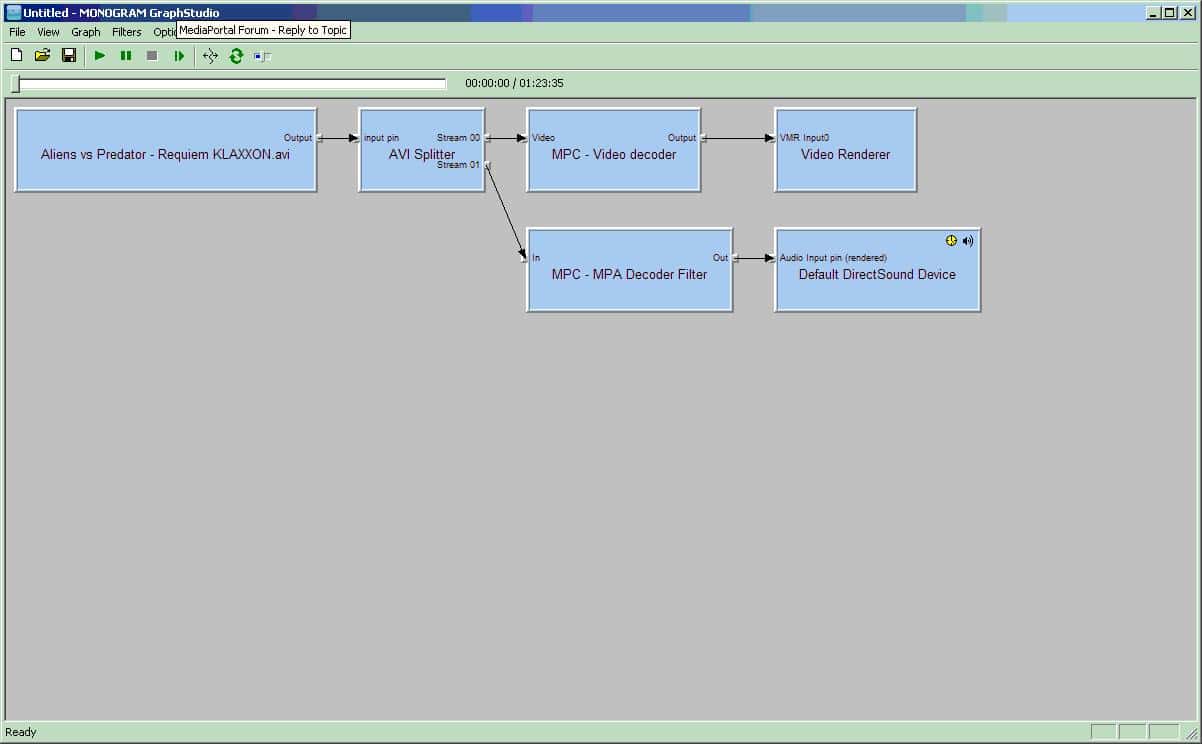
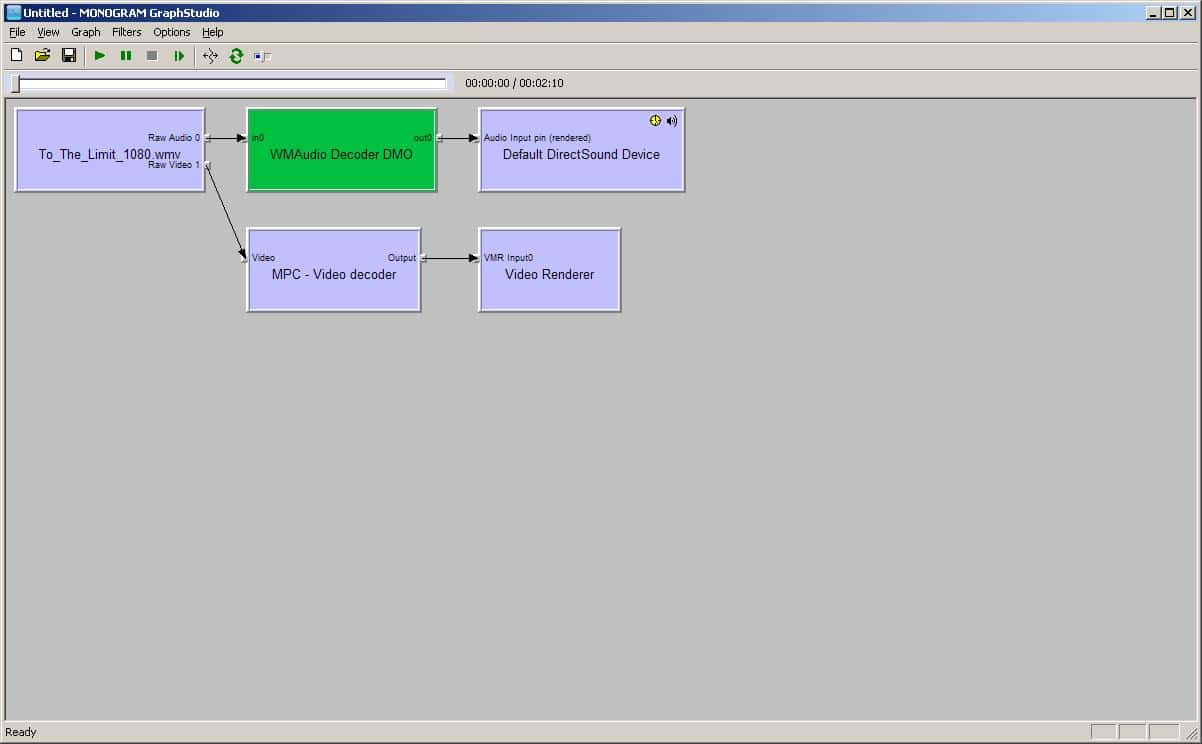
    I've tested playback specifically on two files - one is To The Limit a Microsoft sample HD file (as best as I can tell by loading the file in imedian it is WMV3, WMA3) and the other is a copy of AvP Requiem (XVid, AC3).

    With the current config (having ticked the use hardware accelaration options under directshow in the MP config - incidentally I'm using 1.0.0.0 RC3) I see processor use of 50-55% on both films and stuttering - it is like the picture is being played frame by frame (the AvP file starts with a picture of the earth moving right to left across the screen and it is noticeable that it looks frame by frame).

    If I try the same files in WMP11 (without unloading MP so some extra load in the background) my processor use is 7-10% on AvP and 19-36% on To the limit and playback is flawless.

    In terms of machine config I have a Gigabyte MA78GPm-DS2H (a 780g board) with 2Gb 667 ram (single stick), AMD 4850e processor and now using ATI Catalyst 8.5 on XP Pro SP3.

    I'm attaching log files where I've played both videos long enough to visibly see a problem & a screenshot from GraphStudio.

    I should note another problem here though - both graphstudio and graphedit see the graph being produced by MP but since I've installed RC3 and XP SP3 & SAF (ie a string of changes so I cannot tell where the problem is) I cannot connect to the graph so had to load the file into the graph programme separately.

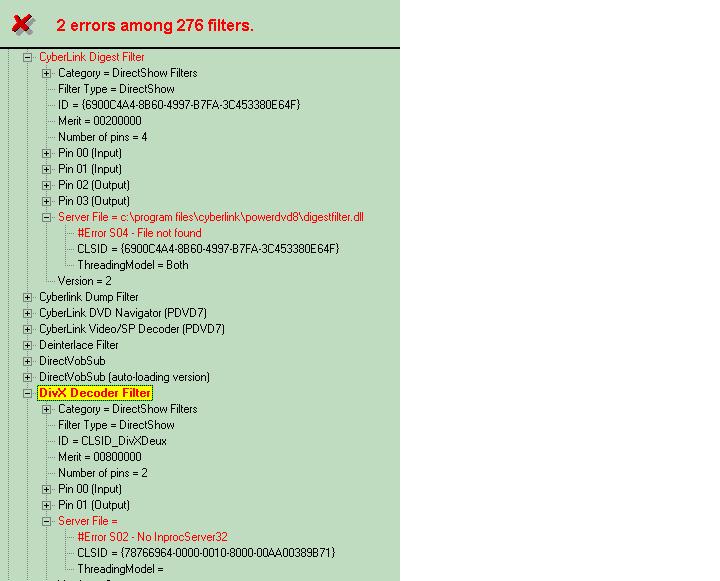
    I've added one more file which is from running Filmerit - I can see they are problems & I am guessing the first is just a case of delete the entry as it is for a product no longer installed but the second I'm not would be good to delete and don't know how to replace without going back to the start yet again - hopefully your better experience here could tell me how to solve that and may also identify if this is a root cause of my problems.

    Hugely greatful for any assistance you can give.
     

    Attachments

    • ToTheLimit.JPG
      ToTheLimit.JPG
      54 KB
    • AvP.JPG
      AvP.JPG
      59.4 KB
    • FilmMerit.JPG
      FilmMerit.JPG
      50.2 KB

    hoborg

    Portal Pro
    June 13, 2008
    4,413
    1,644
    Nový Jičín
    Home Country
    Czech Republic Czech Republic
    Hello, nice to hear it is working to you. :)
    Well, best thing you can do is split non working video by MKVmerge and post some examples here, so i can look on them. This takes just few clicks.

    About your VSFilter problem - VSfilter only load when needed, thats mean only when video have subtitles, or can by loaded by differen splitter then Haali.
    Are you sure your video don't have subtitles?

    I think i will create a section with video examples, and split them to working and non working with SAF...

    I dumped a sample for you to look at. I checked it with graphstudio and nothing else is loading. I also used id changer and set it to 4.1 and that made no difference. Any insight you can give would be awesome. Thanks for your time!

    I have bad news for you.
    Your video is in MPEG4 format, so no DXVA compatible.
    Only H.264 and VC-1 decoding can use DXVA.

    EDIT:
    Sorry, i check it again and it is H.264...
    So it look like it is simply wrongly made H.264 video.

    I re-encode your example and it is now working correctly
    View attachment 28249
     

    akajester

    Portal Pro
    October 13, 2008
    318
    17
    Home Country
    United States of America United States of America
    I re-encode your example and it is now working correctly

    That worked! I bet this will fix a bunch of my videos! Can you tell me how to reencode it? can I do that in mkvmerge? Thanks!
     

    hoborg

    Portal Pro
    June 13, 2008
    4,413
    1,644
    Nový Jičín
    Home Country
    Czech Republic Czech Republic
    Hoborg,

    On my problem with MediaPortal playback I have some more detail and would be grateful if you can see where my problem lies please.

    I've followed the instructions again and have removed PowerDVD 8 and installed SAF2.4.

    I've tested playback specifically on two files - one is To The Limit a Microsoft sample HD file (as best as I can tell by loading the file in imedian it is WMV3, WMA3) and the other is a copy of AvP Requiem (XVid, AC3).

    With the current config (having ticked the use hardware accelaration options under directshow in the MP config - incidentally I'm using 1.0.0.0 RC3) I see processor use of 50-55% on both films and stuttering - it is like the picture is being played frame by frame (the AvP file starts with a picture of the earth moving right to left across the screen and it is noticeable that it looks frame by frame).

    If I try the same files in WMP11 (without unloading MP so some extra load in the background) my processor use is 7-10% on AvP and 19-36% on To the limit and playback is flawless.

    In terms of machine config I have a Gigabyte MA78GPm-DS2H (a 780g board) with 2Gb 667 ram (single stick), AMD 4850e processor and now using ATI Catalyst 8.5 on XP Pro SP3.

    I'm attaching log files where I've played both videos long enough to visibly see a problem & a screenshot from GraphStudio.

    I should note another problem here though - both graphstudio and graphedit see the graph being produced by MP but since I've installed RC3 and XP SP3 & SAF (ie a string of changes so I cannot tell where the problem is) I cannot connect to the graph so had to load the file into the graph programme separately.

    I've added one more file which is from running Filmerit - I can see they are problems & I am guessing the first is just a case of delete the entry as it is for a product no longer installed but the second I'm not would be good to delete and don't know how to replace without going back to the start yet again - hopefully your better experience here could tell me how to solve that and may also identify if this is a root cause of my problems.

    Hugely greatful for any assistance you can give.

    Hello.
    I didnt found any problems here, logs and graphs seems to be OK.
    The first wideo is little special (ASF format) - i dont have any example of such video here.

    The second one - you can reinstall Haali and enable AVI splitting, so AVIs will be splitted by Haali as MKVs files.
    But i suggest to convert avi to MKV by MKVmerge. It will only take few mouse click.

    I re-encode your example and it is now working correctly

    That worked! I bet this will fix a bunch of my videos! Can you tell me how to reencode it? can I do that in mkvmerge? Thanks!

    I dit it by "Xvid4PSP" soft. I realy like this soft. It is realy easy to use, just drag&drop your file, setup Format to MKV, Video Encoding to x264 HQ ultra and audio as Copy. But be prepared - this re-encode can take whole night...
     

    thebalance

    MP Donator
  • Premium Supporter
  • August 11, 2008
    113
    0
    Home Country
    United Kingdom United Kingdom
    Thanks for looking at file files - have tried reinstall of Haali with no impact, will try the MKV option later.

    It is a worry how MP is the only product impacted and how it always uses much more CPU than other prodcts and although there is headroom on my CPU use it does indicate a coding issue somewhere - not just on the movies, slideshows are very processor intensive on MP too.

    Still at least everything is working, it might not be watchable in MP but it does mean I can now venture onto trying to configure my TV card without too many worries about codecs.
     

    jo16v

    Portal Pro
    August 23, 2008
    263
    8
    Home Country
    United Kingdom United Kingdom
    I've tested playback specifically on two files - one is To The Limit a Microsoft sample HD file (as best as I can tell by loading the file in imedian it is WMV3, WMA3) and the other is a copy of AvP Requiem (XVid, AC3).
    The "To The Limit" file is a Windows Media Video 9 file (as are all files on this page). WMV9 is an older pre-cursor to VC-1 and most of them don't work with DXVA. You need a VC-1 file like this Dark Knight trailer to test. Also any 720p/1080p file from here to test AVC/h.264.
     

    hoborg

    Portal Pro
    June 13, 2008
    4,413
    1,644
    Nový Jičín
    Home Country
    Czech Republic Czech Republic
    I've tested playback specifically on two files - one is To The Limit a Microsoft sample HD file (as best as I can tell by loading the file in imedian it is WMV3, WMA3) and the other is a copy of AvP Requiem (XVid, AC3).
    The "To The Limit" file is a Windows Media Video 9 file (as are all files on this page). WMV9 is an older pre-cursor to VC-1 and most of them don't work with DXVA. You need a VC-1 file like this Dark Knight trailer to test. Also any 720p/1080p file from here to test AVC/h.264.

    Exactly. You should try some standart AVC/h.264 file first (not in Windows Media Video format).
     

    jo16v

    Portal Pro
    August 23, 2008
    263
    8
    Home Country
    United Kingdom United Kingdom
    Exactly. You should try some standart AVC/h.264 file first (not in Windows Media Video format).
    Just to add, obviously it is likely VC-1 or h.264 files will not play either for balance as there seems to be a fundemental problem they have with MPC decoder in MP, exactly like I have- I just thought it would be useful for testing (i.e. in MPC-HC player). I think it is very likely our problem is to do with filter merits and only a reinstall, without installing anything like Realplayer, Nero, Quicktime or any codec packs, and just installing MediaPortal, WMP11, and then maybe trying SAF pack and then PowerDVD for HDTV. Hoborg is it possible you can have an option to not install the Cyberlink decoder/navigator for those who want to use SAF alongside PDVD for HDTV?:D
     

    hoborg

    Portal Pro
    June 13, 2008
    4,413
    1,644
    Nový Jičín
    Home Country
    Czech Republic Czech Republic
    Exactly. You should try some standart AVC/h.264 file first (not in Windows Media Video format).
    Just to add, obviously it is likely VC-1 or h.264 files will not play either for balance as there seems to be a fundemental problem they have with MPC decoder in MP, exactly like I have- I just thought it would be useful for testing (i.e. in MPC-HC player). I think it is very likely our problem is to do with filter merits and only a reinstall, without installing anything like Realplayer, Nero, Quicktime or any codec packs, and just installing MediaPortal, WMP11, and then maybe trying SAF pack and then PowerDVD for HDTV. Hoborg is it possible you can have an option to not install the Cyberlink decoder/navigator for those who want to use SAF alongside PDVD for HDTV?:D

    Instead of this option i am thinking to add PowerDVD 8 HD decoder in to SAF only for TV configuration. I have one example of non working *.TS file, but i have no idea why, audio doesn't work (no graph created for audio inside MP). It is not created even whole PowerDVD 8 is installed. I will create SAF test version, so you can try it on HDTV by yourself...

    If you have 100% working HDTV, you should create graph and post it here- this can help.
     

    Users who are viewing this thread

    Top Bottom