SAF v4.00 ''stable'' (StandAlone Filters) - DXVA ready (H.264 and VC-1). (20 Viewers)

Should i integrate FFDshow in to SAF?

  • Yes

    Votes: 406 85.5%
  • No

    Votes: 69 14.5%

  • Total voters
    475

Ingram

Portal Pro
December 9, 2008
98
2
Home Country
Re: SAF v4.00beta (StandAlone Filters) - DXVA ready (MPEG2, H.264 and VC-1).

Subtitles get messed up if you use the resizing function of FFDShow.

As for your tweaking, are you still applying deinterlacing?

Find a PAL DVD and compare Deinterlacing on and off. Find some white text over black credits, you see the quality drop there.

Good threat about deinterlacing is here: HD 1080i Test Pattern to determine Vector Adaptive Deinterlacing + others icl. Ticker - AVS Forum

here is my results: (FFDShow, output to NV12, VA HW deinterlacing)
ffdshow_nv12.jpg

Looks good, but that scene is interlaced. Find something that is progressive, like a FILM->PAL converted DVD. And you will see your settings are degrading the image by applying BOB deinterlacing or something similar when it should be simply WEAVED.
 

markrb

Portal Pro
April 22, 2006
128
2
Re: SAF v4.00beta (StandAlone Filters) - DXVA ready (MPEG2, H.264 and VC-1).

I have a Xonar Slim and successfully tested Dolby True-HD audio pass through and AC3 pass through without loosing any other audio features with SAF400Beta23test2. I have yet to test DTS-MA, but plan to soon.
The Key with the Xonar is to register and use the Arcsoft Total Media 3 (don't know if 2 will work) audio renderer instead of default. The Xonar came with TMT3 or you can download a free copy from Asus that will only work if you have a Xonar installed. To register run the command regsvr32 ASAudioRenderer.dll in the C:\Program Files\ArcSoft\TotalMedia Theatre 3\Codec directory. After doing that the Arcsoft renderer will show up in MP. You still need to manually check off all the HD formats in ffdshow and setup ffdshow post processing in MP. I am not sure if it was needed, but I checked compatibility mode in ffdshow.

I have only been running this way for a few hours and I do not use the TV server. I did have some issues, but I think I worked out the kinks at least I hope I did.
I am finally getting a HTPC very close to perfect for me and it only has taken 2 years so far.

Mark
 

hoborg

Portal Pro
June 13, 2008
4,413
1,644
Nový Jičín
Home Country
Czech Republic Czech Republic
Re: SAF v4.00beta (StandAlone Filters) - DXVA ready (MPEG2, H.264 and VC-1).

Looks good, but that scene is interlaced. Find something that is progressive, like a FILM->PAL converted DVD. And you will see your settings are degrading the image by applying BOB deinterlacing or something similar when it should be simply WEAVED.

? There shouldnot be any deinterlacing at all if picture is progresive... :confused:
Here is progresive picture:
ffdshow_nv12_progresive.jpg
 

edterbak

Portal Pro
March 4, 2008
2,114
1,176
Home Country
Netherlands Netherlands
Re: SAF v4.00beta (StandAlone Filters) - DXVA ready (MPEG2, H.264 and VC-1).

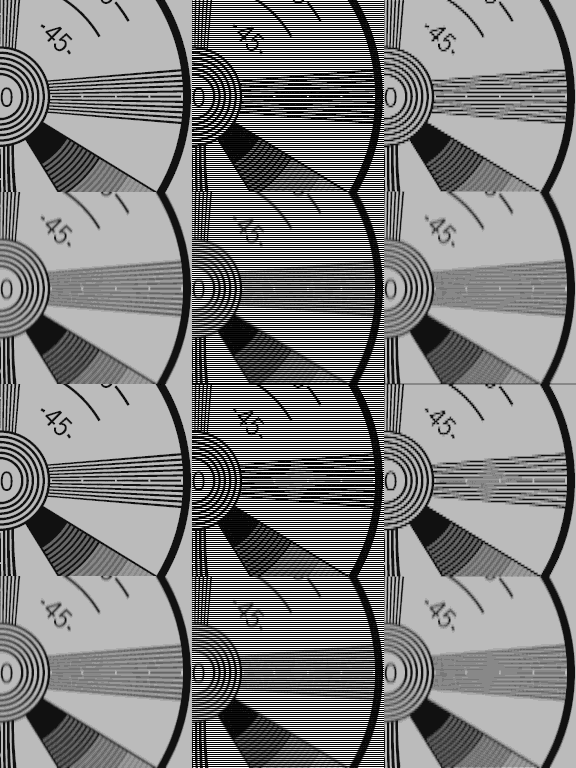
Just to give a propper example for the interested people what hoborg is talking about. The difference between progressive and interlaced:

attachment.php

From left to right: progressive, interlaced animation, and reconstructed (=de-interlaced) using bob (interpolation per field) algorithm.
Top row: original full-resolution image; Bottom row: vertically blurred... (techniques to reduce judder effect)

Progressive: 100% of image is drawn in cycle 1 and 100% in cycle 2 and so on.
Interlaced: 50% if image is drawn in cycle 1 and the remaining 50% in cycle 2 and so on.

In the GIF file the interlaced action (top-middle picture) is slowed down obviously to make it visible what is happening. However, it is obvious that that interlaced movies produce a kind of nevrous/jumpy feeling and are of a lesser quality than progressive.
 

Attachments

  • Indian_Head_interlace.gif
    Indian_Head_interlace.gif
    54.2 KB

Benoe

Portal Pro
December 12, 2006
63
2
Home Country
Hungary Hungary
Re: SAF v4.00beta (StandAlone Filters) - DXVA ready (MPEG2, H.264 and VC-1).

How can someone set up in mp that for vc-1 contect what codec should be used?

Any suggestion to this question? (How can I use Cyberlink to decode VC-1 content in MP?)
 

edterbak

Portal Pro
March 4, 2008
2,114
1,176
Home Country
Netherlands Netherlands
Re: SAF v4.00beta (StandAlone Filters) - DXVA ready (MPEG2, H.264 and VC-1).

How can someone set up in mp that for vc-1 contect what codec should be used?

Any suggestion to this question? (How can I use Cyberlink to decode VC-1 content in MP?)

For VC-1 material I use (SAF's) MPC-HC video decoder. "MPCVideoDec.ax".
Inside mediaportal.exe you can go to renderer settings and select per mediagroup what filters should be used. Here you can specify for MPEG2/DVD the codec, for H264 material (Which includes VC-1), etc. You can specify mpc-hc or powerdvd codecs to do the job.

If you get SAF unlocked (PM Hoborg for instructions) this will be easiest for you.

Good luck
 

Benoe

Portal Pro
December 12, 2006
63
2
Home Country
Hungary Hungary
Re: SAF v4.00beta (StandAlone Filters) - DXVA ready (MPEG2, H.264 and VC-1).

How can someone set up in mp that for vc-1 contect what codec should be used?
For VC-1 material I use (SAF's) MPC-HC video decoder. "MPCVideoDec.ax".
Inside mediaportal.exe you can go to renderer settings and select per mediagroup what filters should be used. Here you can specify for MPEG2/DVD the codec, for H264 material (Which includes VC-1), etc. You can specify mpc-hc or powerdvd codecs to do the job.

Yes, but I have problem playing back a certain VC-1 material with MPC decoder, that's why I need cyberlink (see my previous post I have linked)

And as I remember I even tried to set MP to powerdvd codec in H264 material at Video mediagroup, but the playback was still with MPC codec. (according to the bad playback and to graphstudio as well)
 

tourettes

Retired Team Member
  • Premium Supporter
  • January 7, 2005
    17,301
    4,800
    Re: SAF v4.00beta (StandAlone Filters) - DXVA ready (MPEG2, H.264 and VC-1).

    Yes, but I have problem playing back a certain VC-1 material with MPC decoder, that's why I need cyberlink (see my previous post I have linked)

    VC-1 interlaced content by any change? As it is not supported (yet) by the MPC-HC decoder.

    And as I remember I even tried to set MP to powerdvd codec in H264 material at Video mediagroup, but the playback was still with MPC codec. (according to the bad playback and to graphstudio as well)

    You could try to dsable the VC-1 setting in MPC-HC decoder (connect to the running graph with GraphEdit and disable the option from MPC-HC decoder's property page).
     

    Benoe

    Portal Pro
    December 12, 2006
    63
    2
    Home Country
    Hungary Hungary
    Re: SAF v4.00beta (StandAlone Filters) - DXVA ready (MPEG2, H.264 and VC-1).

    VC-1 interlaced content by any change? As it is not supported (yet) by the MPC-HC decoder.

    Yes.

    You could try to dsable the VC-1 setting in MPC-HC decoder (connect to the running graph with GraphEdit and disable the option from MPC-HC decoder's property page).

    I will try that when I get home. Thanks.
     

    hoborg

    Portal Pro
    June 13, 2008
    4,413
    1,644
    Nový Jičín
    Home Country
    Czech Republic Czech Republic
    Re: SAF v4.00beta (StandAlone Filters) - DXVA ready (MPEG2, H.264 and VC-1).

    Interlaced VC-1 is not supporterd by MPC-HC as tourettes mentioned.

    I do not known why, but new Cyberlink video decoder should support VC-1, but failed to decode any VC-1 at all - no ide why - maybe some registry entries are missing?
     

    Users who are viewing this thread

    Top Bottom