Codecs SAF v5.02 *final* (based on FFDShow DXVA decoder) (18 Viewers)

metagrobolis

Portal Member
March 7, 2008
38
1
Re: SAF v5.00 experimental (based on FFDShow DXVA decoder)

SAF 5.00 SVN101201:
- ALL - MPC-HC filters/player updated to rev. 1.4.2747
- ALL - FFDShow updated to rev.3634

Hoborg, thanks for all your efforts. I've just cut over to SAF5 (101201) from Shark007 and am having some trouble getting some of my 1080p .mp4's to work properly under DXVA.

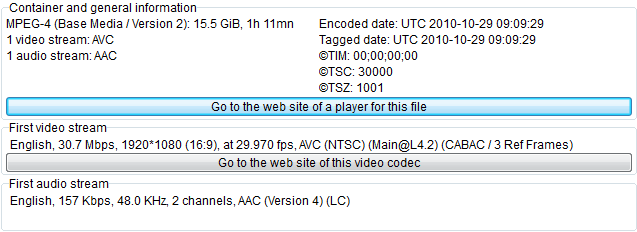
First, I am getting extreme stuttering in all my 1080p .mp4 content under ffdshow DXVA. A MediaInfo dump for a representative file is attached. I get extreme frame-drop/stuttering with cpu utilisation hovering around 50-65% (indicating poor DXVA speedup). By contrast, using Win 7's built-in MS DTV-DVD Video decoder in MePo config results in silky smooth playback with <10% cpu utilisation.

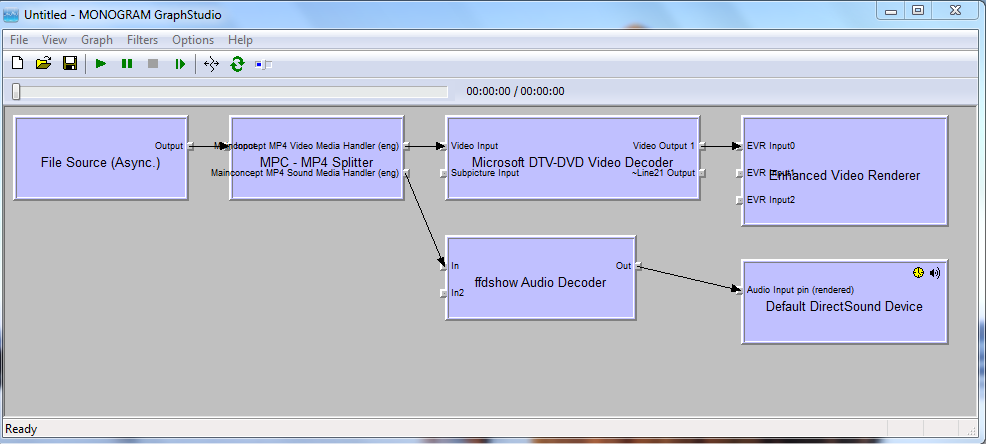
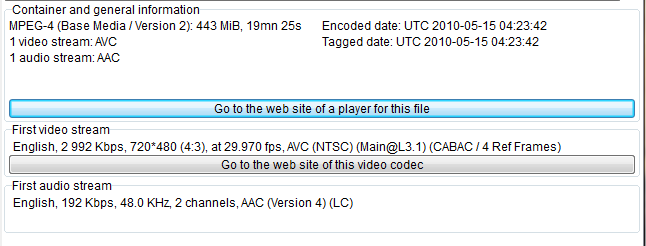
I would be content to just use the MS decoder; unfortunately however, using it alongside ffdshow for audio results in audio sync issues. I get into an out-of-sync condition any time I skip fwd or backward in the video stream. The MediaInfo dump for a 720p .mp4 file alongwith the filtergraph used by MePo while exhibiting this behaviour is attached. Its worth mentioning that there are no audio sync issues if ffdshow video and audio are both used together.

So, I'm in a bit of bind here. I need/prefer the MS decoder given its superb IQ and the difficulty ffdshow DXVA is having with my 1080p content, but using the MS decoder results in unacceptable audio-sync problems.

Any help and/or guidance here is much appreciated. Thanks in advance, and do keep up the great work!
 

Attachments

  • 1080p-MP4-DXVA.PNG
    1080p-MP4-DXVA.PNG
    23.3 KB
  • 720p-MP4-DXVA.PNG
    720p-MP4-DXVA.PNG
    23.3 KB
  • MP4-Graph.PNG
    MP4-Graph.PNG
    63.7 KB

rich76

Portal Pro
December 3, 2006
141
30
Home Country
United Kingdom United Kingdom
Re: SAF v5.00 experimental (based on FFDShow DXVA decoder)

Can some1 send me a pm on how to unlock.
TIA

Rich
 

hoborg

Portal Pro
June 13, 2008
4,413
1,644
Nový Jičín
Home Country
Czech Republic Czech Republic
Re: SAF v5.00 experimental (based on FFDShow DXVA decoder)

SAF 5.00 SVN101201:
- ALL - MPC-HC filters/player updated to rev. 1.4.2747
- ALL - FFDShow updated to rev.3634

Hoborg, thanks for all your efforts. I've just cut over to SAF5 (101201) from Shark007 and am having some trouble getting some of my 1080p .mp4's to work properly under DXVA.

First, I am getting extreme stuttering in all my 1080p .mp4 content under ffdshow DXVA. A MediaInfo dump for a representative file is attached. I get extreme frame-drop/stuttering with cpu utilisation hovering around 50-65% (indicating poor DXVA speedup). By contrast, using Win 7's built-in MS DTV-DVD Video decoder in MePo config results in silky smooth playback with <10% cpu utilisation.

I would be content to just use the MS decoder; unfortunately however, using it alongside ffdshow for audio results in audio sync issues. I get into an out-of-sync condition any time I skip fwd or backward in the video stream. The MediaInfo dump for a 720p .mp4 file alongwith the filtergraph used by MePo while exhibiting this behaviour is attached. Its worth mentioning that there are no audio sync issues if ffdshow video and audio are both used together.

So, I'm in a bit of bind here. I need/prefer the MS decoder given its superb IQ and the difficulty ffdshow DXVA is having with my 1080p content, but using the MS decoder results in unacceptable audio-sync problems.

Any help and/or guidance here is much appreciated. Thanks in advance, and do keep up the great work!

If you disable FFDshow subtitle engine, does it happend too?
If yes, can you post small video sample to reproduce?

EDIT:
BTW, there is an profile in FFDShow DXVA "xMP4@50" - if you *.MP4 video have 50FPS, DxVA is not in use becouse there is an "bug" in decoder causing glitch every 3s. Becouse of this, regular FFDshow decoder is in use.
 

metagrobolis

Portal Member
March 7, 2008
38
1
Re: SAF v5.00 experimental (based on FFDShow DXVA decoder)

If you disable FFDshow subtitle engine, does it happend too?
If yes, can you post small video sample to reproduce?

EDIT:
BTW, there is an profile in FFDShow DXVA "xMP4@50" - if you *.MP4 video have 50FPS, DxVA is not in use becouse there is an "bug" in decoder causing glitch every 3s. Becouse of this, regular FFDshow decoder is in use.

Thanks for your response. FFDshow subtitle engine is disabled and the content is 29.97 fps (see mediainfo reports in my last message). So, its unlikely that I'm running into the xMP4@50 issue.

I'm attaching a sample .mp4 here. The MS decoder results in smooth playback in MePo while FFDshow DxVA results in extreme stuttering/frame-drops. Hopefully this helps.

In the meantime, any ideas on how to get around/eliminate the audio sync issue when using the Win 7 native decoder and FFDshow audio together? I momentarily reverted to the latest Shark007 to test this combination with Haali's splitter ... the audio sync issue after skipping back and forth in the stream was there but decidedly less severe than with SAF5's .mp4 splitter. I'm afraid I don't know enough about this stuff to know whether this is relevant, but thought I'd let you know any way.

Much thanks in advance for your help.
 

shaitan

Portal Member
June 27, 2009
15
2
Home Country
Germany Germany
Re: SAF v5.00 experimental (based on FFDShow DXVA decoder)

Hi,

I have a strange problem with my sound. I'm using SAF 5.0 *unlocked*

Sometimes my PC looses the capability to play any AC3 or DTS Sound and instead it plays strange Sounds like a loud "clicking noise". Default Stereo PCM still works fine, but each DVD, BlueRay or TV-AC3 fails. This behavior doesn't affect the Video playback.

I tried a newer SAF release and newer ATI-Driver, but the problem is still there.

Unfortunately I cannot reproduce the Error in a definite way. :oops:
First I thought it happens if I turn the HTPC to Standby while Sound-Playback (TV e.g) is running, and after Resume it fails, but then I stopped playback before the StandBy and it still fails on Resume.

Only I can 100% say: After a complete Reboot it works for some time - but I hate to reboot every time I want to switch to other Sound then PCM. :mad:

Is there anybody with similar Problems or an idea what goes wrong / how to fix it?


Any ideas? :confused:
 

hoborg

Portal Pro
June 13, 2008
4,413
1,644
Nový Jičín
Home Country
Czech Republic Czech Republic
Re: SAF v5.00 experimental (based on FFDShow DXVA decoder)

If you disable FFDshow subtitle engine, does it happend too?
If yes, can you post small video sample to reproduce?

EDIT:
BTW, there is an profile in FFDShow DXVA "xMP4@50" - if you *.MP4 video have 50FPS, DxVA is not in use becouse there is an "bug" in decoder causing glitch every 3s. Becouse of this, regular FFDshow decoder is in use.

Thanks for your response. FFDshow subtitle engine is disabled and the content is 29.97 fps (see mediainfo reports in my last message). So, its unlikely that I'm running into the xMP4@50 issue.

I'm attaching a sample .mp4 here. The MS decoder results in smooth playback in MePo while FFDshow DxVA results in extreme stuttering/frame-drops. Hopefully this helps.

In the meantime, any ideas on how to get around/eliminate the audio sync issue when using the Win 7 native decoder and FFDshow audio together? I momentarily reverted to the latest Shark007 to test this combination with Haali's splitter ... the audio sync issue after skipping back and forth in the stream was there but decidedly less severe than with SAF5's .mp4 splitter. I'm afraid I don't know enough about this stuff to know whether this is relevant, but thought I'd let you know any way.

Much thanks in advance for your help.

I tested your sample and it plays great for me...
If you play it in Graphstudio - same issue?
 

metagrobolis

Portal Member
March 7, 2008
38
1
Re: SAF v5.00 experimental (based on FFDShow DXVA decoder)

Yes, same issue while playing back in Graphstudio. Assuming you verified smooth playback on Win 7 x64, could it have something to do with my hardware config (AMD 780G) ... although this is highly unlikely given the perfect DxVA acceleration with the MS decoder.

Are there any debug logs/dlls I could use to give you better insight on what might be happening with my setup?
 

hoborg

Portal Pro
June 13, 2008
4,413
1,644
Nový Jičín
Home Country
Czech Republic Czech Republic
Re: SAF v5.00 experimental (based on FFDShow DXVA decoder)

Yes, same issue while playing back in Graphstudio. Assuming you verified smooth playback on Win 7 x64, could it have something to do with my hardware config (AMD 780G) ... although this is highly unlikely given the perfect DxVA acceleration with the MS decoder.

Are there any debug logs/dlls I could use to give you better insight on what might be happening with my setup?

I have Win7 x64/WinXP dual boot system. I will try to play on WinXP later.
 

jenklins

Portal Member
April 15, 2008
27
0
Home Country
Sweden Sweden
Re: SAF v5.00 experimental (based on FFDShow DXVA decoder)

Hi,

I have a strange problem with my sound. I'm using SAF 5.0 *unlocked*

Sometimes my PC looses the capability to play any AC3 or DTS Sound and instead it plays strange Sounds like a loud "clicking noise". Default Stereo PCM still works fine, but each DVD, BlueRay or TV-AC3 fails. This behavior doesn't affect the Video playback.

I tried a newer SAF release and newer ATI-Driver, but the problem is still there.

Unfortunately I cannot reproduce the Error in a definite way. :oops:
First I thought it happens if I turn the HTPC to Standby while Sound-Playback (TV e.g) is running, and after Resume it fails, but then I stopped playback before the StandBy and it still fails on Resume.

Only I can 100% say: After a complete Reboot it works for some time - but I hate to reboot every time I want to switch to other Sound then PCM. :mad:

Is there anybody with similar Problems or an idea what goes wrong / how to fix it?


Any ideas? :confused:


Hi!

What receiver do you have ??

I had a H/K AVR355 with a similar problem... I could reproduce it if i play a DTS or AC3 movie and paused for 3-5 min.
Then the audio is gone...

Easiest way to recover is to use the refresh rate changer and change refresh rate before playing a movie.
Then the audio always work. but you probably cant pause...

if I paused and the audio disappear I changed between inputs on the receiver, that also worked...

This is a problem with the HDMI unit in the receiver...
If you have warranty left change it else throw it away... :(

Hope this helps...
 

Users who are viewing this thread

Top Bottom