
Codecs SAF v5.02 *final* (based on FFDShow DXVA decoder) (222 Viewers)

Markpainter

Portal Member
April 8, 2009
42
0
Home Country
United Kingdom United Kingdom
FLV

Hi Guys, I am pulling my hair on on this one. I really struggle to understand the codec issue, so I have just done a fresh install of the latest Media Portal (1.2 RC2) on an XP system with all the latest Microsoft updates etc.
I have no other codec packs installed except SAF 5.

I have changed the settings in MP configuration as shown in the pictures on page one of this thread.
In the FFDshow video decoder FLV1 and VP6F (And most other codecs are set to libavcodec)

I know this has been discussed elsewhere, but I just can't find an answer that works.
I have several FLV files that I want to play. If I double click them outside of Media Portal 'Media Player Classic' opens and they play fine.

However if I try to play them inside Media Portal they fail with the message
Unable to play: 'xxxx.flv'
'Video Codec AAC'
'Audio Codec AAC Version 4 LC'

Please guys, what am I missing?

Thanks!
 

hoborg

Portal Pro
June 13, 2008
4,413
1,644
Nový Jičín
Home Country
Czech Republic Czech Republic
Re: FLV

Hi Guys, I am pulling my hair on on this one. I really struggle to understand the codec issue, so I have just done a fresh install of the latest Media Portal (1.2 RC2) on an XP system with all the latest Microsoft updates etc.
I have no other codec packs installed except SAF 5.

I have changed the settings in MP configuration as shown in the pictures on page one of this thread.
In the FFDshow video decoder FLV1 and VP6F (And most other codecs are set to libavcodec)

I know this has been discussed elsewhere, but I just can't find an answer that works.
I have several FLV files that I want to play. If I double click them outside of Media Portal 'Media Player Classic' opens and they play fine.

However if I try to play them inside Media Portal they fail with the message
Unable to play: 'xxxx.flv'
'Video Codec AAC'
'Audio Codec AAC Version 4 LC'

Please guys, what am I missing?

Thanks!
Hi.
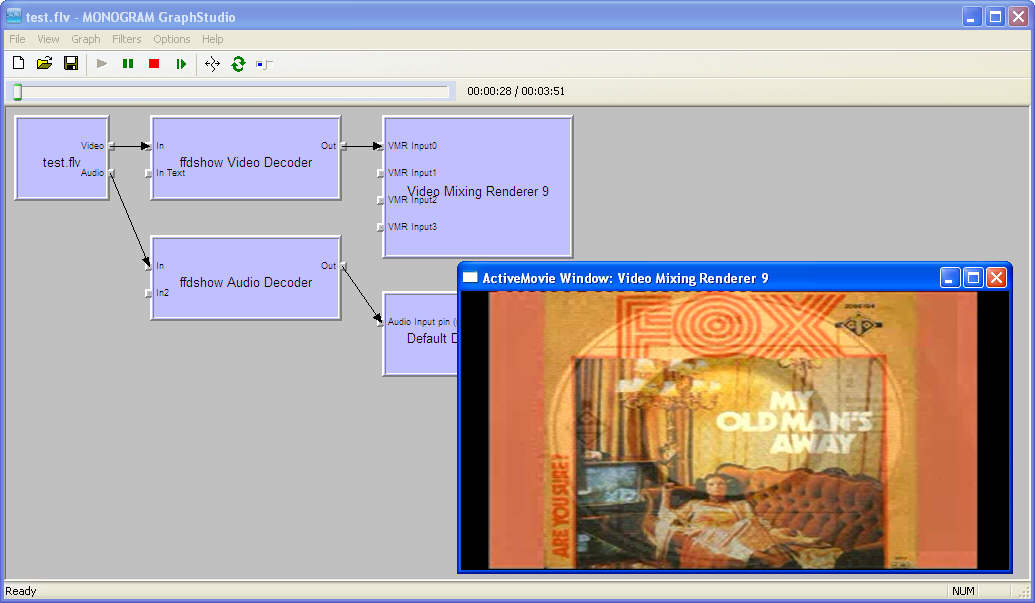
Rule are simple, if you are able to play your video in graphstudio, then your codec setup is OK and problem is no player side.
 

Markpainter

Portal Member
April 8, 2009
42
0
Home Country
United Kingdom United Kingdom
Re: FLV

Then provide small video sample to test.

Not sure sure how to do that so I have uploaded the file (About 5mB) to :-

test.flv - humyo.com

Thanks for your assistance. I am sure I have done something simple, or missed something obvious in my set up.

EDIT:
That sharing site doesn't seem to let you download the file, so I will try to find somewhere else to put it.
 

hoborg

Portal Pro
June 13, 2008
4,413
1,644
Nový Jičín
Home Country
Czech Republic Czech Republic
Re: FLV

Then provide small video sample to test.

Not sure sure how to do that so I have uploaded the file (About 5mB) to :-

test.flv - humyo.com

Thanks for your assistance. I am sure I have done something simple, or missed something obvious in my set up.

EDIT:
That sharing site doesn't seem to let you download the file, so I will try to find somewhere else to put it.

I have no problem to play your sample here in graphstudio/MePo - SAF 5 latest SVN, default settings/no Passthrough/enabled SAF subtitles.
It is standard AVC + ACC audio.
snap1.jpg
 

Markpainter

Portal Member
April 8, 2009
42
0
Home Country
United Kingdom United Kingdom
Re: FLV

I have no problem to play your sample here in graphstudio/MePo - SAF 5 latest SVN, default settings/no Passthrough/enabled SAF subtitles.
It is standard AVC + ACC audio.

Well I have just done a completely fresh install of XP, updated it with all the service packs and other updates.
I then installed Media Portal RC2, Installed SAF 5.00Beta. Set the configuration files as per message 1 on this thread, and it has made no difference!

I still can't play the specific FLV, and Graphstudio still says 'Cannot open file', but the file happily plays outside of Media Portal if I double click on it.

The odd thing is, it's not all my FLV's, but it is this one.

Can anyone suggest anything to help?

http://www.humyo.com/10329557/Test Video/?a=86oz9_2kgRY,YI6LkrdbRxM,6rh1ijNgQqg
 

hoborg

Portal Pro
June 13, 2008
4,413
1,644
Nový Jičín
Home Country
Czech Republic Czech Republic
Re: FLV

I have no problem to play your sample here in graphstudio/MePo - SAF 5 latest SVN, default settings/no Passthrough/enabled SAF subtitles.
It is standard AVC + ACC audio.

Well I have just done a completely fresh install of XP, updated it with all the service packs and other updates.
I then installed Media Portal RC2, Installed SAF 5.00Beta. Set the configuration files as per message 1 on this thread, and it has made no difference!

I still can't play the specific FLV, and Graphstudio still says 'Cannot open file', but the file happily plays outside of Media Portal if I double click on it.

The odd thing is, it's not all my FLV's, but it is this one.

Can anyone suggest anything to help?

humyo.com

Send your SAF logs.
BTW, working fine on my home machine too (WinXP and ATI 5770).
 

Sebell

Portal Pro
November 25, 2007
277
7
Lippstadt
Home Country
Germany Germany
AW: SAF v5.00 experimental (based on FFDShow DXVA decoder)

Hey Guys

I have PRoblems with SAF. I install the latest Version incl. H264 Codec. But i get only 25FPS, with the Microsoft DTV-DVD Video Codec 50fPS an alll works fine. What´s the PRoblem?

CyberlinkVideo Decoder 25FPS
unbenanntt82cmz36.jpg


Microsoft DTV-DVD Video Codec same with , ATI Video Codec and MPC but Problem with Fullscreen and Artefakts all 50 FPS
unbenanntimgj5hza.jpg
 

Users who are viewing this thread

Top Bottom