Codecs SAF v5.02 *final* (based on FFDShow DXVA decoder) (15 Viewers)

Anjin

Portal Pro
March 28, 2008
59
7
Home Country
Hi

I have a question regarding advanced video quality in AMD catalyst.

I am using

Q6600 CPU MB
GV-R6850OC-1GD HD68850 card
Catalyst 11.5 drivers from the AMD web site
XP SP3
One display 1920x1200

The mosquito noise and de-blocking options are not displayed in the catalyst control panel.

Have tried the usual fixes, cleaning drivers and registry, re-installing driver etc. without succes.

I have read elsewhere that these options are not exposed in XP, is this correct?

Is a particular catalyst driver release required?

Has anyone else encountered this problem?

Sorry if this is the wrong forum for posting this question...

Thanks
 

sheish

Portal Member
January 20, 2009
20
0
Home Country
United States of America United States of America
Hi.
Yes, server is down. I already report it to provider.
Please try again later...

Thanks Hoborg.

I was able to download the latest SAF 5 and also upgraded to MP 1.1.3. Everything is fine now, the lag is gone.

-sheish


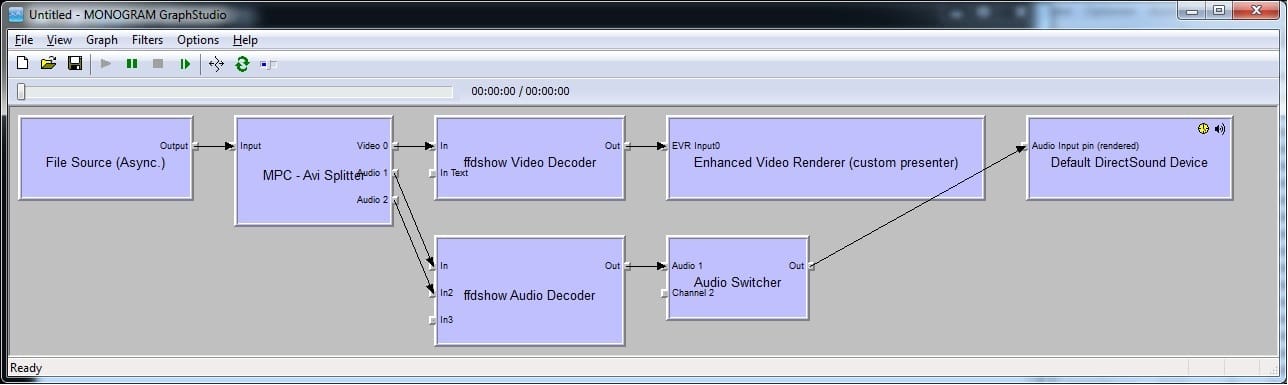
Everything worked fine after upgrading to SAF 502 and MP 1.1.3. But, after the next day reboot, there has been some change in the audio setup. There is no audio output for any video I am playing from my library. I have the codecs configured in MP just like the suggestions from the original post of this thread. When I open the video file from graphstudio, I see no audio config for the video I opened. I have attached the graphstudio output. What have I messed up? Note that I have HD audio passthrough enabled as I have my receiver in the middle.

The video plays file for the file, just the audio is the issue here. I verified that the hdmi connection is fine by playing other audios from outside of MP/ghaphstudio.

Thanks for your help.

-sheish
 

Attachments

  • graphstudio.jpg
    graphstudio.jpg
    64.8 KB

hoborg

Portal Pro
June 13, 2008
4,413
1,644
Nový Jičín
Home Country
Czech Republic Czech Republic
Hi

I have a question regarding advanced video quality in AMD catalyst.

I am using

Q6600 CPU MB
GV-R6850OC-1GD HD68850 card
Catalyst 11.5 drivers from the AMD web site
XP SP3
One display 1920x1200

The mosquito noise and de-blocking options are not displayed in the catalyst control panel.

Have tried the usual fixes, cleaning drivers and registry, re-installing driver etc. without succes.

I have read elsewhere that these options are not exposed in XP, is this correct?

Is a particular catalyst driver release required?

Has anyone else encountered this problem?

Sorry if this is the wrong forum for posting this question...

Thanks

Hi.
Not sure, maybe you really need Vista/Win7 for this?

Everything worked fine after upgrading to SAF 502 and MP 1.1.3. But, after the next day reboot, there has been some change in the audio setup. There is no audio output for any video I am playing from my library. I have the codecs configured in MP just like the suggestions from the original post of this thread. When I open the video file from graphstudio, I see no audio config for the video I opened. I have attached the graphstudio output. What have I messed up? Note that I have HD audio passthrough enabled as I have my receiver in the middle.

The video plays file for the file, just the audio is the issue here. I verified that the hdmi connection is fine by playing other audios from outside of MP/ghaphstudio.

Thanks for your help.

-sheish

Hi.
Looks like you audio renderer refusing connection.
Make sure you setup default audio renderer in MePo setup.
Also test it in graphstudio.
And try to disable audio pasthrough if you enable it durning SAF setup.
 

WhyTea

MP Donator
  • Premium Supporter
  • January 3, 2008
    98
    1
    Dortmund
    Home Country
    Germany Germany
    @WhyTea:
    How are you testing? In Graphstudio?

    SAF6 should be less CPU hungry becouse of great LAVF audio decoder.
    Lo-res videos should be played even on old CPUs. Here i have old Intel Atom CPU, and lo-res videos playing just fine even if i use FFDShow ReSize filter.

    OK I've tested a little.
    If I play a non-hd xvid in MPC-HC I'm getting 70-75% systemload. Playin it with MP I'm getting a little more systemload.

    Any ideas why I'm getting such as high systemload??
    The attachment shows the the graph of the non-hd xvid playin it with mpc-hc

    If I play the same file with the wmp i'm getting a systemload of 25-30%.

    If I play a HD(H264, 1080P) file with MPC-HC or MP, I'getting a systemload of 30-35%


    Tomorrow I make the same test with SAF6 installed!
     

    Attachments

    • mpc.jpg
      mpc.jpg
      98.6 KB

    hoborg

    Portal Pro
    June 13, 2008
    4,413
    1,644
    Nový Jičín
    Home Country
    Czech Republic Czech Republic
    @WhyTea:
    Please, open and play your video directly in graphstudio and hit play.

    If enabled, try to disable resize filter in FFDshow video decoder (click on systray icon).

    EDIT:
    You have AMD X2 BE-2400 CPU? This one is really low end, right?
    HD videos using GPU (DXVA) to decode.
     

    mrspock

    Portal Pro
    September 14, 2008
    124
    32
    Madrid
    Home Country
    Spain Spain
    Hi!

    I haven't read the whole thread, but I did read last month posts and I couldn't find an answer to the following 2 questions:

    I am using SAF 4 unlocked and I want to install SAF 5 unlocked. Shal I uninstall SAF 4 before installing SAF 5 or SAF 5 installer will update everything?

    After installing SAF 5, is it a good idea to update ffdshow to the latest version or doing so will broke the system?

    :D
     

    WhyTea

    MP Donator
  • Premium Supporter
  • January 3, 2008
    98
    1
    Dortmund
    Home Country
    Germany Germany
    @WhyTea:
    Please, open and play your video directly in graphstudio and hit play.

    If enabled, try to disable resize filter in FFDshow video decoder (click on systray icon).
    I'll try it in the evening.
    EDIT:
    You have AMD X2 BE-2400 CPU? This one is really low end, right?
    HD videos using GPU (DXVA) to decode.

    No I'm using this...

    E35M1-M inkl. AMD Fusion E-350

    with 4GB DDR3-1333, as OS I use Win7, swapfile turned off

    With the BE-2400 I've got no Problem
     

    WhyTea

    MP Donator
  • Premium Supporter
  • January 3, 2008
    98
    1
    Dortmund
    Home Country
    Germany Germany
    Hi again! ;)

    It was the resize filter!
    My little machine is too weak to resize the video to 1920x1080

    I turned it off and everything is fine now! CPU-load is about 15-20% when I play an xvid now. :)

    Maybe the picturequality is a litte bader now... but no matter!


    I've switched to SAF6 now and it works great, too!

    Thank you for help!
     

    sheish

    Portal Member
    January 20, 2009
    20
    0
    Home Country
    United States of America United States of America
    Everything worked fine after upgrading to SAF 502 and MP 1.1.3. But, after the next day reboot, there has been some change in the audio setup. There is no audio output for any video I am playing from my library. I have the codecs configured in MP just like the suggestions from the original post of this thread. When I open the video file from graphstudio, I see no audio config for the video I opened. I have attached the graphstudio output. What have I messed up? Note that I have HD audio passthrough enabled as I have my receiver in the middle.

    The video plays file for the file, just the audio is the issue here. I verified that the hdmi connection is fine by playing other audios from outside of MP/ghaphstudio.

    Thanks for your help.

    -sheish

    Hi.
    Looks like you audio renderer refusing connection.
    Make sure you setup default audio renderer in MePo setup.
    Also test it in graphstudio.
    And try to disable audio pasthrough if you enable it durning SAF setup.

    Thanks Hoborg,

    I found that the MP audio render was set as OS default and I found that HDMI out was the default output device. But, I changed the MP audio renderer to force it to "HDMI out". Then I found that I didnt have AC3/DTS set as supported formats for hdmi out, so I turned those "on" too for HDMI out device.

    Now, AC3 is passed through to my receiver fine. But, DTS is still a problem. When I play a DTS video from graphstudio, DTS is passed through to my receiver just fine. It is an issue only from MP. What config in MP would allow DTS to passthrough? Am I missing something from MP?

    Thanks.

    -sheish
     

    BrownGhost

    MP Donator
  • Premium Supporter
  • October 15, 2008
    435
    30
    Home Country
    Denmark Denmark
    Re: AW: SAF v4.10 experimental (based on FFDShow DXVA decoder)

    sorry wrong formt to post in, my bad
     

    Users who are viewing this thread

    Top Bottom