- Thread starter
- #1,551
I use FFDshow audio to convert anything above AC3 (DTS, DTS-HD, etc.) to AC3. When will this will be possible with LAVF?
Never. Use ReClock for this


I use FFDshow audio to convert anything above AC3 (DTS, DTS-HD, etc.) to AC3. When will this will be possible with LAVF?
Why? Ffdshow does a fantastic job. Whats the advantage of reclock?

 Italy
Italy
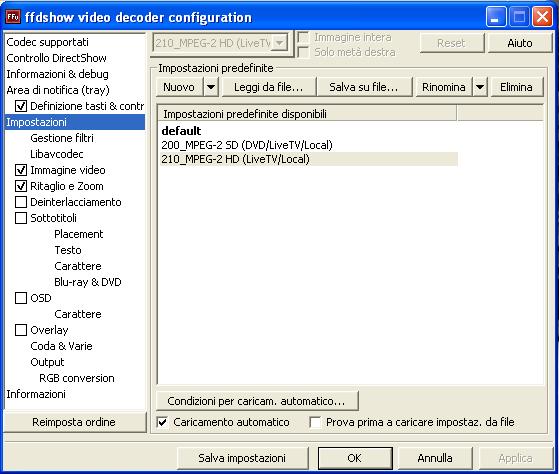
HD have deinterlacing option. There was some problems with MPEG-2 HD files on some systems (hi CPU usage), so i created two profiles.Hi Hoborg,
what are the differences between the "200_MPEG-2 SD (DVD/LiveTV)Local" profile and the "210_MPEG-2 HD (LiveTV/Local)" in ffdshow video decoder config?
I seem to be identical
Thanks
General
Unique ID                        : 219085567896061796628193208678625898207 (0xA4D2587694E054DF8DEDD6DCF8D4EEDF)
Complete name                    : *\Die.Verurteilten.1995.German.DTS-HD.DL.1080p.BluRay.VC-1.Remux-LeetHD\lhd-verurteilten-rmx.mkv
Format                           : Matroska
File size                        : 30.7 GiB
Duration                         : 2h 22mn
Overall bit rate                 : 30.8 Mbps
Encoded date                     : UTC 2011-05-09 14:16:53
Writing application              : mkvmerge v4.4.0 ('Die Wiederkehr') gebaut am Oct 31 2010 21:52:48
Writing library                  : libebml v1.0.0 + libmatroska v1.0.0

Video
ID                               : 1
Format                           : VC-1
Format profile                   : AP@L3
Codec ID                         : WVC1
Codec ID/Hint                    : Microsoft
Duration                         : 2h 22mn
Bit rate                         : 27.1 Mbps
Width                            : 1 920 pixels
Height                           : 1 080 pixels
Display aspect ratio             : 16:9
Frame rate                       : 23.976 fps
Chroma subsampling               : 4:2:0
Bit depth                        : 8 bits
Scan type                        : Progressive
Compression mode                 : Lossy
Bits/(Pixel*Frame)               : 0.545
Stream size                      : 27.0 GiB (88%)

Audio #1
ID                               : 2
Format                           : DTS
Format/Info                      : Digital Theater Systems
Format profile                   : MA / Core
Codec ID                         : A_DTS
Duration                         : 2h 22mn
Bit rate mode                    : Variable
Bit rate                         : 1 561 Kbps / 1 510 Kbps
Channel(s)                       : 6 channels
Channel positions                : Front: L C R, Side: L R, LFE
Sampling rate                    : 48.0 KHz
Bit depth                        : 16 bits
Compression mode                 : Lossless / Lossy
Language                         : German

Audio #2
ID                               : 3
Format                           : DTS
Format/Info                      : Digital Theater Systems
Format profile                   : MA / Core
Codec ID                         : A_DTS
Duration                         : 2h 22mn
Bit rate mode                    : Variable
Bit rate                         : 1 561 Kbps / 1 510 Kbps
Channel(s)                       : 6 channels
Channel positions                : Front: L C R, Side: L R, LFE
Sampling rate                    : 48.0 KHz
Bit depth                        : 16 bits
Compression mode                 : Lossless / Lossy
Language                         : English

Text
ID                               : 4
Format                           : VobSub
Muxing mode                      : zlib
Codec ID                         : S_VOBSUB
Codec ID/Info                    : The same subtitle format used on DVDs
Language                         : German

Menu
00:00:00.000                     : de:Chapter 01
00:05:00.000                     : de:Chapter 02
00:10:00.000                     : de:Chapter 03
00:15:00.000                     : de:Chapter 04
00:20:00.000                     : de:Chapter 05
00:25:00.000                     : de:Chapter 06
00:30:00.000                     : de:Chapter 07
00:35:00.000                     : de:Chapter 08
00:40:00.000                     : de:Chapter 09
00:45:00.000                     : de:Chapter 10
00:50:00.000                     : de:Chapter 11
00:55:00.000                     : de:Chapter 12
01:00:00.000                     : de:Chapter 13
01:05:00.000                     : de:Chapter 14
01:10:00.000                     : de:Chapter 15
01:15:00.000                     : de:Chapter 16
01:20:00.000                     : de:Chapter 17
01:25:00.000                     : de:Chapter 18
01:30:00.000                     : de:Chapter 19
01:35:00.000                     : de:Chapter 20
01:40:00.000                     : de:Chapter 21
01:45:00.000                     : de:Chapter 22
01:50:00.000                     : de:Chapter 23
01:55:00.000                     : de:Chapter 24
02:00:00.000                     : de:Chapter 25
02:05:00.000                     : de:Chapter 26
02:10:00.000                     : de:Chapter 27
02:15:00.000                     : de:Chapter 28
02:20:00.000 : de:Chapter 29If i understand nevcairiel right, it should be equal to bitsreaming, just use the dtsdecoder.dll from Arcsoft.
But its more fancy to show DTS HD HR than multichannel on the receiver
Hello,
unfortunately i'm not able to playback VC1 mkv files with SAF6.
when i check "VC1 DXVA" in ffdshow configuration the playback crashes with this:
Error
without checking "VC1 DXVA" playback is possible but with massive stuttering.
i opened the file in graphstudio. everything seems to be fine there but also no playback possible.
GraphStudio
any idea?
edit: vga card is a radeon hd 5450.
greetings.
VC-1 DXVA is not supported very well.
What CPU do you have?
Can you cut small sample and send it here? You can use MKVMerge for this.
You have to drop the dtsdecoderdll.dll from TMT3/5 Codecs directory into Lav directory, but i don’t use SAF right now so i don’t know where that would be.How is the dtsdecoder.dll used- just be unticking the bitstream checkboxes in the lav audio configuration, or do I have to do something more?