
Codecs SAF v6 (based on LAVF) (10 Viewers)

hoborg

Portal Pro
June 13, 2008
4,413
1,644
Nový Jičín
Home Country
Czech Republic Czech Republic
Re: AW: SAF v6 (based on LAVF)

curious thing is ...i tried to play some samples now.
Some take very long to start over network
and some dont start in GraphStudio , error "cannot open file"
I copied this file to hd on htpc - then it works without problems!
This file also open immediately over network with vlc but takes VERY long with MPC.

it cannot be a network problem otherwise VLC wouldnt open so fast

I think problem is the lav splitter or whaterver because before I installed the brand new SAF it worked.
I also ahve powerdvd 11 ultra on htpc and it opens this particular nearly as fast as VLC! (powerdvd opens all files over network immediately!)
I dont get this! .....

Try these tips:
Divx/XVid playback stuttering - Page 2
 

hoborg

Portal Pro
June 13, 2008
4,413
1,644
Nový Jičín
Home Country
Czech Republic Czech Republic
does rly noone else here have the mpc crashes if you try to play 10bit mkvs ??

I didnt try it yet. can you provide small sample?

EDIT:
Go to FFDshow video decoder settings, RGB convesion and disable "hi quality yv12 to RBG conversion".
 

pirivan

Portal Pro
January 19, 2008
62
2
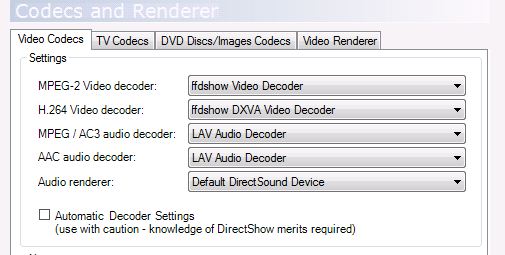
I have what is hopefully a simple issue. Basically I can't play ANYTHING back in MediaPortal right now using the latest SAF6. Nothing will open and MP will tell me it can't open the file (AVC, XVID, AC3, DTS etc.). Everything appears to open/playback just fine in both GraphStudio and MediaPlayer Classic home cinema.

Here is what I believe the issue is though I am not sure how to fix it exactly. Basically I had an old HTPC using SAF 6.0 unlocked without any issues. I setup a new HTPC, reinstalled MediaPortal, reinstalled my addins (streamed MP and a few others) and then unlocked and reinstalled the version of SAF I had been using previously (I updated to the latest SAF6 later as part of my troubleshooting). Once everything was installed, I literally copied over ALL the MediaPortal directories from the old HTPC (which was also Windows 7x64). Program Files, Program Data, the files from the Users directory; everything. More or less this allowed me to completely re-use my old MediaPortal config and after some skin issues it was all working fine. It's just that nothing will open at all in MediaPortal.

Attached are what my codec settings look like. Changing these around hasn't seemed to have made a difference (neither did upgrading to the latest SAF). Again, everything plays fine in GraphStudio and MPC Home Cinema. My logs are attached. Any thoughts? I am sure it is some issue from copying all my config files over; hopefully it is simple to diagnose!
 

Attachments

  • Codec Settings.JPG
    Codec Settings.JPG
    37 KB

pünktchen

Portal Pro
October 26, 2010
537
201
Home Country
Germany Germany
AW: SAF v6 (based on LAVF)

curious thing is ...i tried to play some samples now.
Some take very long to start over network
and some dont start in GraphStudio , error "cannot open file"
I copied this file to hd on htpc - then it works without problems!
This file also open immediately over network with vlc but takes VERY long with MPC.

it cannot be a network problem otherwise VLC wouldnt open so fast

I think problem is the lav splitter or whaterver because before I installed the brand new SAF it worked.
I also ahve powerdvd 11 ultra on htpc and it opens this particular nearly as fast as VLC! (powerdvd opens all files over network immediately!)
I dont get this! .....

I've noticed the same here. With the last versions of LAV splitter the performance over network becomes worse and worse. Now with LAV 0.44 every player is freezing when opening mkv's :mad:
 

pirivan

Portal Pro
January 19, 2008
62
2
@pirivan:
Reproduce the problem in MePo and post MePo LOGs.

Hi Hoborg,

Thank you so much for the reply! Unfortunately I do not have access to my HTPC to run MediaPortal at the moment (it won't run over RDP) so I just collected all of the MediaPortal logs. I will run it with the option for 'Report a bug to a plugin developer or skin developer' and then reproduce the issue when I get home and post those logs. In any case all the currently present logs are attached. The issue should hopefully be in there at around 1:00AM - 1:30AM PST as I tried launching files most of the times I was launching MediaPortal during that time-frame.

Thanks again for the assistance and for the fantastic SAF6; I love it!
 

alegend

Portal Pro
October 23, 2011
121
4
46
AW: SAF v6 (based on LAVF)

Update:

NOw I uninstalled SAF 6.04 and reinstalled -same problem!
Then I uninstelled SAF and installed Plain lav filters (0.44) works fast as hell - but now I got the initial problem back....
I dont have DTS, DTS MASTER nor do I have DD ?!? why the heck is this??
I thought LAV audio filter does the job?!? When i install saf 6.04 i got all dts, dts master, dd, but afer uninstall of saf networks and opening files is very very fast but only PCM output?`!?!

where is the mistake?!
 

hoborg

Portal Pro
June 13, 2008
4,413
1,644
Nový Jičín
Home Country
Czech Republic Czech Republic
@pirivan:
Reproduce the problem in MePo and post MePo LOGs.

Hi Hoborg,

Thank you so much for the reply! Unfortunately I do not have access to my HTPC to run MediaPortal at the moment (it won't run over RDP) so I just collected all of the MediaPortal logs. I will run it with the option for 'Report a bug to a plugin developer or skin developer' and then reproduce the issue when I get home and post those logs. In any case all the currently present logs are attached. The issue should hopefully be in there at around 1:00AM - 1:30AM PST as I tried launching files most of the times I was launching MediaPortal during that time-frame.

Thanks again for the assistance and for the fantastic SAF6; I love it!

There is something wrong with your MePo setup i think, you have a lot of such errors:

Code:
2012-01-09 01:26:13.835775 [Info.][MPMain(1)]: Exception   :Error in the application.
-2005532292 (D3DERR_OUTOFVIDEOMEMORY)

Try to remove MePo completelly, then install it, install SAF 6 and try to play a video. Then add your plugin - and test again video playback.

Update:

NOw I uninstalled SAF 6.04 and reinstalled -same problem!
Then I uninstelled SAF and installed Plain lav filters (0.44) works fast as hell - but now I got the initial problem back....
I dont have DTS, DTS MASTER nor do I have DD ?!? why the heck is this??
I thought LAV audio filter does the job?!? When i install saf 6.04 i got all dts, dts master, dd, but afer uninstall of saf networks and opening files is very very fast but only PCM output?`!?!

where is the mistake?!
To bad i cannot reproduce this (no NAS here).
Can be FFDshow video decoder the source of your problem here?
Try reinstall SAF, durning the instalation, enable LAV video decoder. After the install, go to FFDshow video decoder/FFDshow DXVA video decoder settings, and disable h.264. Now if you open your MKV in graphstudio, LAV video docoder should be in use.
Please report if this helped or not.
Snother source of problem can be subtitles setting in LAV splitter.
There should not be any difference between original LAV and SAF LAV instalation, only some LAVF settings.
 

alegend

Portal Pro
October 23, 2011
121
4
46
AW: SAF v6 (based on LAVF)

ok a short update - I got it working now!

Like I mentioned above, wenn I install Saf v6 opening movies takes ages.
Uninstalled saf v6 installed lav 0.44.
First i had only pcm sound - but the reason for this was very simple....
In lav audio configuration the dts dts-hd boxes were not checke .-)

NOw it runs all smooth ! very fast.
I dont know why saf v6 slows file opening down that much
I also installed ffdshow tryouts but i dont use this, I just did this for testing if I get DTS sound or no....

I use the lavf for audio and video decoding now.
 

Users who are viewing this thread

Top Bottom