Codecs SAF v6 (based on LAVF) (7 Viewers)

manray

Portal Pro
December 5, 2008
56
19
lav video decoder is only for nvidia gpu again?
?
LAV Video Decoder never was, that was "LAV CUVID Decoder".

Hi,

I have the following questions.
Is Lav Video Decoder DXVA filter?
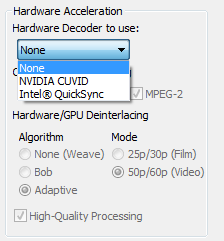
In order to use HW acceleration with LAV Video decoder and AMD/ATI HD3200 GPU there is no option to select. only
Nvidia CUVID and Intel QuickSync

Thanks:D
 

Attachments

  • LAV Video.png
    LAV Video.png
    8.5 KB

mamachan

MP Donator
  • Premium Supporter
  • September 25, 2006
    724
    48
    Home Country
    Italy Italy
    lav video decoder is only for nvidia gpu again?
    ?
    LAV Video Decoder never was, that was "LAV CUVID Decoder".

    Hi,

    I have the following questions.
    Is Lav Video Decoder DXVA filter?
    In order to use HW acceleration with LAV Video decoder and AMD/ATI HD3200 GPU there is no option to select. only
    Nvidia CUVID and Intel QuickSync

    Thanks:D

    perfect, it's the same thing that I wanted to ask :D
    only Nvidia CUVID and Intel QuickSync can it?
     

    hoborg

    Portal Pro
    June 13, 2008
    4,413
    1,644
    Nový Jičín
    Home Country
    Czech Republic Czech Republic
    I have the following questions.
    Is Lav Video Decoder DXVA filter?
    In order to use HW acceleration with LAV Video decoder and AMD/ATI HD3200 GPU there is no option to select. only
    Nvidia CUVID and Intel QuickSync

    Thanks:D

    There is two ways hot to use HW acceleration with LAV video decoder:
    1) to have nVidia GPU (CUVID)
    2) to have modern Intel GPU - Sandy bridge or newer (Intel QuickSync)

    So if you dont want to play modern games on your HTPC, Intel Sandy bridge CPU is all you need, there is no need to have extra GPU.
     

    clunesy

    New Member
    November 25, 2008
    4
    0
    Hi there, I'm running MePo 1.2.2 with SAF 6.0.4. on Win-7x64 I have an ATI Radeon HD 46xx with latest Catalyst drivers.
    I am using native HDMI out to Samsung Plasma 59".
    I am decoding h264 with FFDshow (soft). The 720p -> 1080p isn't great in the DXVA versions, and I have some kooky files it just won't play.
    I'm using LAV audio decoder to send AC3 / DTS audio from mkv files to the HDMI.

    I have configured MePo to dynamically alter refresh rate based on source file, and I have my 23.976 TV / Movie MKVs set to play at 24fps. The TV is also set to 24ftp 'cinema smooth'. Everything I play skips (its either a frame drop or repeat) about every 10 secs or so. It doesn't seem to matter what codecs I use (seems same with DXVA and FFDshow audio decoder), nor whether I set the audio LAV coder to resync audio /video or not (but I think it may be to do with this). Can anyone suggest any ideas to fix?

    thanks and sorry if I've left out important info.
     

    fnokke

    Portal Member
    February 26, 2009
    43
    2
    Home Country
    Sweden Sweden
    I have installed the 6.04 version and tried the recommended settings on the first page, but for some reason video and TV playback wouldn´t start. From the logs of debug mode it seems as though MePo somehow failed to find the LAV audio decoder. Switching audio codecs away from LAV audio to MS-DTV (I am running 64-bit Win7 pro) solved the problem but ffdshow video and MS-DTV audio don't seem to sync well, at least not after fast-forwarding.

    I had some version of LAVF installed previous to installing SAF 6.04 (I think? from installing OnlineVideos plugin) and was prompted to uninstall these when installing SAF. I have not debugged this further but was hoping somebody would have had a similar experience and a quick answer?

    Thanks!
     

    larsbln

    MP Donator
  • Premium Supporter
  • June 12, 2010
    337
    62
    Germany
    You could try ffdshow audio decoder .. If you don't have it you can reinstall SAF and choose it as an option.
    ffdshow can passthrough everything or convert audio formats your A/V-Receiver isn't capable to play to AC3.
     

    hoborg

    Portal Pro
    June 13, 2008
    4,413
    1,644
    Nový Jičín
    Home Country
    Czech Republic Czech Republic
    I have installed the 6.04 version and tried the recommended settings on the first page, but for some reason video and TV playback wouldn´t start. From the logs of debug mode it seems as though MePo somehow failed to find the LAV audio decoder. Switching audio codecs away from LAV audio to MS-DTV (I am running 64-bit Win7 pro) solved the problem but ffdshow video and MS-DTV audio don't seem to sync well, at least not after fast-forwarding.

    I had some version of LAVF installed previous to installing SAF 6.04 (I think? from installing OnlineVideos plugin) and was prompted to uninstall these when installing SAF. I have not debugged this further but was hoping somebody would have had a similar experience and a quick answer?

    Thanks!

    Can you post SAF and MePo LOGs?
    Did you enabled audio passthrough durning SAF install?
     

    D3ltoroxp

    MP Donator
  • Premium Supporter
  • June 1, 2008
    3,272
    212
    Home Country
    Germany Germany
    AW: Re: SAF v6 (based on LAVF)

    I have the following questions.
    Is Lav Video Decoder DXVA filter?
    In order to use HW acceleration with LAV Video decoder and AMD/ATI HD3200 GPU there is no option to select. only
    Nvidia CUVID and Intel QuickSync

    Thanks:D

    There is two ways hot to use HW acceleration with LAV video decoder:
    1) to have nVidia GPU (CUVID)
    2) to have modern Intel GPU - Sandy bridge or newer (Intel QuickSync)

    So if you dont want to play modern games on your HTPC, Intel Sandy bridge CPU is all you need, there is no need to have extra GPU.


    Than i can use my ATI Radeon HD 6750 furthermore. I must only by an Intel CPU for that HW acceleration ? Than makes all the cpu or both cpu and my ati gpu ? If the codec on the ?
     

    hoborg

    Portal Pro
    June 13, 2008
    4,413
    1,644
    Nový Jičín
    Home Country
    Czech Republic Czech Republic
    Re: AW: Re: SAF v6 (based on LAVF)

    Than i can use my ATI Radeon HD 6750 furthermore. I must only by an Intel CPU for that HW acceleration ? Than makes all the cpu or both cpu and my ati gpu ? If the codec on the ?

    You need to have Intel CPU with Intel HD 2000/3000 GPU and driver installed for Intel QuickSync HW accelearion. There is no need to have monitor connected to Intel GPU.
    Decoder copy frame from system memory to intel GPU, decode it and copy it back to system memory. Then it is sended to video renderer (EVR). Here it is processed by GPU driver (for example to do HW deinterlacing) with connected monitor.
    More info here:
    http://forum.doom9.org/showthread.php?t=162442
     

    fnokke

    Portal Member
    February 26, 2009
    43
    2
    Home Country
    Sweden Sweden
    I have installed the 6.04 version and tried the recommended settings on the first page, but for some reason video and TV playback wouldn´t start. From the logs of debug mode it seems as though MePo somehow failed to find the LAV audio decoder. Switching audio codecs away from LAV audio to MS-DTV (I am running 64-bit Win7 pro) solved the problem but ffdshow video and MS-DTV audio don't seem to sync well, at least not after fast-forwarding.

    I had some version of LAVF installed previous to installing SAF 6.04 (I think? from installing OnlineVideos plugin) and was prompted to uninstall these when installing SAF. I have not debugged this further but was hoping somebody would have had a similar experience and a quick answer?

    Thanks!

    Can you post SAF and MePo LOGs?
    Did you enabled audio passthrough durning SAF install?

    yes, logs added (to the original post). I did not enable passthrough, I just have my (old) amplifier hooked up to the earphone jack of the sound card.
     

    Users who are viewing this thread

    Top Bottom