Server and client work but remote clients fail (4 Viewers)

irw

Portal Member
July 21, 2022
32
4
Home Country
United Kingdom United Kingdom
Server and client on modern uptodate Windows 11 desktop. Software is Server and Client version x86 1.38.003
Remote client on modern uptodate Windows 11 laptop. Software is Client only version x86 1.38.003
Remote client on Windows 10 desktop. Software is Client only version x86 1.38.003

When installing, the 'allow firewall changes' box is ticked.

Remote clients see the server and display the list of live TV programmes and the list of recorded TV programmes.
Remote clients cannot play any live or recorded TV. An error message pops up that looks like Hex.

I've tried downgrading the remote clients to 1.37 and 1.36 but no improvement.

Should I downgrade the server/client version?
Should I try all on x64 version?
Can I mix x64 versions with x86 versions?
Is MediaPortal 2 still not being developed?
 

CyberSimian

Test Group
  • Team MediaPortal
  • June 10, 2013
    3,611
    2,639
    Southampton
    Home Country
    United Kingdom United Kingdom
    First, the easy question:
    Is MediaPortal 2 still not being developed?
    I have not seen any of the MP developers visiting this web site in the last few months, so work on MP2, and assistance with MP2 problems, has ceased. Will it restart at some point in the future? No one can tell.

    Now the difficult question:
    Remote clients see the server and display the list of live TV programmes and the list of recorded TV programmes.
    Remote clients cannot play any live or recorded TV. An error message pops up that looks like Hex.
    I think that it was Winston Churchill who said:
    Networking is a riddle, wrapped in a mystery, inside an enigma.
    and I agree with him.

    There may be clues hidden somewhere in the MP log files, and this is a case where you need to provide all of the log files. You can do this easily by using the "MP Watchdog" to collect all of the log files from the server, and (separately) all of the log files from one of the clients that fails. Attach the zip files resulting to this thread.

    -- from CyberSimian in the UK
     

    irw

    Portal Member
    July 21, 2022
    32
    4
    Home Country
    United Kingdom United Kingdom
    Thank you for such a quick reply.
    I'm attaching the log files from the Win 11 desktop single seat, the Win 11 laptop Client and the Win10 desktop Client
    I hope you can find something to help.
     

    Attachments

    • MP_Logs_ASROCK_26_03_15_22_34.zip
      1.8 MB
    • MP_Logs_HP-TV_26_03_15_22_38.zip
      5 MB
    • MP_Logs_HP-I5_26_03_15_23_24.zip
      423.4 KB

    CyberSimian

    Test Group
  • Team MediaPortal
  • June 10, 2013
    3,611
    2,639
    Southampton
    Home Country
    United Kingdom United Kingdom
    Remote clients see the server and display the list of live TV programmes and the list of recorded TV programmes.
    Remote clients cannot play any live or recorded TV. An error message pops up that looks like Hex.
    The logs show that you are encountering Windows error 0x80004005. Unfortunately, this is a general error code that simply means that the resource could not be accessed.

    I don't know the cause of your problem, but I think that you should check the authorisations for the folders that TV Server uses. There can be multiple folders, depending on what you defined in "TV Server Config". I use the same recording folder for all tuners, so I have only one recording folder, but you can define a different recording folder for each tuner. You need to check the authorisations for all of those.

    In addition, live TV works by writing the data stream to a file, and then reading that file and sending the data to the client (this is what allows you to rewind live TV to view again earlier parts of the programme). Usually, TV Server uses a different folder for live TV, so you need to check the authorisations for that too. This folder is defined in the "Timeshifting" section of "TV Server Config".

    To check or grant authorisations:
    • Start "Windows Explorer".
    • Navigate to the recording folder.
    • Right-click the recording folder and click "Give access to", and then click "Specific people".
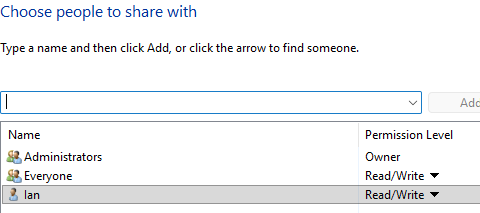
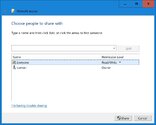
    • On the "Network access" panel, check who is authorised for what. I would suggest that you authorise the "Everyone" identity for read/write access. You need read access to play a recording or live TV, and write access in order to delete a recording. If you want to be more restrictive, you can add specific identities (userids) for the people who will log on to the MP client systems, and give them less access.
    • Repeat for the live TV folder (timeshifting folder).
    Here is the "Network access" panel on the laptop that I am posting from (Windows 10):

    authorisations.jpg

    -- from CyberSimian in the UK
     

    irw

    Portal Member
    July 21, 2022
    32
    4
    Home Country
    United Kingdom United Kingdom
    Great. I have jsut gone for the deault settings when installing so I have not set up any special folders for live and recorded TV.
    Thanks for this but it seems the Server PC access is already correct. I attach three screen shots.
    The TimeShiftBuffer is already as you describe.
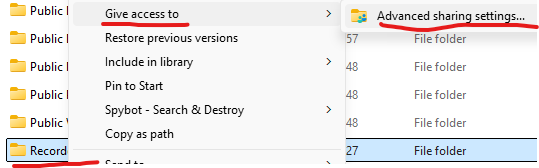
    The Recorded TV folder right-click does not give access to specific people but instead only offers advaced sharing that goes to Settings Advanced Sharing that does allow file sharing in the public folder for my private network.
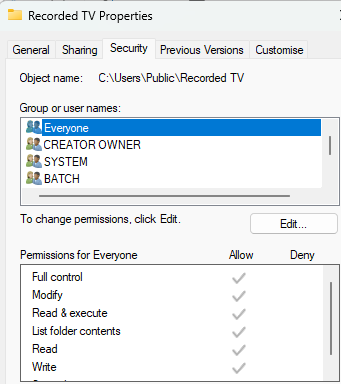
    So, I checked the Properties Security tab and show that it allows access to Everyone.
     

    Attachments

    • Recorded TV Security.png
      Recorded TV Security.png
      17.9 KB
    • Recorded TV.png
      Recorded TV.png
      18.9 KB
    • TimeShiftBuffer.png
      TimeShiftBuffer.png
      10 KB

    CyberSimian

    Test Group
  • Team MediaPortal
  • June 10, 2013
    3,611
    2,639
    Southampton
    Home Country
    United Kingdom United Kingdom
    Well, it was worth checking the authorisations, but your settings do look correct (although in wandering around various Windows panels I notice that the "Public" folder and its subfolders do seem to be special-cased by Windows, meaning that they may behave differently from ordinary folders).

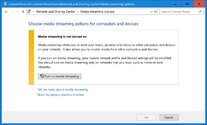
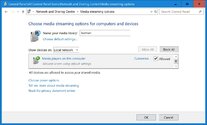
    One thing that I have just noticed is that Windows 10 (and probably 11) has a Media streaming option. Try this:
    • Open "Control Panel" (Start button > Windows System > Control Panel).
    • Click "Network and Sharing Centre".
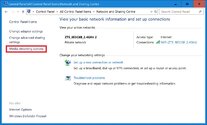
    • Click "Media streaming options" (left side menu).
    • Click "Turn on media streaming".
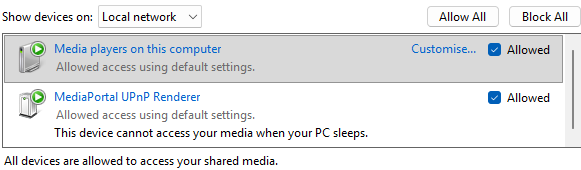
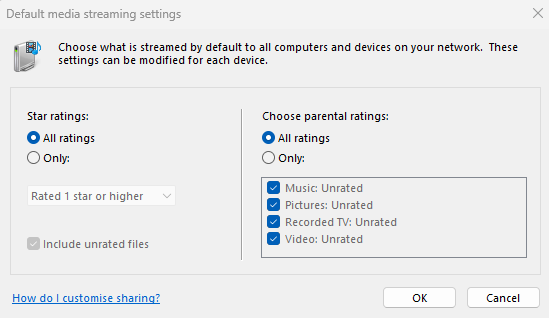
    • Check that the settings look reasonable (see screen shot).
    Here are the panels on my system:

    network_and_sharing.jpg media_streaming.jpg sharing_settings_1.jpg

    It is not obvious to me whether this is a server-only setting, or whether you need to repeat it on each of the clients (the wording suggests server-only).

    -- from CyberSimian in the UK
     

    doskabouter

    Development Group
  • Team MediaPortal
  • September 27, 2009
    5,223
    4,168
    Nuenen
    Home Country
    Netherlands Netherlands
    there's also the rtsp/unc option you can try.
    Also you can try disabling the firewall on both server and client temporarily to see if the issue is in that area
     

    irw

    Portal Member
    July 21, 2022
    32
    4
    Home Country
    United Kingdom United Kingdom
    Thanks for this. I did this on the single-seat and both clients. I attach two images from the W11 single-seat desktop. It is interesting that the defaults pick up the existience of Recorded TV.
    Sadly, nothing has changed and the clients still fail.

    Written before I saw your later post about rtsp/unc and disabling the firewalls. Will report back.
     

    Attachments

    • Media Streaming .png
      Media Streaming .png
      16.6 KB
    • Media Streaming Defaults.png
      Media Streaming Defaults.png
      17.8 KB

    irw

    Portal Member
    July 21, 2022
    32
    4
    Home Country
    United Kingdom United Kingdom
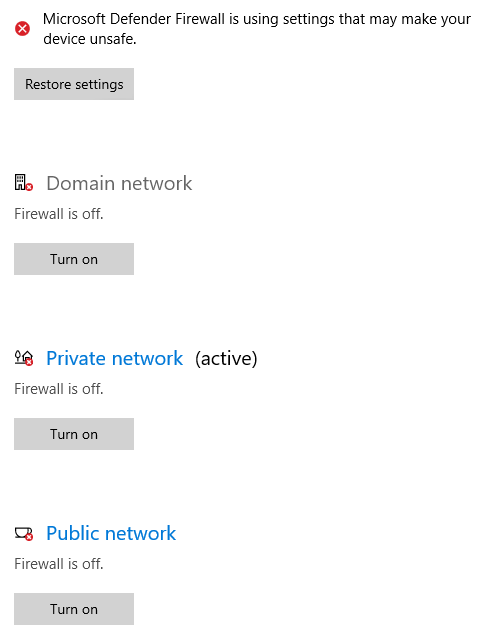
    I logged in as Admin and turned off the firewall settings for all three areas - domain, private and public on the server PC. I then logged in as Admin and did the same on the Win10 client.
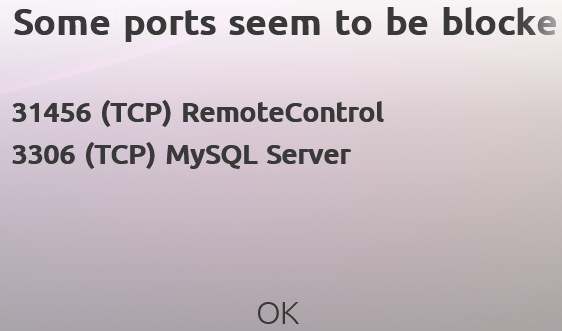
    I ran MP as Admin and was really surprised to see the MediaPortal error when trying to load a live TV programme and show in the attached clip. I show another screen shot witnessing all firewall settings are off. They were off the same in the Win11 server.
    I have returned all firewall settings to 'on' on both PCs.

    I don't really understand how to use the rtsp/unc option. I did search about it but and read a Microsoft article about it but I could not see how to employ the protocol on either PC.
     

    Attachments

    • Firewall Error.PNG
      Firewall Error.PNG
      142.2 KB
    • Firewall Settings.PNG
      Firewall Settings.PNG
      13.7 KB

    CyberSimian

    Test Group
  • Team MediaPortal
  • June 10, 2013
    3,611
    2,639
    Southampton
    Home Country
    United Kingdom United Kingdom
    Have you ever had this working properly, or is this the first time that you have installed MP1? (I think that you previously used MP2?)

    If MP1 was working previously, we need to identify what has changed on your system that causes MP1 to fail now. It could be something such as a Windows update that has changed a setting somewhere.

    -- from CyberSimian in the UK
     

    Users who are viewing this thread

  • Top Bottom