standby problem after reinstallation (4 Viewers)

harryzwo

Portal Pro
July 25, 2006
953
147
Home Country
Germany Germany
Nachdem ich mp 1.38 neu installiert habe klappt soweit alles wie früher. Ein Problem besteht aber und das ist Standby nach einer Aufnahme. Standby über die Fernbedienung klappt, wenn keine Aufnahme läuft. Wenn eine Aufnahme läuft und die Aufnahmezeit ist vorbei, fährt MP trotzdem nicht in Standby. Im LOG finde ich nichts und habe alle Einstellmöglichkeiten ausprobiert, die mir eingefallen sind. Im Moment arbeite ich auf Windows 11. Auf Windows 10 hatte ich da keine Probleme. Gibt es für Win11 konkrete Änderungen die ich tätigen muss? Log habe ich mal angehängt.

After I have reinstalled mp 1.38 everything works as before. But there is one problem and that is standby after a recording. Standby via the remote control works when no recording is in progress. If a recording is in progress and the recording time is over, MP still does not go into standby. I can't find anything in the LOG and have tried all the settings I could think of. At the moment I'm working on Windows 11. On Windows 10 I had no problems. Are there any specific changes for Win11 that I need to make? I have attached the log.
 

Attachments

  • MP_Logs_HTPC_26_05_14_18_05.zip
    1.4 MB
Last edited:

CyberSimian

Test Group
  • Team MediaPortal
  • June 10, 2013
    3,614
    2,642
    Southampton
    Home Country
    United Kingdom United Kingdom
    But there is one problem and that is standby after a recording. Standby via the remote control works when no recording is in progress. If a recording is in progress and the recording time is over, MP still does not go into standby.
    Have you enabled the "PowerScheduler" plugin in "TV Server Config" and also in "MP Config"? (Most settings are in "TV Server Config".)

    When you use the remote control to sleep the system, the system will sleep immediately (assuming that there is nothing else that requires the system to remain active).

    When a recording finishes and there is nothing else that requires the system to remain active, the system will sleep after the unexpired portion of the defined sleep timeout has expired. For example, if the Windows sleep timeout is 30 minutes, and the recording finishes when only 10 minutes of the sleep timeout has been consumed, the system will run for another 20 minutes before the system sleeps.

    The sleep timer is reset to zero when you interact with your system (use the remote control, mouse, or keyboard). So, if you are watching live TV and a recording starts, and you finish watching live TV and use the sleep button on the remote control 10 minutes before the end of the recording, when the recording finishes, 10 minutes of the sleep timeout will have been consumed, and the system will run for another 20 minutes before sleeping.

    You can specify what sleep timeout you want to use, but it is a bit of a compromise. If the sleep timeout is 30 minutes, the system will run for a maximum of 30 minutes after the end of a recording. If the sleep timeout is one minute, the system will sleep almost immediately after the end of a recording. But you run the risk that the system will sleep if you leave the room to make coffee. You can avoid this by pausing the playback of media (this inhibits sleep), or by enabling the Only allow standby when on Home window PowerScheduler setting in "MP Config" and not leaving MP on the "Home" panel.

    I believe that recent versions of Windows also support an "unattended sleep timeout". This allows you to define a timeout that is different from the usual sleep timeout. The unattended sleep timeout will be used if the system wakes to perform a recording, and there is no other interaction with the system prior to the end of the recording.

    -- from CyberSimian in the UK
     

    harryzwo

    Portal Pro
    July 25, 2006
    953
    147
    Home Country
    Germany Germany
    I know everything so far and I have tried it. Standby via remote control. a recording is also not supposed to be in standby. So far so good. When the recording is finished, everything goes into standby, USB hard drive, graphics card. Tested with and without USB hard drive. Only the pC stays on. I can't tell what condition it is in, because there is no image. Actions with the keyboard and mouse do not help. I can only turn the PC off and on again. Then it restarts.
     

    harryzwo

    Portal Pro
    July 25, 2006
    953
    147
    Home Country
    Germany Germany
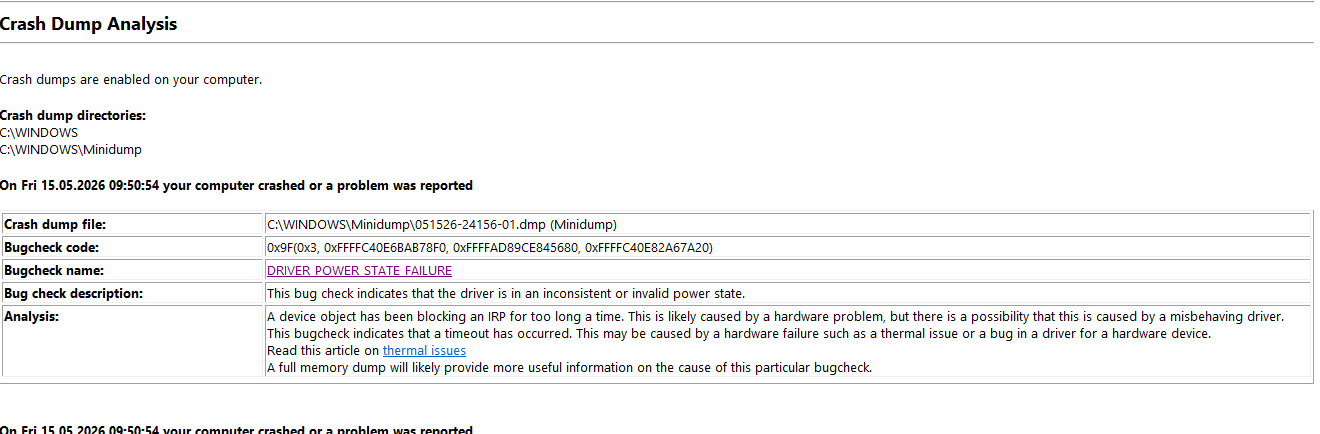
    Hier noch ein weiterer Hinweis auf einen Driver-Fehler. Vielleicht ist das das Problem und nicht MP. nur was bedeutet das?
     

    Attachments

    • Power-driver-error.png
      Power-driver-error.png
      33.2 KB

    CyberSimian

    Test Group
  • Team MediaPortal
  • June 10, 2013
    3,614
    2,642
    Southampton
    Home Country
    United Kingdom United Kingdom
    I have not seen that error before. As you have a minidump file available, you might find that "BlueScreenView" gives you more information about the device or driver that is causing the problem.

    On my HTPC, I very occasionally get a blue screen, and "BlueScreenView" indicates that it is the driver for my TBS 6284 tuner card that is causing the problem. Sadly, that card is no longer supported by the manufacturer, so no fixes are available, but at least I know what is causing the problem.

    "BlueScreenView" can be downloaded from here.

    -- from CyberSimian in the UK
     

    harryzwo

    Portal Pro
    July 25, 2006
    953
    147
    Home Country
    Germany Germany
    I don't like to troubleshoot in an area where I don't know my way around. So I went and got back an old fuse, adapted accordingly. But I still have a problem with recordings and standby. Recording is running and PC is in awaymode. When the recording is over, it probably goes into standby for a short time, but starts again immediately. Can anyone think of anything about this?
     

    CyberSimian

    Test Group
  • Team MediaPortal
  • June 10, 2013
    3,614
    2,642
    Southampton
    Home Country
    United Kingdom United Kingdom
    When the recording is over, it probably goes into standby for a short time, but starts again immediately. Can anyone think of anything about this?
    I have also had this problem in the past. There are two components to this problem:
    • Your internet router is pinging the HTPC at regular intervals in order to see if the HTPC is still present on the network.
    • The network adapter in the HTPC has "Wake on Lan" enabled. So at the end of a recording, the HTPC transitions from away mode to sleep, and then the ping from the internet router wakes it up again.
    If you disable the "Wake on Lan" setting in the properties window for the network adapter, the problem should be solved.

    -- from CyberSimian in the UK
     

    Users who are viewing this thread

    Top Bottom